/Logo%202023%20final%20dunkelgrau.png?width=221&height=97&name=Logo%202023%20final%20dunkelgrau.png)






















In everyday life, intuitive web interfaces have become the de facto standard. Usually we can achieve the desired result in just a few clicks. However, in the working environment we have to deal with user interfaces that have often not been adapted since the 1980s. For example, when it comes to maintaining data in a simple table, we have to laboriously fill in multiple input masks to complete the task. These large differences in software ergonomics lead to changed expectations and demands of the users.
In the face of this imbalance, more and more companies are taking the initiative to develop their own solutions using SAP UI5 to simplify table maintenance for users. In this article, you will learn which steps are necessary to implement table maintenance with SAP UI5 and what you must pay attention to.

As the SAP software has been developed with focus on functionality, table maintenance becomes a complex process. With the transition to SAP UI5 and Fiori, companies expect improved productivity and increased user satisfaction. In addition, an intuitive interface promises fewer user errors and lower costs of user training.
Implement UI5 user interface
In order to meet the expectations, a modern user interface with an UI5 App must be developed. To achieve this, SAP delivers a SAP UI5 framework, which enables you to link HTML5 applications with SAP systems. SAP UI5 is based on HTML5, CSS3 and JavaScript and is currently the most widespread SAP interface technology besides WebDynpro.
SAP UI5 is supposed to be established as the sole front end technology in the future and is therefore undoubtedly the right choice for designing an user interface. However, it is only a framework, the actual user interface must be created on one's own, if necessary in cooperation with an UX expert. In this case, knowledge of HTML5, CSS3 and JavaScript is essential. Moreover, the user interface is only the tip of the iceberg. It only provides the entry point for accessing the data from the backend system.
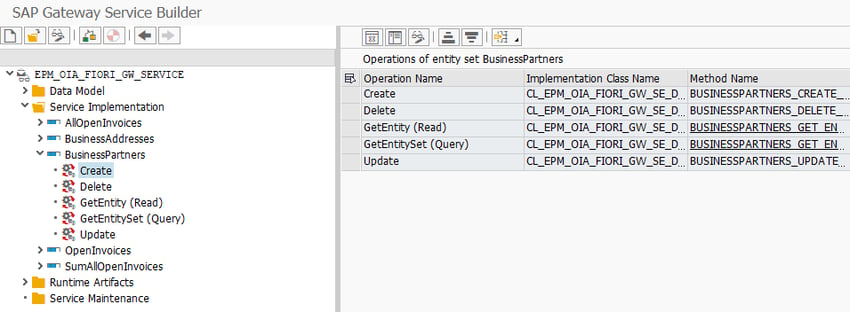
NetWeaver Gateway deployment with OData Service
The actual work begins in the backend system, because the surface must be able to communicate with the system. The central backend technology OData helps to let third-party applications "speak" with your SAP system via an SAP Gateway. The number of OData services that are delivered by default with SAP NetWeaver Gateway is small. This is also due to the fact that OData Services are inherently very granular and tailored to a particular application. When developing applications, therefore, a large part of the entire development time must be invested in the creation of suitable OData services and associated CRUD (Create, Read, Update, Delete) methods.
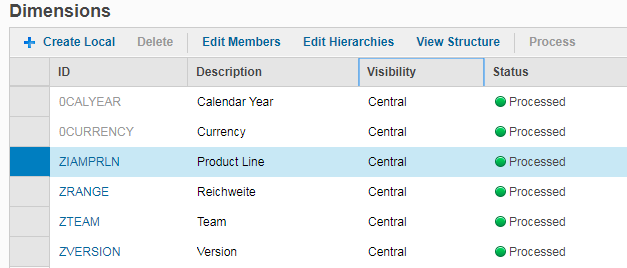
Create Search Help
To facilitate table maintenance, it is necessary to include a search help. This feature has to be developed separately. However, the master data required by the department must be identified first.

Maintain authorizations
Why do we need permissions in first place? Should not everyone have access to all information in the company, for the purpose of transparency? Well, It may be in the company's interest to restrict access to the data. Properly maintained authorizations help to avoid business risks, such as financial losses due to errors, mistakes or negligence. At the same time, industrial espionage through data theft is becoming more and more of an issue.
In addition, there are also legal requirements. These force companies to eliminate the possibility of so-called fraudulent acts (such as financial manipulation and embezzlement). Therefore, the integrity of the data must be ensured and data manipulation prevented. Last but not least, the confidentiality of personal data also plays a role. Think for example about HR data or salary statements.
Therefore, an authorization concept is required, which eliminates the risks mentioned above and at the same time takes cost efficiency into account. The administrative processes should be efficient and expenses during reorganisation should be as low as possible. That's why you should think about authorizations before you start the development. Who can access which tables? May he change the data or just view it? These questions must be answered.
Develop data validation
In-house developments are unpopular and feared in internal IT and governance. Possibly rightly so, because with wrong user inputs a lot of garbage ends up in the system. The subsequent cleanup takes a lot of time. It is therefore necessary to use data validation mechanisms that prevent incorrect entries or even correct them automatically.
All in all, the development of a UI5 interface is a medium-sized project. Hands-on experience also shows that an effort of 4 to 5 man-days (incl. UI5 App, Gateway, Test and Documentation) can be expected to create a new application which can be used to edit a single table.
The alternative
If you're looking for a user-friendly, easy-to-use, and platform-independent solution, NextTables could be an alternative for you. NextTables includes several validation mechanisms and further validation features can be implemented. The "out of the box" solution delivers many thought-out business logics such as search help, authorizations and data validations that can be customized. The connection of new tables takes only a few hours and not days.
Particularly noteworthy is the intuitive user interface with the possibility to change settings flexibly on the fly. So if you value a smooth business process and want to provide your department with a simple and configurable solution, then NextTables can be an alternative for you.
Our Summary - App for Table Maintenance with SAP UI5
If your table maintenance has to be visually customized to a large extent and only one table is connected at a time, in-house development with SAP UI5 is the recommended way. However, if you want to connect multiple tables while working in a secure environment with built-in authorizations, search help and automatic data validation, NexTables might be the better solution. Would you like to learn more about master data Maintenance in SAP BW with NextTables? Ask now for your personal free test version. If you have any questions, please do not hesitate to contact us.
Images by Pexels, CC0 License