Skip to content
NextLytics
Megamenü_2023_Über-uns

Shaping Business Intelligence

Whether clever add-on products for SAP BI, development of meaningful dashboards or implementation of AI-based applications - we shape the future of Business Intelligence together with you. 

Megamenü_2023_Über-uns_1

About us

As a partner with deep process know-how, knowledge of the latest SAP technologies as well as high social competence and many years of project experience, we shape the future of Business Intelligence in your company too.

Megamenü_2023_Methodik

Our Methodology

The mixture of classic waterfall model and agile methodology guarantees our projects a high level of efficiency and satisfaction on both sides. Learn more about our project approach.

Products
Megamenü_2023_NextTables

NextTables

Edit data in SAP BW out of the box: NextTables makes editing tables easier, faster and more intuitive, whether you use SAP BW on HANA, SAP S/4HANA or SAP BW 4/HANA.

Megamenü_2023_Connector

NextLytics Connectors

The increasing automation of processes requires the connectivity of IT systems. NextLytics Connectors allow you to connect your SAP ecosystem with various open-source technologies.

IT-Services
Megamenü_2023_Data-Science

Data Science & Engineering

Ready for the future? As a strong partner, we will support you in the design, implementation and optimization of your AI application.

Megamenü_2023_Planning

SAP Planning

We design new planning applications using SAP BPC Embedded, IP or SAC Planning which create added value for your company.

Megamenü_2023_Dashboarding

Business Intelligence

We help you with our expertise to create meaningful dashboards based on Tableau, Power BI, SAP Analytics Cloud or SAP Lumira. 

Megamenü_2023_Data-Warehouse-1

SAP Data Warehouse

Are you planning a migration to SAP HANA? We show you the challenges and which advantages a migration provides.

Business Analytics
Megamenü_2023_Procurement

Procurement Analytics

Transparent and valid figures are important, especially in companies with a decentralized structure. SAP Procurement Analytics allows you to evaluate SAP ERP data in SAP BI.

Megamenü_2023_Reporting

SAP HR Reporting & Analytics

With our standard model for reporting from SAP HCM with SAP BW, you accelerate business activities and make data from various systems available centrally and validly.

Megamenü_2023_Dataquality

Data Quality Management

In times of Big Data and IoT, maintaining high data quality is of the utmost importance. With our Data Quality Management (DQM) solution, you always keep the overview.

Career
Megamenü_2023_Karriere-2b

Working at NextLytics

If you would like to work with pleasure and don't want to miss out on your professional and personal development, we are the right choice for you!

Megamenü_2023_Karriere-1

Senior

Time for a change? Take your next professional step and work with us to shape innovation and growth in an exciting business environment!

Megamenü_2023_Karriere-5

Junior

Enough of grey theory - time to get to know the colourful reality! Start your working life with us and enjoy your work with interesting projects.

Megamenü_2023_Karriere-4-1

Students

You don't just want to study theory, but also want to experience it in practice? Check out theory and practice with us and experience where the differences are made.

Megamenü_2023_Karriere-3

Jobs

You can find all open vacancies here. Look around and submit your application - we look forward to it! If there is no matching position, please send us your unsolicited application.

Blog
NextLytics Newsletter
Subscribe for our monthly newsletter:
Sign up for newsletter
 

SAP HANA SQLScript

Performance optimization during exponential data growth

Over the last few years, the data volume in SAP systems has multiplied. And while the amount of information to be stored continues to grow exponentially, performance is becoming increasingly important. If you use customer-specific logic in a SAP HANA Data Warehouse, SAP BW on HANA (from version 7.5) or SAP BW/4HANA system, SQLScript can provide help.

You can use SQLScript in transformations, customer exits and BAdIs as well as HANA Analytic Views to benefit from enormous performance increases. In real life projects we have experienced cases with up to 15x faster runtime. Since the calculations are executed directly on the database level ("code to data" approach), you don't have to wait until the data is loaded. You can concentrate directly on implementing the knowledge gained and thus gain a competitive advantage.

SAP HANA SQLscript


When Should You Actually Migrate ABAP to SQLScript?
A Practical Decision Framework

How Do I Know Which ABAP Routines Are Actually Worth Migrating? Not all of them - performance gains only matter where they count. Check criticality first: prioritize transformations that exceed or come close to SLA limits, and factor in execution frequency (saving minutes on an hourly job matters more than on a nightly batch run). Then verify feasibility: find the real bottleneck - if ABAP processing or the data transfer between application and database server is the slow part, SQLScript helps; if the underlying database access itself is inefficient, tuning the ABAP SELECT statements is the better fix. Finally weigh complexity: some ABAP logic is so intricate that migrating it costs more time and money than the resulting performance gain justifies - always run a cost-benefit check first.
What Skills Does my Team Actually Need Before Switching? AMDP and SQLScript demand a different mindset than ABAP: developers used to working with loops and internal tables need to rethink in terms of relational, set-based operations. Before committing, honestly assess whether SQLScript know-how exists in-house - you'll want to adjust these transformations yourself once the consultants who built them have moved on.
Can You Mix ABAP and SQLScript in the Same Routine? No. For transformations specifically, you must choose one or the other per routine. There's also a notable exception where ABAP stays mandatory regardless: characteristic relationships of type "Exit" still run in ABAP whenever input-ready queries are used (the SQL equivalent only handles disaggregation), and planning functions of type "Forecast" also execute their characteristic relationships in ABAP. So even a fully SQLScript-based setup sometimes needs to keep the corresponding ABAP implementation in place as a fallback.
What Practical Limitations Catch Teams Off Guard? A few worth knowing before you commit: queries used as InfoProviders aren't supported (workaround: save the query as a HANA view); rule groups can't be executed in HANA at all; near-line connections aren't supported; and - this one is easy to miss - when InfoCubes or InfoObjects are used as targets, SID handling still happens in ABAP, so AMDP won't actually speed up simple 1:1 field assignments. If that's your scenario, using newer HANA objects like ADSOs is the better move. AMDP also performs zero data validation on output, so your result set must exactly match both the SAP HANA data types and the BW-specific field definitions, or the load fails.
How Do You Test SQLScript Logic Without Re-Running the Full DTP Every Time? Use the SQL Editor's anonymous block feature instead of triggering a data transfer process for every test cycle. Wrap your logic in a DO BEGIN ... END; block, define your input table inline, and run it directly - this lets you iterate on transformation logic interactively before wiring it into a production AMDP routine, saving real time during development.
What's Still Waiting for You in the Whitepaper These five answers cover the decision framework and the biggest gotchas - but the whitepaper adds the complete implementation detail: full AMDP code examples including the USING clause syntax and error-table handling, the complete limitations list (including error-handling version prerequisites and a package-bundling issue that only shows up at multi-million-row scale), and the underlying architecture diagram. It also points out which scenarios SAP has already pre-built for you, such as currency conversion, that make the migration noticeably easier. 

Whitepaper: Performance-Boost with SQL-Script

Whitepaper: Performance Boost with SQLScript 

As data volumes grow, the performance of BW systems becomes more important. If you use data-intensive logic, SQLScript can help.
Read our whitepaper to learn when it makes sense to make the switch and what pitfalls you need to avoid.

How to achieve up to 15x faster business insights

Performance Boost due to SQLScript

Using SQLScript in your business logic allows you to fully exploit the potential of your HANA database. The calculations are executed directly in the database without loading the data into the application layer first. This way you can benefit from up to 15 times better runtime!

speedometer


Make decisions faster

Don't wait any longer for the data to be loaded, make decisions! Because of the enormous speed advantage, you can focus on data analysis, gaining new insights and getting results instead of waiting for data to be processed.

Decision making


Beat the competition!

Don't waste time waiting, but use the latest insights before competitors do. Take advantage of SQLScript to consolidate and expand your market position and increase existing competitive advantages.

Rocket


Paradigm shift in data processing

Why should you use SQLScript?

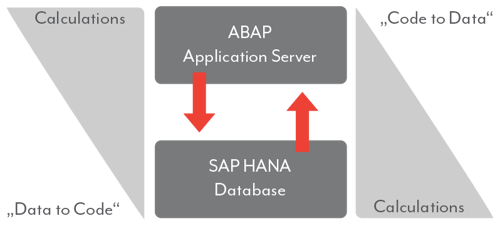
The launch of the HANA database led to a paradigm shift in data processing. In order to fully exploit the advantages of the new database, SAP relies on the "Code Pushdown" concept. This involves transferring calculations involving large amounts of data to the database level. This prevents unnecessary data transfers from the database to the ABAP server. Instead, calculations are performed directly in the SAP HANA database, where the data is stored. The code thus is brought "to data" (so-called "code to data" approach). This saves a lot of time, especially with data-intensive calculations.

Architekturdiagramm zum SAP-Paradigmenwechsel bei Berechnungen. Stellt den traditionellen „Data to Code“-Ansatz (Berechnungen im ABAP Application Server) dem optimierten „Code to Data“-Prinzip gegenüber, bei dem Berechnungen direkt in die SAP HANA Datenbank verlagert werden.


Have a chat with our expert!

Contact us - we will be happy to help you

Do you need help defining your data warehouse strategy? Or do you have questions about SAP Datasphere, SAP BW/4HANA, SAP HANA Data Warehouse or SAP Cloud Platform? We would be happy to advise you on all aspects of data warehousing, reporting and analysis. 

FAQ - SAP HANA SQLScript

These are some of the most frequently asked questions about SAP HANA SQLScript

What is SAP HANA SQLScript? SAP HANA SQLScript is a programming language used to implement custom logic and perform complex calculations directly in the HANA database. It enhances the performance of data processing by executing calculations at the database level instead of the application layer.
How does SQLScript improve performance? SQLScript enables calculations to be performed directly in the database, avoiding the need to load data into the application layer. This results in up to 15 times faster performance for data processing tasks.
What is the “Code to Data” approach in SAP HANA? The "Code to Data" approach means that calculations are performed where the data resides—in the HANA database—rather than transferring data to the application layer. This minimizes unnecessary data transfer and speeds up processing.
How does SQLScript contribute to faster decision-making? By executing calculations directly in the HANA database, SQLScript eliminates the waiting time for data loading. This allows businesses to focus on insights and decision-making rather than waiting for data to be processed.
What are the benefits of using SQLScript in business logic? SQLScript allows businesses to fully leverage the power of the HANA database by performing calculations in the database itself. This enables faster insights, improved decision-making, and a competitive edge.
What is the impact of SQLScript on competition? By using SQLScript, businesses can gain insights faster than their competitors, allowing them to make informed decisions ahead of others, thereby gaining and maintaining a competitive advantage.
How does SQLScript help with handling large data volumes? SQLScript optimizes the processing of large data volumes by performing calculations within the database, reducing data transfer times and improving the overall efficiency of data-heavy operations.
Why should businesses adopt SQLScript for SAP HANA? SQLScript offers significant performance improvements, reduces data transfer time, and helps businesses to execute complex data logic directly in the HANA database. This enhances the speed and efficiency of data processing, making it a valuable tool for businesses handling large datasets.

Would you like to know more about SQLScript?

Find interesting articles about this topic in our Blog

PlanViz for Analytical Models in SAP Datasphere

In our article “The hidden JSON-Hack for Database Hints in SAP Datasphere”, we showed you how to...

PlanViz for Analytical Models in SAP Datasphere

Splitting Comma-Separated Lists to Rows in SAP Datasphere with SQLScript

When working with business data, it’s not uncommon to find columns that store multiple values in a...

Splitting Comma-Separated Lists to Rows in SAP Datasphere with SQLScript

Test automation with SQL in SAP Datasphere

Test automation with SQL in SAP Datasphere
Table Of Contents
Content Box Pages Blogs