/Logo%202023%20final%20dunkelgrau.png?width=221&height=97&name=Logo%202023%20final%20dunkelgrau.png)





















Despite the powerful features of modern planning tools such as SAP Analytics Cloud (SAC), Microsoft Excel often remains a favourite among business users. In our projects, we see over and over that an upload of values into the planning application is requested. SAP recognizes this need and continues to develop the upload function further. In this article, we take a look at the latest developments in SAC and an alternative.
Use Cases: When Offline Planning Meets Integrated Enterprise Workflows
The desire for a simple upload of offline planned data remains undiminished. There are several scenarios in which Excel provides added value as an upstream tool. For example, Excel can be used for complex ancillary calculations or individual computations whose logic has not yet been implemented in the system. The final result is then uploaded to SAC and is available for further planning steps.
Another advantage is offline availability. Planners can prepare their data in Excel while traveling or in locations without stable internet access and then upload it to the central planning application. External suppliers or subsidiaries without system access can also deliver their planning data in standardized Excel templates.
To meet these demands, SAP initially released a Custom Widget, which we introduced in the article SAP Analytics Cloud File Upload Custom Widget – A Tool with Potential. A little later, file upload was introduced as an SAC standard feature. We thoroughly tested the functions in the article The New File Upload in SAP Analytics Cloud and Its Possibilities. Now SAP is releasing a further improvement. The new option Clean and replace subset of data ensures that after the upload the data in the system exactly matches to the Excel file. It does so by automatically removing obsolete entries that are missing in the new file. You can determine the scope of the data to be deleted in the settings.
What problems are addressed with this improvement?
Until now, there were only two options when uploading files. The existing data could either be overwritten or added to the new data. In both cases, data that was not included in the file but already existed in the system remained unintentionally in the system.
With the new functionality Clean and replace subset of data, the entire version or a specific data range can now be automatically deleted. When the upload is executed, the system checks the data contained in the file for the defined range and deletes it automatically. This eliminates the need to tediously control the deletion process through data actions, which had no access to the content of the file.
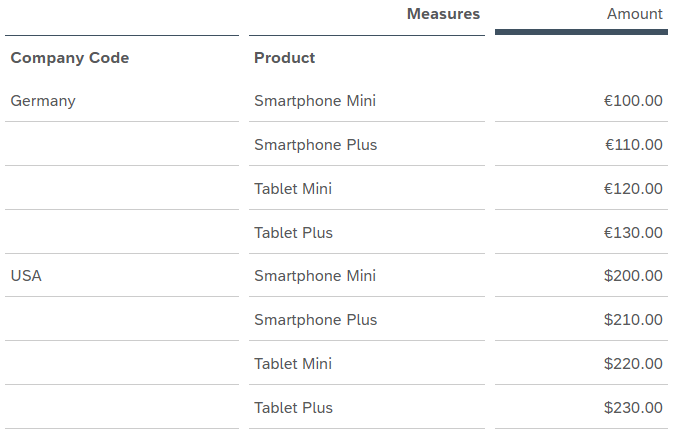
To illustrate this functionality, let us look at the following example. SAP Analytics Cloud contains data for the company codes Germany and USA as well as their respective products.
Now a new file is uploaded that only contains the values for one company code, Germany, as well as a subset of products.
202601;1000;SM;101
202601;1000;SP;111
The products Tablet Mini and Tablet Plus are no longer sold in Germany. Therefore, the planned values for these products should be deleted. However, we do not want the plan for the company code USA to be affected.
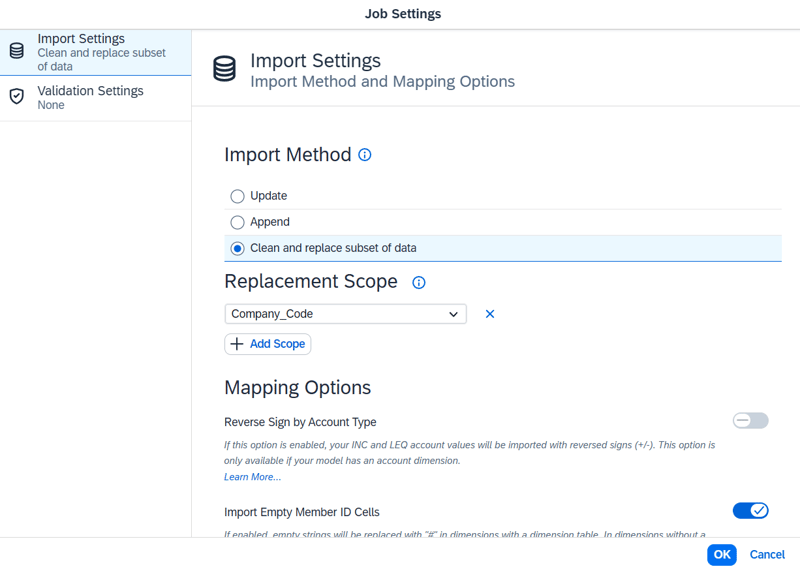
This is where the Clean and replace subset of data setting comes into play. If we select this option in the import settings and do not specify a dimension, all records in the target version are first deleted and then the new data is uploaded.
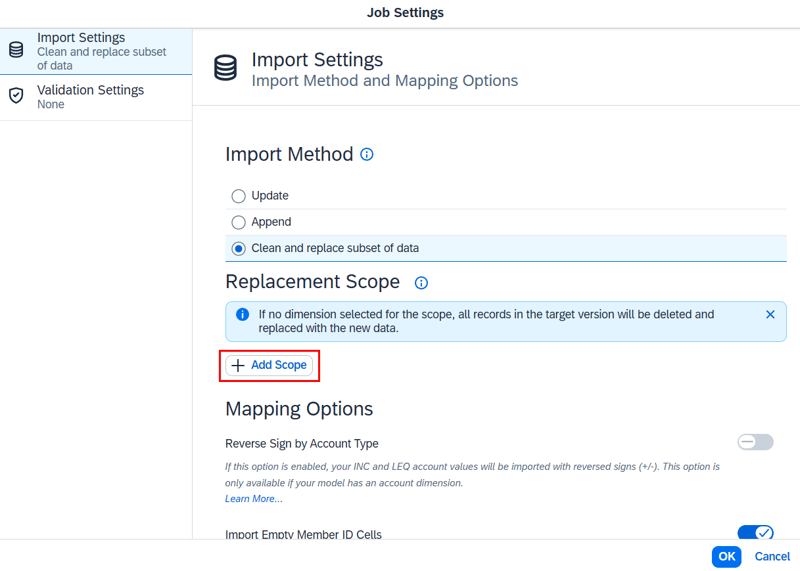
Since this is not our goal, we add the Company Code dimension via Add Scope. When we then execute the file upload, the system checks the data contained in the file for existing values in the Company Code dimension. Since records exist for company code 1000 (Germany), the system first performs a deletion action for all records of this company code in the target version and then loads the data from the file into the system. Data booked to other company codes remains untouched. The following image shows the result.
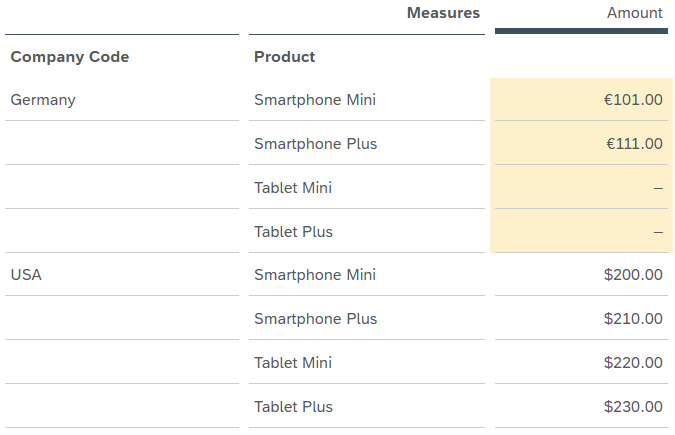
The key advantage is that after the upload, the data in the system corresponds exactly to the content of the file. Outdated entries that are missing from the new file are automatically removed.
With the Replacement Scope option, you can also specify multiple dimensions. For example, if you add Date and Region to the replacement scope, data entries that match the dates and regions in the file to be uploaded will be replaced. All other records remain unchanged.
With the new function, SAP closes a critical gap in the upload process. What previously often led to data inconsistencies or required complex workarounds through data actions can now be resolved with a simple setting.
The alternative
Despite the improved SAC functionalities, business departments often reach their limits in pure upload scenarios. A common obstacle when working with Excel uploads is data validation. Errors such as typos in master data or incorrect formatting are often only detected after the import has already failed, requiring subsequent corrections. Additionally, the IT department still needs to be involved to set up the upload processes in the first place or to resolve errors that occur, which limits the flexibility of business users.
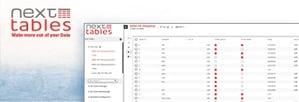
Our partner NextTables has a solution for exactly these problems. NextTables allows business users to maintain data directly in SAP Datasphere, so that it is immediately available in SAP Analytics Cloud. In addition to the intuitive user interface, NextTables offers further advantages such as real-time validation of records. An integrated error report visually highlights the erroneous points in the data. Furthermore, users are able to correct faulty data immediately.
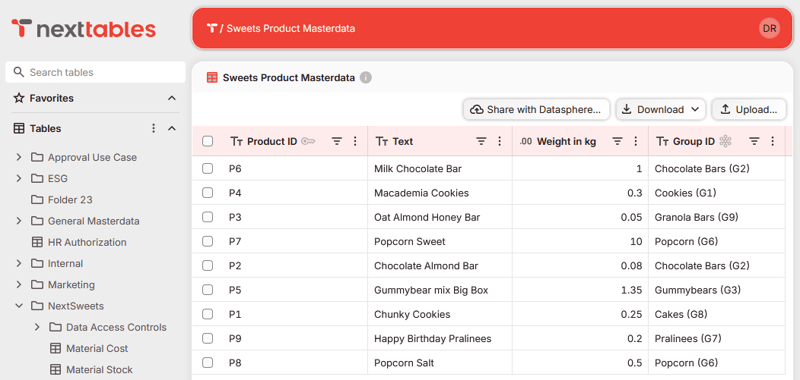
In SAC, on the other hand, the erroneous records are only available as a CSV download. The records must be corrected in the source file and the adjusted file must be uploaded again. Furthermore, with SAC we miss a status indicator that displays the progress of the upload, as NextTables does. Another shortcoming of SAC is the performance. The validation of master data takes a disproportionate amount of time. This is particularly noticeable with small data volumes.
Our summary: A Step Toward More Reliable and Governed Planning Integration
The new "Clean and Replace" function in SAP Analytics Cloud is an important step for scenarios in which Excel remains indispensable, such as complex offline calculations. However, if your goal is to streamline processes, proactively ensure data quality and eliminate manual steps, NextTables offers a compelling alternative.
In this article we only highlight a snapshot of what is possible with NextTables. If you would like to explore detailed implementation guidance, configuration best practices, and real project lessons learned, get in touch with our experts. We will be happy to share additional insights and discuss how these approaches can be tailored to your specific planning landscape.