/Logo%202023%20final%20dunkelgrau.png?width=221&height=97&name=Logo%202023%20final%20dunkelgrau.png)























Even almost 40 years later, Excel is still the most widely used planning tool. Many companies use Excel to collect and consolidate planning data from various stakeholders. This practice is not only found in medium-sized companies, even global companies use Excel to collect data from subsidiaries that do not use SAP. The data is imported into the headquarters SAP system using a uniform Excel format.
Planning data is often created by just a few employees
Also departments involved in planning processes do not always need large planning solutions like SAC or SAP BPC if only three employees are involved in creating plan data. Excel is still an ideal solution for this scenario. However when it comes to plan / actual comparison in reporting scenarios plan data often needs to be imported to systems like SAP BW, because actual data is considerably larger than plan data and many users want to access reporting concurrently. Now a process is needed where the department can upload data in a self service manner at any point of time and see the results in reporting right away. This is exactly where NextTables comes in.
Use NextTables to bring planning data and actual data together for reporting
NextTables is an add-on for SAP which, in addition to the manual maintenance of SAP tables, InfoProviders and InfoObjects, also enables Excel files to be uploaded using a user-friendly interface. This means that users can continue to use the familiar Excel functions to create plans and then transfer the plan values to the system. The master data is compared and any errors can be corrected either automatically or directly in the loading screen.
Examples of automatic correction could be the removal of currencies from key figure fields or the replacement of the description with the technical key. For example, if data for company codes is imported and the description is used instead of the technical key, an error is usually returned. With NextTables, however, a BAdI (Business Add-in) checks whether a company code with this description exists. If this is the case, the technical key of this company code is used.
Excel import with NextTables into SAP BW
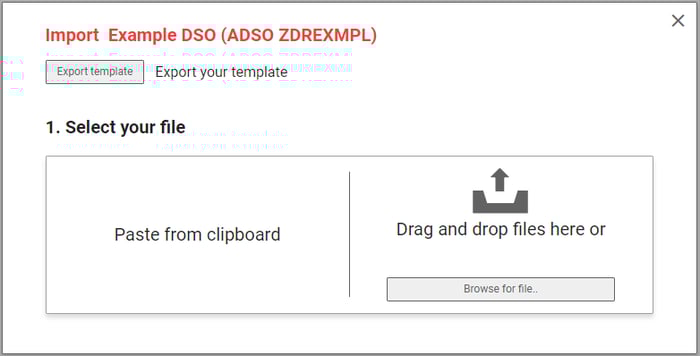
Excel data can be imported using drag & drop or by copying data from the clipboard. It is particularly worth mentioning that the import settings can be easily adjusted. Moreover, import templates can also be used to facilitate the upload.
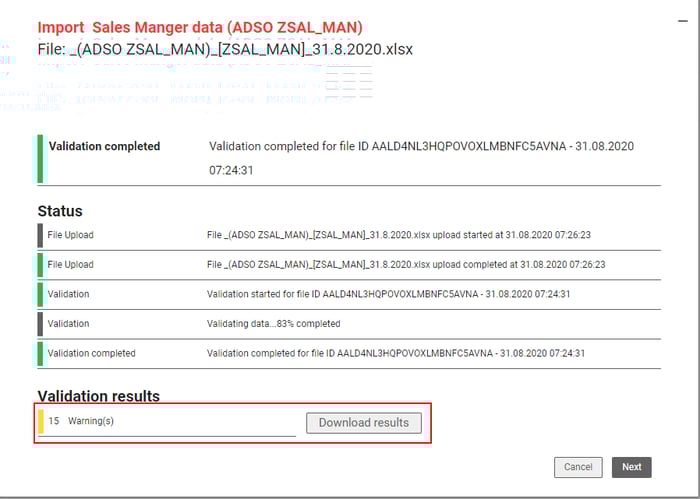
After the successful upload, you will receive an overview of the upload process and the validation results. This function is aimed at business users who are notified of errors during the upload and can correct them directly. Furthermore, you can define additional validation checks using a BAdI. You also have the option of activating or deactivating the master data check with just one click. The results of the validation can also be downloaded in Excel format.
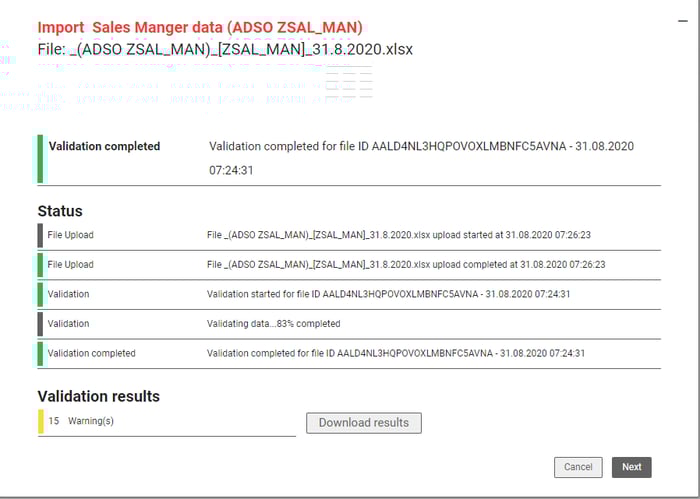
If errors occur during an import, you will immediately receive a summary of all errors and warnings. This way you don't have to spend time searching for errors.
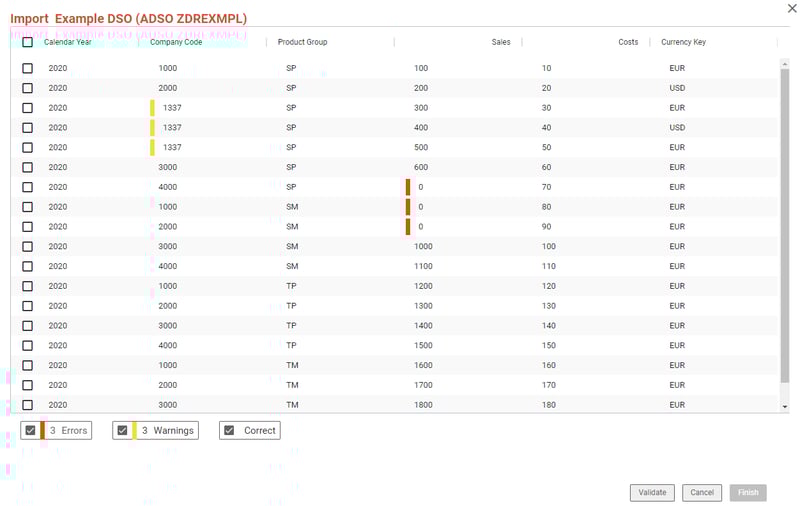
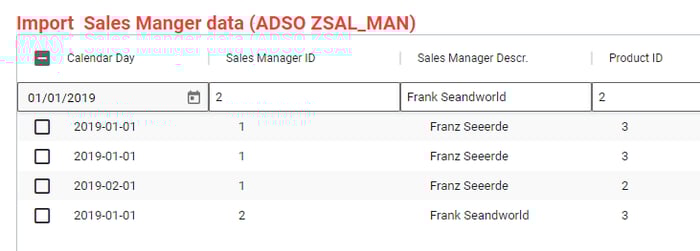
Errors in smaller files can be corrected immediately. This considerably shortens the import process. You do not have to cancel the import to correct the source file, but can continue with the import after the error correction.
Immediate error correction is not possible for files larger than 10 MB, as the amount of data is simply too large. Instead, you can download a comprehensive log of all warnings and errors. By the way, large files are no obstacle for NextTables. We have already successfully imported files of 200 MB and more with NextTables.
As you can see, NextTables is ideal for importing data into SAP. Fast and easy data upload can provide a solution, especially for planning applications that are primarily aimed at collecting data from relevant stakeholders.
Your benefits when using NextTables
- Import data from Excel, CSV files or the clipboard with instant validation report
- Standard import corrections, e.g. removing currency symbols from amount fields
- You can also customize these corrections on a table or field-specific basis
- Several validation options already implemented, and more can be added per table
- A warning is displayed if a data record with the same key already exists
- The import dialog can be used as a standalone display or integrated into any table display
- NextTables recognizes the columns regardless of formatting based on the column header
- An Excel template is also available for import in the coherent format
- Custom Buttons can be added, so the user can start additional staging or transformation processes when it is needed
- Any imported data is immediately available in reporting in SAC or any other BI Tool with live connection to SAP BW
So if you are looking for a way to load the values planned in Excel into the SAP system and want to offer your business department a simple and freely configurable solution, NextTables may be an alternative for you.
In the capability overview we introduce NextTables to you in detail and show you all the possible applications. Would you like to learn more about NextTables? We are happy to support you!