/Logo%202023%20final%20dunkelgrau.png?width=221&height=97&name=Logo%202023%20final%20dunkelgrau.png)





















I’m looking at the UI and just staring at the screen: “Activation in progress… Editor not editable.” I could go get a coffee, like I always do. Or check my emails. Or -as I did that day - start seriously thinking about whether things really have to stay this way. Somewhere in the world, an AI agent is currently deploying a complete microservices architecture, and I’m mapping AUFTRAGSDAT to ORDER_DATE.
So I start searching. Because this can’t be right: The entire industry is talking about Agentic AI, SAP is working with Joule on its own vision - which, however, runs primarily in the cloud, offers no attractive entry-level options for SAP partners, and, as always, is much more announcement than reality - and for BW developers, nothing changes.
While researching, I stumble upon an MCP server list by Marian Zeis on GitHub that deals exclusively with SAP tooling. Jackpot - something like this already exists? And then, while scrolling through: an MCP server for ABAP. The same stack that BW runs on. Double jackpot.
I give it a try. First minute: blown away. This thing really works. AI that writes directly to the SAP system via the same interface as Eclipse ADT itself - no detours, no screenshots, no copy-paste.
A few weeks later: DSAG Technology Days in Hamburg. Marian’s presentation on AI-powered SAP development with MCP servers. The hall is packed, which alone shows just how much interest there is. No Joule demo, no AI Units pricing. Instead: an open-source mindset and a live demo that shows, end-to-end, how the developer’s role is shifting right now.
On the drive home from Hamburg, I think: Wait a minute. ADT API. That’s available for the BW Modeling Tools, too. And so, that same evening, an inspiration turned into a project: bw-modeling-mcp.
Check out the Github repository as you read along: https://github.com/dnic-dev/bw-modeling-mcp
Check out our blog series "Agentic AI meets SAP BW": |
|
| 1. Agentic AI meets SAP BW | |
| 2. Agentic AI in Practice |
What is MCP?
A standalone AI model has no direct access to external systems. It processes inputs and generates outputs - nothing more. Only an agentic environment like Claude Code, OpenAI Codex, or Gemini CLI provides the model with tools: Bash, HTTP and the file system.
But even with that, you won’t get very far with SAP BW. This is because the BW Modeling REST API is not publicly documented. It is the internal interface that Eclipse BWMT itself uses and has never published or made available as an official interface. Claude simply does not know which endpoints exist, what XML structures are expected, or how the lock protocol and internal session handling work.
This knowledge resides in the MCP Server: reverse-engineered from Eclipse BWMT, nicely encapsulated in tool implementations thus usable by any MCP-capable AI tool.
This is exactly what makes the Model Context Protocol the right approach: an open standard, originally developed by Anthropic, that enables AI models to interact with external systems in a structured way and perform real operations. The model decides independently when it needs which tool; the tool executes the operation; the result flows back into the model; and it continues working until the task is complete.
In the case of bw-modeling-mcp, this means specifically: The server connects to the BW Modeling REST API (/sap/bw/modeling/) and every write operation follows the BW locking protocol - lock, read current object XML, apply changes, write back complete XML, activate. What a developer does in Eclipse click by click, Claude performs here as described by a prompt and without manual intermediate steps.

Where the real potential lies
From the very beginning, it was clear that the server was intended to support two basic use cases:
- Read-only: Read, analyze and understand existing BW structures
- Write: Create, modify and activate objects - fully agentic
The potential applications resulting from this are numerous. In this article, we’ll look at a few typical examples to quickly illustrate what the server can do and how it works.
However, the potential extends far beyond what is immediately apparent. BW systems contain knowledge accumulated over many years - modeling decisions, complex business logic deeply embedded in transformation logic and query definitions. An AI assistant that can read and navigate directly within these structures opens up entirely new perspectives: for analyzing existing structures, but also for migrating them to modern data platforms - one that understands the semantics behind mature BW structures and can independently derive a target state that fits the new platform.
Watch the recording of our webinar "Bridging Business and Analytics: The Plug-and-Play future of Data Platforms"
Ask your BW
Let’s start with the first use case: reading, analyzing and understanding existing BW structures.
You can ask the MCP simple questions, such as: Give me all custom queries in the system, including the creator, InfoProvider and creation and modification dates. In a production system, you would narrow this down depending on the role and context. An IT administrator might ask for queries that do not follow naming conventions or have not been touched in over a year. A developer is more interested in which queries are running on a specific InfoProvider, especially if a restructuring is planned. And the business department might ask something entirely different: Explain to me exactly what Query X does, which metrics it contains and which variables control the filter. On our demo BW/4HANA system, we simply query all custom queries - admittedly on a system where no new queries have been developed for quite some time.
Search for all BW Queries whose technical name starts with "Z". For each result, read the full query definition. Then present a summary table with the following columns: Technical Name, Description, InfoProvider, InfoArea, Package, Status, Responsible, Created On, Changed On. Sort by Created On descending.
The result: 28 queries, cleanly arranged in a table with all relevant header data, plus a brief summary analysis. The video has been edited only minimally, just at the points where the model pauses to think. What hasn’t been edited: the actual tool calls. They’re as fast as they look.
Another example that demonstrates what is truly possible with Read-Only is a comprehensive technical and business data lineage analysis. The data model we’re examining here is our NextJuice model, which some of you may recognize from our Seamless Planning blog. Originally, it resided exclusively in the Datasphere; for this specific use case, we migrated it to BW, building it via the MCP server itself.
The analysis is quite ambitious by design. I don’t just want to know how the model is structured; I also want to understand what the transformations and routines do, both technically and in business terms. This is an important distinction: reading the structure is one thing, but it’s only the explanation of the business logic that turns the technical analysis into usable documentation. The prompt for this:
Analyze the complete data lineage of aDSO [NJMCPIO]. Explain the business logic behind the transformation logic in plain language. What is being calculated, derived, or looked up? For every routine logic you encounter, retrieve the actual source code and include it in the output. Explain what the code does step by step and how the business logic is implemented. Present the lineage as a structured table sorted by level. Follow with a plain-language summary of the complete data flow from source to target, including the key transformation logic.
It’s worth taking a closer look at what happens here: Claude automatically goes through the entire dependency chain, step by step: reading the aDSO, performing a where-used analysis on the object, working backward through the transformations and fetching the respective source objects. And as soon as it gets to the routine code, Claude automatically switches to the ADT MCP Server and reads the source code from there. This is the same switch a developer makes in Eclipse when jumping from the BW Modeling Tools into the ABAP Development Tools to view a routine coding. Except that here, Claude doesn’t switch perspectives, but instead pulls in the right tool from a different MCP server. In my setup, that’s vibing-steampunk.
This video has also been edited only at the points where the AI is actually processing the task, not during tool calls. The results are so detailed that we have attached the complete data lineage analysis as a PDF: download the pdf document here.
Model your BW
Reading data is only half the story, but the really interesting question is, of course: can Claude also create objects, build transformations and load data? The answer is: Yes, he can.
And to demonstrate that, I’m not going to use our NextJuice model again this time, but rather an example straight from real life - actually, a colleague’s spontaneous idea for his very first MCP prompt. That’s exactly how you get started. Whether you really need SAP BW/4HANA for Bundesliga analytics is another question - but as a demo, it definitely has its charm.
Create a field-based aDSO [NJBULI] with write-interface (Type standard) to store Bundesliga match results in the InfoArea [MCPBW_01]. Include fields for matchday,home team, away team, home goals, away goals, and match date. Use NUMC(2) for matchday so it can serve as a key field. Use aggregation type NONE for all numeric fields. Define matchday, home team, and away team as key fields. Suggest suitable technical names for the fields. Then load the aDSO with a sample dataset of around 30 plausible matches via the Push API.
What’s great about this example is that it demonstrates three different things in a single run. First, the modeling process, in which Claude creates a standard-type aDSO write interface in the correct InfoArea, using the key parameters specified in the prompt, such as the aggregation type and key fields. Second, the field structure, which is translated from a business description (“matchday, home team, away team, home goals, away goals, match date”) into concrete BW fields with appropriate data types and lengths, including meaningful technical field names that Claude suggests itself. And third, loading the data via the Push API, which allows you to write data records directly into the aDSO via a REST interface. Claude generates a plausible dataset of 30 matches for this and writes it into the system in one go as JSON records. It was to be expected that Bayern Munich would come out on top once again - to be honest, I would have liked to see a bit more hallucination.
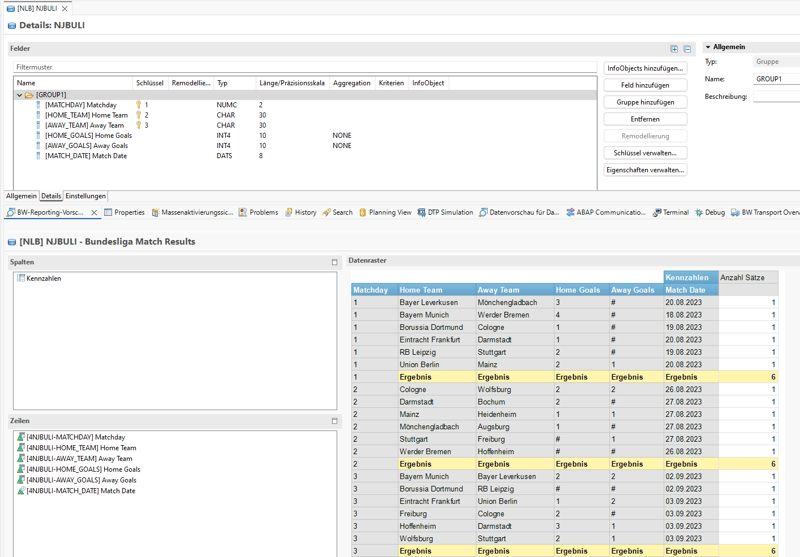
Another thing you’ll notice in the video: before every write operation, Claude Code asks whether it’s actually allowed to execute the call. This isn’t a random thing - it’s set up that way on purpose. In my setup, all read-only tools run without prompting because they don’t make any changes. For write operations, such as creating an aDSO or pushing data to the system, I must actively confirm. This keeps control in the developer’s hands without having to click through every harmless read-only tool.
This example covers only a tiny part of what the MCP is currently capable of. Here’s a look at the other features:
- InfoObjects: Create characteristics and key figures using all common data types, with support for master data and text; manage display and navigation attributes
- aDSOs: Add and remove fields and InfoObjects, manage key fields, customize field properties such as aggregation behavior, change aDSO types and settings
- InfoAreas: Create and move objects between InfoAreas
- InfoSources: Create, manage fields, import from existing objects
- Transformations: Create between all common source and target types, set field mappings as direct mappings or formulas, add start, end and field routines in ABAP or AMDP, switch runtime between ABAP and AMDP
- DTPs: Create, set filters and filter routines, maintain descriptions and settings
- BW Queries (read-only): complete resolution of variables, filters, layout, calculated and restricted metrics, including recursively resolved CKF formulas, as well as exceptions and query settings
- General: Search and where-used analysis, activation, unlocking locks, deleting objects, transport request assignment
And when it comes to ABAP or AMDP coding for routines, the BW MCP sticks to its role and leaves the writing of the actual source code to an ADT MCP Server. The two work hand in hand, just as the BW Modeling Tools and the ABAP Development Tools run side by side in Eclipse. A complete overview of all tools can be found in the project’s README.
Try it yourself
The setup is surprisingly unexciting. All you need are three things: an MCP-compatible agentic environment, a BW/4HANA system and a few minutes of your time.
In my setup, I use Claude Code, but the server works just as well with other MCP-compatible clients. The basic principle is the same for all clients, but the specific configuration varies. For Claude Code, there are essentially three steps: clone the repository from GitHub, build it once using npm install and npm run build and enter the server along with the BW credentials in the .mcp.json file in the project directory. The complete instructions, including a sample configuration, are in the project’s README.
Where you run Claude Code is a matter of personal preference. I use the native integration in VS Code, but a standard PowerShell, the built-in terminal in VS Code, or even a terminal view in Eclipse work just as well.
And now to the question that often comes up at this point: Do I need to set up a server somewhere for this? No. The term “MCP Server” is misleading here, because despite the name, it is not a server in the traditional sense. The MCP is a local Node.js script that launches the agentic environment upon startup and runs only as long as the session is active. The MCP communicates with the BW system’s REST API from the local machine, just as Eclipse BWMT does.
Update: Talk to Your BW Data
A few weeks after the initial release of bw-modeling-mcp, the project has already evolved significantly. Support for cross-references, DataFlows, CompositeProviders and repository navigation has been added continuously. But one of the most interesting additions changes the interaction model entirely: the MCP can now query live BW data directly.
Until now, the focus was primarily on metadata, modeling objects, and transformation logic. The AI assistant could understand structures, create objects, and navigate dependencies. Now it can also execute analytical requests directly against BW providers and queries.
In practice, this means you can ask questions such as:
“Show me the top 5 products by gross sales by month.”
- even if no BW Query exists for that specific requirement.
The AI agent identifies the relevant provider, determines how to retrieve the data, applies aggregations and filters, and returns the result directly in the chat. All through the BW Modeling API and without predefined reporting artifacts.
What makes this particularly interesting is that the assistant is no longer limited to understanding the BW model statically. It can now actively interact with the data model and use it dynamically for analysis.
Current capabilities include:
-
Execute BW Queries and InfoProviders directly by name
-
Fill variables and apply filters dynamically
-
Control rows, columns, and axis layouts
-
Navigate hierarchies and key figure structures
-
Retrieve valid filter values before execution
-
Return formatted analytical results directly in the conversation
In the demo below, Claude Code queries live BW data directly from the underlying provider, aggregates the result, and returns the analysis interactively - without any manually created query in advance.
Agentic AI meets SAP BW: Our conclusion and the road ahead
What we’ve seen so far is just the beginning. The MCP already covers a large portion of typical BW development and analysis scenarios and new features are being developed continuously. The query reader tool, for example, was added just a few days ago, following my announcement on LinkedIn last week. And the server has now also made its way onto Marian Zeis’ curated list - the very same list through which I myself came across the topic a few months ago. Next on the roadmap are, among other things, CompositeProvider, planning objects, compatibility with BW on HANA 7.5 and Launchpad features such as process chains.
A pattern that will likely continue: new object types are usually added in read mode first. There’s a simple reason for this. Reading is relatively straightforward, whereas Create, Update and Modify are significantly more complex because BW works internally with locking, session handling, transports and many small API specialties that must first be properly encapsulated before a write operation is truly stable. But that doesn’t mean it will stay that way. The goal is to gradually turn the MCP into a tool that can fully understand a BW system and work within it.
In addition, there are other questions that we find exciting and will certainly explore further: How many tokens does a typical BW operation “consume,” what is the overall performance and what role does prompting play in this - that is, which phrasings deliver the best results with the least possible resource usage? How well does the MCP server work with other AI platforms such as OpenAI Codex or Microsoft Copilot Studio, or with model-agnostic tools like OpenCode, which also support local models? And of course: What security-related questions arise when AI assistants operate autonomously in systems with critical data models - such as in HR reporting? These are not academic questions; ultimately, they determine whether an exciting approach becomes a productive tool.
Interested in optimizing your BW system or need help with implementation? Reach out today for a personalized consultation and explore how our solutions can transform your SAP BW/4HANA environment.