/Logo%202023%20final%20dunkelgrau.png?width=221&height=97&name=Logo%202023%20final%20dunkelgrau.png)





















If you're working in an SAP landscape, SAP Analytics Cloud (SAC) is hard to avoid as a frontend. And if you're also running Snowflake as your central data warehouse, you've been dealing with a fair amount of configuration overhead. With QRC1 2026, SAP has fundamentally simplified this: native live connection, no agent, no gateway. In this article, we walk through how to set up the connection, what the model concept means, and where the limits are.
Setting Up the Snowflake Connection in SAC
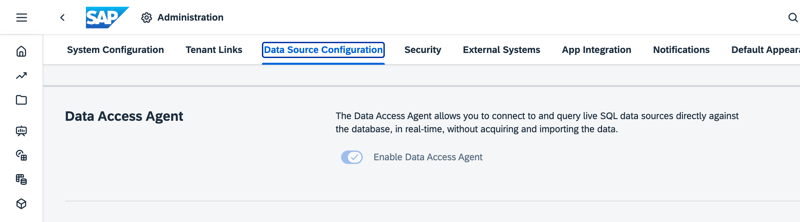
Before you start, there's one technical prerequisite: the SAC tenant must run on SAP HANA Cloud and the Data Access Agent must be activated. The Data Access Agent is the component through which SAC accesses external sources live. Without it, there's no live connection to Snowflake.
You activate the Data Access Agent in the SAC administration under Data Source Configuration. It's a one-time step that requires admin rights (specifically, execution rights for SDA Administration).
After that, go to Connections in SAC, click "+" and select Snowflake. One thing to note: the connection is listed under "Acquire Data" rather than "Live Data" - don't let that throw you off. At the end of the configuration, it is still a live connection.
You'll need the following details:
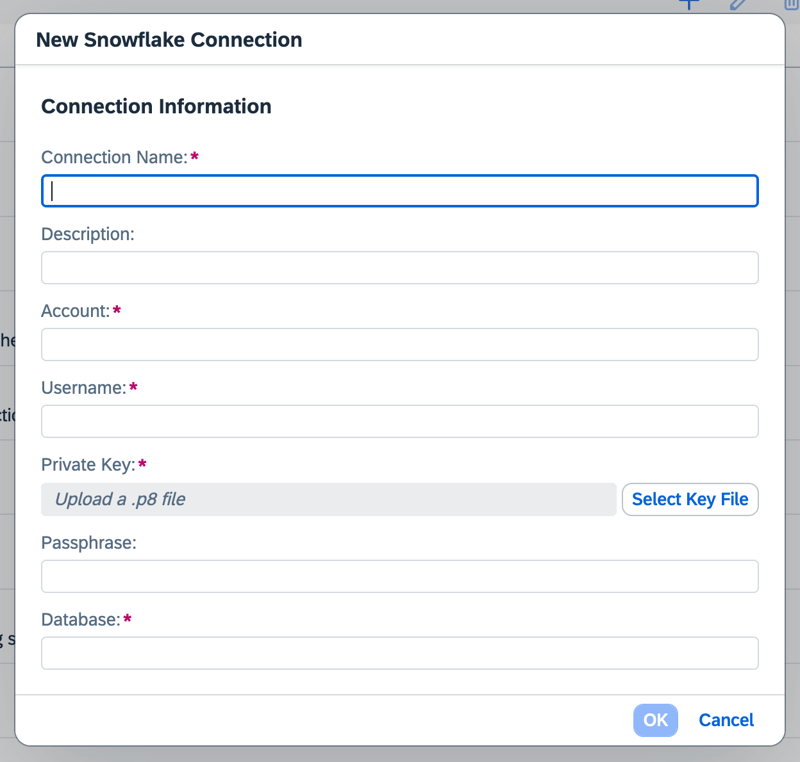
• Connection name (free choice)
• Snowflake Account Name
• Username (the Snowflake user the public key will be assigned to)
• Private key (.p8 file)
• Passphrase - only if the private key is encrypted (more on that below)
• Snowflake database name
No JDBC driver, no local agent, no complex installation. Compared to the old import setup, this is a significant simplification.
Important note: If the Snowflake user is new, they may need a default database assigned. This can be done via SQL in Snowflake, or simply by opening any database - Snowflake will prompt for it automatically at that point.
Dashboarding with SAP Analytics Cloud -
Dowload our Whitepaper!
Key-Pair Authentication: Creating the Private and Public Key
The live connection relies on key-pair authentication. Instead of a username and password, SAC authenticates via a cryptographic key pair. The private key stays on the SAC system; the public key is assigned to the Snowflake user. No password travels over the network.
If the private key is stored securely, you can work without a passphrase. In production environments, we recommend using one anyway.
Step 1: Create the Private Key
The OpenSSL commands are run locally in the terminal – not in the Snowflake interface. On Windows, install OpenSSL first (e.g. via Win32 OpenSSL: https://slproweb.com/products/Win32OpenSSL.html); on macOS and Linux it's usually pre-installed. Alternatively, you can run the commands directly via SnowSQL - our preferred approach (https://docs.snowflake.com/en/user-guide/snowsql-install-config).
Unencrypted key (simplest option):
openssl genrsa 2048 | openssl pkcs8 -topk8 -inform PEM -out rsa_key.p8 -nocryptopenssl genrsa 2048 | openssl pkcs8 -topk8 -inform PEM -out rsa_key.p8Step 2: Derive the Public Key
openssl rsa -in rsa_key.p8 -pubout -out rsa_key.pubStep 3: Assign the Public Key to the Snowflake User
In Snowflake (as SECURITYADMIN or with OWNERSHIP rights on the user), run the following:
ALTER USER my_user SET RSA_PUBLIC_KEY='<my key content>';DESC USER my_user;The SAC Model with Snowflake - A Concept of Its Own
If you've worked with live connections to SAP BW or SAP Datasphere before, you'll need to adjust your thinking here. The Snowflake connection works differently - conceptually it's closer to a Seamless Planning Connection than to a classic BW Live Connection.
Creating the Model
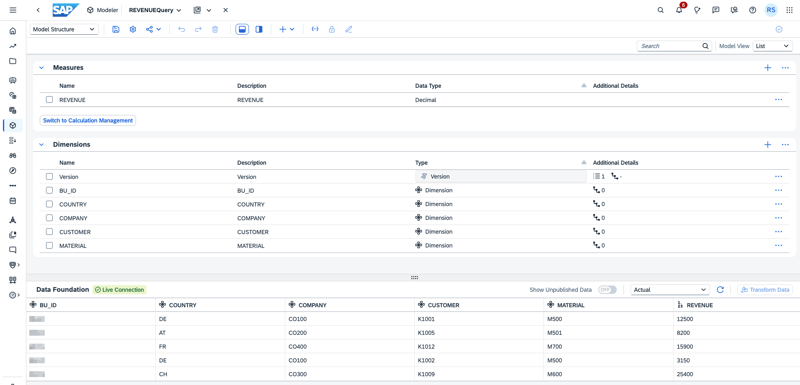
The model is created in the SAC Modeler via Start with Data. Select Snowflake as the data source, then the connection you just set up, and then a view. Important: SAC expects regular Snowflake Views. Snowflake Semantic Views - the newer object layer in Snowflake with its own Logical Tables, Dimensions, and Metrics - are currently not supported and cannot be used as the basis for a SAC model. Even with regular views, you may occasionally run into compatibility issues, for example if the view contains complex constructs or unsupported data types.
Next, select Live Connection as the processing method. The model is built along the structure of the view, with an immediate live data preview. Dimensions and measures can be adjusted, renamed, and removed as needed. Live calculations are possible at the model level.
Live Version - The Key Difference
The data from Snowflake is available in the model as what SAC calls a Live Version. This is not a planning version in the traditional sense - it's a direct, non-replicated view of the source data from Snowflake, queried live at runtime.
What you can do with it:
• Display Live Version data in charts, tables, and stories
• Reference Live Version data in model and story calculations
• Use Live Version data in Data Actions - including Advanced Formulas
• Copy Live Version data into planning versions via copy/paste or Data Actions
What's not possible: writing directly back to the Snowflake source. The Live Version is read-only. Planning corrections are always saved in the internal SAC planning versions. If you want to transfer planning data back to Snowflake, that's possible via separate processes (e.g. a data export from SAC) - but it's not part of the Live Connection itself.
Replication or Live - Both Options Are Available
SAC offers flexibility here: if you prefer replicated data (better performance for large data volumes, offline availability), that's still an option. If you want to query live from Snowflake without replication, use the Live Connection. In a story, both approaches can even be used simultaneously - across multiple sources.
Supported Data Types
SAC supports the following data types for the Snowflake Live Connection:
• Fully supported: NUMBER, DECIMAL, VARCHAR, DATE, TIMESTAMP, TIMESTAMP_LTZ, TIMESTAMP_NTZ, TIMESTAMP_TZ
• Interpreted as text (works, but with limitations): FLOAT, TIME - these can be adjusted in the Modeler, but may cause performance issues. Recommendation: adjust data types directly in the Snowflake View before creating the model.
• Limited support (may cause validation or story errors): ARRAY, GEOGRAPHY, GEOMETRY, OBJECT, VARIANT
• Unsupported data types: Anything outside the above list is automatically detected by SAC and will prevent the model from being created. In that case, the view in Snowflake needs to be adjusted before you can proceed.
What Works in SAC with a SAC Model with Snowflake Live Connection
This is the part that matters most in practice. The short answer: essentially everything SAC Stories can do - because SAC treats the SAC model with Snowflake Live Connection like any other SAC Analytical Model. The story doesn't "know" that Snowflake is running in the background. All story features that work with a regular SAC model are available.
Concretely, that includes:
-
Charts and tables in all available types - bar, line, waterfall, Pareto, area, geo charts, etc.
-
Filters, input controls, linked analysis
-
Calculated measures and dimensions at the story level
-
Thresholds and conditional formatting
-
Scripting and API access to the model
-
Bookmarks
-
Multiple models in one story - including mixed with Datasphere or other sources
-
Story versioning: save and restore up to 10 versions per story
-
Centralized comment management
Planning features are also available: planning models can be created directly on top of Snowflake Views. The Live Version from Snowflake serves as the actual data baseline. Important: planning data is always saved in the internal SAC planning versions - writing directly back to Snowflake is not possible. Also, this functionality only applies to SAC models created directly in SAC. Unlike Seamless Planning with SAP Datasphere, Snowflake-based models cannot be deployed to Datasphere - the SAC model with Snowflake Live Connection always remains a native SAC model.
My Metrics
My Metrics is not a story feature but a standalone area in SAC - and it works equally well with SAC models with Snowflake Live Connection. Recent updates have significantly upgraded My Metrics: users can subscribe to KPI reports and have them delivered by email on a schedule. If you're using Snowflake as your data source, you can use this workflow end to end.
Data Analyzer
The Data Analyzer also works without restrictions - ad-hoc analyses, drag-and-drop, cross-tabbing measures, all directly on live Snowflake data. Since SAC treats the SAC model with Snowflake Live Connection like any other Analytical Model, there are no tool-specific special rules within SAC.
SAC Excel Add-In
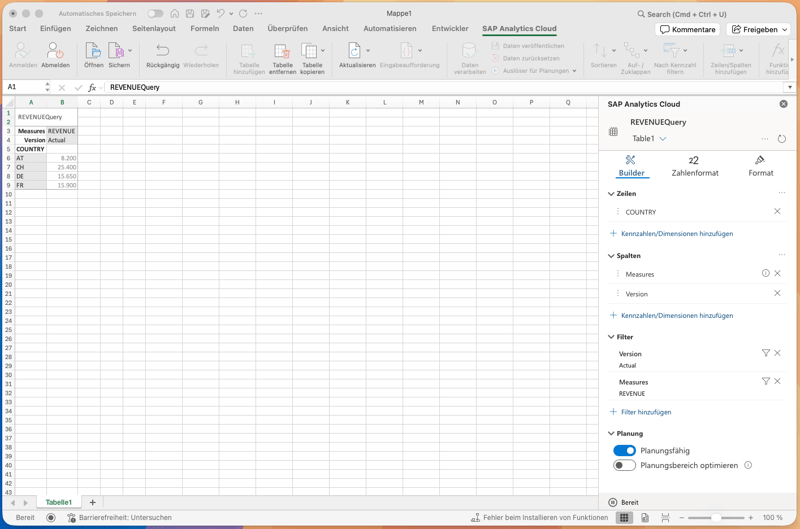
The SAC Add-in for Excel can also access SAC models with Snowflake Live Connection. Teams that prefer to do their analysis in Excel get the flexibility of Excel combined with live data directly from Snowflake - no manual export, no stale numbers.
Limitations - What You Should Know
If you're ready to jump in, keep these points in mind:
-
Regular Snowflake Views only: Snowflake Semantic Views are not supported. Even with regular views, compatibility issues can occur - this should be tested during setup.
-
Data Access Agent is required: Tenants not running on SAP HANA Cloud cannot use the live connection at this time.
-
No write-back via Live Connection: The Live Version is read-only. Exporting planning data to Snowflake is generally possible, but not through the direct connection.
-
Planning features only outside of Datasphere deployment: If you're already using Seamless Planning with Datasphere, the Snowflake Live Version cannot be added there on top.
-
Data types: As described above, not all types are fully supported. Recommendation: check views for data types before setting up the model.
Data Wrangler – not there yet
Anyone who has previously used the Data Wrangler to clean up imported data in SAC will need to adjust their thinking for Live Connections. For Snowflake, Google BigQuery, and eventually SharePoint, the Data Wrangler is currently not available. Data should already be in a clean, consumable state in the source system – gold standard, so to speak. Stories that work with multiple sources and data blending are hit hardest, as the data from different models needs to align – and without the Data Wrangler, that has to be ensured upstream.
SAP is aware that this is a real pain point. A completely rebuilt solution is reportedly in the works – more powerful, with SQL and possibly Python as transformation languages. There are no official roadmap entries yet, and anyone familiar with SAC's history knows that similar plans have quietly disappeared before. We'll be watching to see if and when it arrives.
Snowflake and SAP Snowflake
Why Snowflake is not always the same as Snowflake: this distinction is worth understanding. There's regular Snowflake and SAP Snowflake. Technically, they're the same product - but SAP Snowflake is an SAP-managed Solution Extension, procured directly through SAP and - crucially - can be operated in the same data center as SAC, SAP Business Data Cloud and Datasphere. Snowflake's own documentation explicitly recommends provisioning SAP Snowflake in the same region as the SAP BDC Cockpit for optimal performance. When that's the case, performance is good. When SAC and Snowflake are in different regions or data centers, performance can be noticeably worse - which matches our project experience, where connecting to an external Snowflake system felt slower than comparable live connections to SAP Datasphere or SAP BW. The recommendation: if you're using SAP Snowflake, make sure you're in the same region. If you're connecting an existing Snowflake system, check regional proximity and set up a dedicated warehouse for SAC queries.
SAP Analytics Cloud Snowflake Live Connection: Our Conclusion
The native live connection between SAC and Snowflake is a genuine step forward. No external agent, no JDBC configuration, no replication requirement, no password auth problems. For organizations running Snowflake as their central data warehouse and looking to use SAC as their frontend, this is the cleanest path available.
What remains: the model concept with the Live Version is not the same as a BW or Datasphere Live Connection. Understand that, keep the limitations in mind - particularly around views and performance – and the connection works well. If you prefer replicated data, that's still an option. Both approaches are available, and that's exactly the flexibility you'd expect from a modern connectivity setup.
One caveat remains: you can't access Snowflake directly - you always need to create a SAC model first that points to a Snowflake View. For individual use cases, that's perfectly fine. But if you're building out a large reporting portfolio with many models, factor in the initial configuration overhead.
If you’d like to evaluate or properly implement the SAC–Snowflake connection in your landscape, feel free to get in touch for a non-binding consultation.