/Logo%202023%20final%20dunkelgrau.png?width=221&height=97&name=Logo%202023%20final%20dunkelgrau.png)
























In our previous article Azure Databricks Governance with Terraform and Databricks Bundles, we split Azure Databricks governance across three stages: Terraform provisions the cloud infrastructure, Databricks Declarative Automation Bundles (DAB) configure the platform´s permissions and the Python SDK handles what bundles can't express declaratively.
Governance in Databricks plays out across three permission levels: account, workspace, and Unity Catalog. This article zooms in on the last one (Unity Catalog), where most of the day-to-day grant work lives.
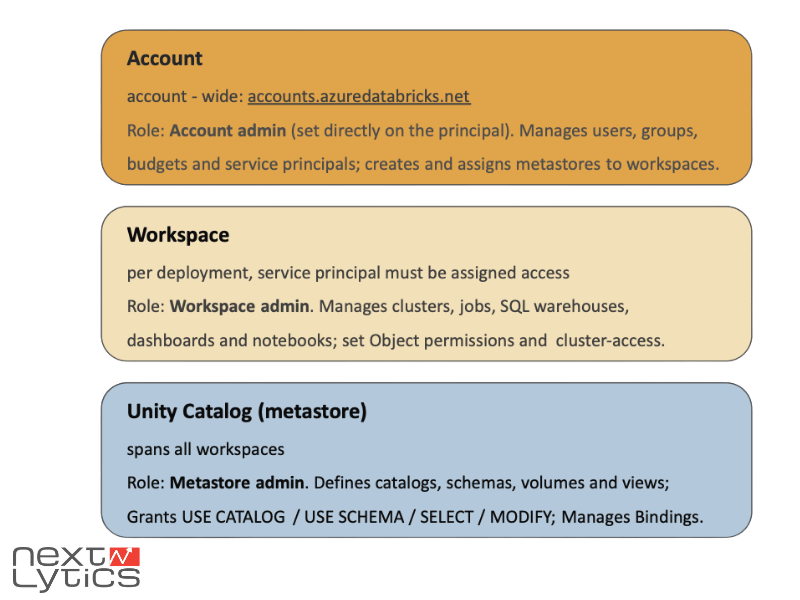
That setup works well, until your platform grows. Once your medallion architecture spans bronze, silver, and gold catalogs, each with several schemas, one thing multiplies fast: the grants: blocks. The same workspace users READ or job runner WRITE permissions get copied onto every catalog and every schema. And copy-paste is where governance quietly breaks. Change one privilege and you have to find and update it in a dozen places.
This article introduces a small, native YAML feature that removes that repetition entirely: anchors.
(A quick reminder: YAML is the human-readable markup language that Databricks Asset Bundles are written in. Every databricks.yml and resource file in the bundle is YAML.)
What are YAML anchors and aliases?
Before applying anything to Databricks, it helps to see the mechanism on its own. YAML has related features for reusing content within a file.
An anchor (&name) marks a node so you can refer back to it. An alias (*name) then reuses that exact node somewhere else. A simple example:
default_grant: &read_access
  principal: workspace_users
  privileges: [USE_CATALOG, SELECT]

catalog_a:
  grants: *read_access
catalog_b:
  grants: *read_access
Here catalog_a and catalog_b both point at the same block defined once under &read_access. Change the anchor and both follow.
The key thing to understand is, that all of this is a feature of YAML itself. It's resolved by the YAML parser when the file is read, before Databricks ever sees the content. There's no bundle-specific magic involved; anchors work in any YAML file.
Why Databricks Bundle Grants Get Repetitive
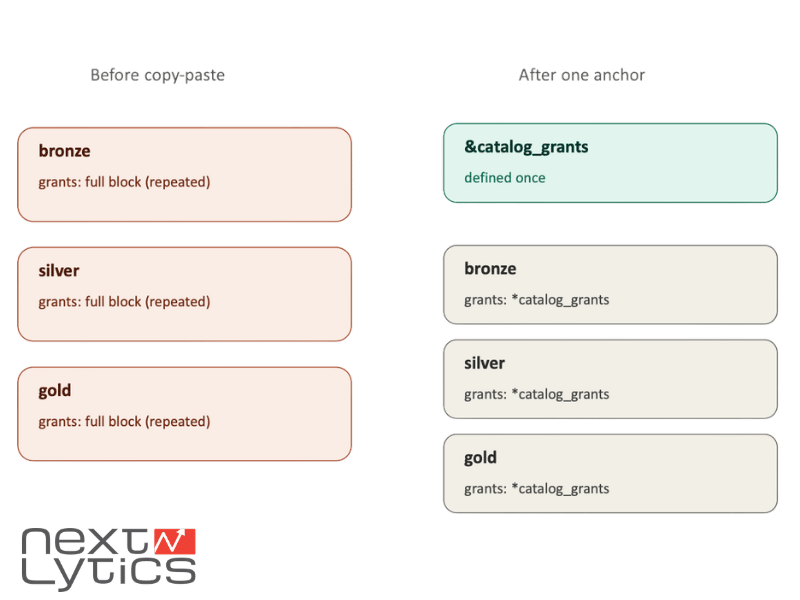
Getting to the real setup now. In a medallion architecture, each layer is its own catalog: bronze, silver, gold and every catalog needs the same baseline access: workspace users can read, the job-runner service principal can create schemas. Written out plainly, a bundle ends up looking like this:
catalogs:
  bronze:
    name: bronze
    grants:
      - principal: workspace_users
        privileges: [USE_CATALOG]
      - principal: job_runner_sp
        privileges: [USE_CATALOG, CREATE_SCHEMA]
  silver:
    name: silver
    grants:
      - principal: workspace_users
        privileges: [USE_CATALOG]
      - principal: job_runner_sp
        privileges: [USE_CATALOG, CREATE_SCHEMA]
  gold:
    name: gold
    grants:
      - principal: workspace_users
        privileges: [USE_CATALOG]
      - principal: job_runner_sp
        privileges: [USE_CATALOG, CREATE_SCHEMA]
The same eight lines, three times over and that's before the schemas underneath each catalog repeat their own grant blocks. Now imagine a governance review decides the job-runner should also get BROWSE. You're editing the same change in three catalogs and every schema, hoping you catch them all. Miss one and gold silently drifts from bronze. This is the exact class of error Infrastructure-as-Code is supposed to prevent, yet copy-paste reintroduces it inside the YAML.
Watch the recording of our webinar "Bridging Business and Analytics: The Plug-and-Play future of Data Platforms"

Using YAML Anchors to Keep Bundle Grants DRY
Here's the same setup rewritten with an anchor. Define the grants: block once, give it a name with &, then reference it with * on every catalog:
_common: &catalog_grants
  - principal: workspace_users
    privileges: [USE_CATALOG]
  - principal: job_runner_sp
    privileges: [USE_CATALOG, CREATE_SCHEMA]

catalogs:
  bronze:
    name: bronze
    grants: *catalog_grants
  silver:
    name: silver
    grants: *catalog_grants
  gold:
    name: gold
    grants: *catalog_grants
The eight repeated lines now live in exactly one place. That governance review that adds BROWSE? One edit to &catalog_grants and bronze, silver and gold all inherit it. No chance of one layer drifting from the others.
Anchors reuse a whole block exactly as it's defined. That has one consequence worth stating plainly: a grants: list is reused as a whole. YAML anchors don't append to a list, so if one catalog needs an extra principal, you define a second anchor rather than "extending" the first.
(Skip that and you're back to copy-pasting the block with one line changed, exactly what anchors were meant to avoid).
Anchors also compose with Databricks bundle variables. The anchored block can hold ${var...} placeholders, so structure is reused via the anchor while environment-specific values still come from your variables file:
_common: &catalog_grants
  - principal: ${var.group_workspace_users}
    privileges: ${var.catalog_privilege_use}
Anchors for shape, variables for values. That combination is the pattern worth internalizing. It's also what makes one bundle serve multiple environments: the same anchored blocks deploy to DEV, QA and PROD unchanged, while variables inject the right catalog names and privileges per environment.
YAML Anchors vs. Databricks Bundle Variables
At this point one question arises: don't Databricks bundle variables already do reuse? You've seen ${var.catalog_privilege_use} and ${resources.catalogs.silver.name} throughout the config. They look like the same idea, so why anchors too?
Because they operate at different stages. YAML anchors are resolved by the YAML parser the moment the file is read. Bundle variables (${...}) are resolved later, by the Databricks CLI, when it assembles and deploys the bundle. Anchors are expanded first; variable substitution happens afterward, on the already-expanded document.
That ordering leads to a clean rule of thumb:
-
use anchors for structure: a whole grants list, a shared cluster config
-
and variables for values: a catalog name, a privilege set, and the environment string.
Anchors and variables compose. An anchored block full of ${var...} placeholders is the sweet spot: the anchor guarantees every catalog gets the same shape, while variables keep the actual names environment-aware across environments.
Takeaway:
-
if you're repeating a block, reach for an anchor
-
if you're repeating a value, reach for a variable
Mixing them up, trying to make a variable point at a block, or hard-coding values an anchor should carry, is where configs get brittle.
Common YAML Anchor Pitfalls in Databricks Bundles
Anchors are a sharp tool, but a few edges are worth knowing before you lean on them.
-
Anchors are file-scoped. An anchor defined in schemas.yml cannot be referenced from catalogs.yml. The alias simply won't resolve. This is why, in a real multi-file bundle, you sometimes see what looks like the "same" block defined twice, once per file. It's not an oversight; it's the scoping rule. If you want true cross-file reuse, that's the job of bundle variables, not anchors.
-
Readability has a limit. An alias like *general_privileges is only clear if the reader can quickly find &general_privileges. Scatter anchors across a long file and every reviewer has to scroll hunting for the definition. The DRY win turns into a comprehension cost.
-
Debug against the expanded document, not the source. What you wrote isn't quite what Databricks deploys. The parser has expanded every alias first. When a grant looks wrong, run databricks bundle validate and inspect the fully-resolved output. That's the version that actually matters.
-
Don't anchor what appears once. An anchor referenced a single time adds indirection without saving anything. Anchors earn their keep through repetition. If a block isn't repeated, leave it inline.
YAML Anchor Best Practices for Databricks Teams
If anchors are going to live in a bundle that several people maintain, a little discipline keeps them an asset rather than a puzzle.
-
Adopt a naming convention for anchors that signals scope and intent. Something like &catalog_grants or &schema_read reads far better than &block1. The alias should tell a reviewer what they'll get without scrolling to the definition.
-
Keep anchor definitions discoverable. Define them near the top of the file, or in a clearly marked conventions block, so there's one obvious place to look (_common). An anchor buried between two unrelated resources is the one people miss.
-
Remember that a change to a shared anchor is a big change. Editing &catalog_grants once updates bronze, silver and gold together. Useful, but worth a careful review before you commit.
And always validate before you deploy. Run databricks bundle validate in CI so the fully-expanded configuration is checked on every change: the same environment-aware, approval-gated approach we walked through in part one of this article. Anchors reduce the surface for mistakes; a validation step catches the ones that slip through.
Cleaner Databricks Governance with YAML Anchors: Our Conclusion
YAML anchors won't show up in a Databricks release note or a governance framework. They're a small, native feature of the config language itself. But that's exactly why they matter for admins. As your medallion architecture grows from a handful of resources to bronze, silver and gold catalogs with schemas, volumes and grants underneath each, the real risk is that the repetition quietly drifts out of sync. Anchors collapse that repetition into a single source of truth, so a governance change is one edit instead of a dozen.
For your notes: anchors for structure, variables for values and validation before every deployment. Used with that discipline, anchors make bundles shorter, reviews clearer, and Unity Catalog governance consistent across environments, which is the whole point of doing this declaratively in the first place.
This wraps up our look at keeping Databricks Asset Bundles maintainable at scale. If you're building out platform governance and want a partner who's been through the sharp edges, we are happy to help.