/Logo%202023%20final%20dunkelgrau.png?width=221&height=97&name=Logo%202023%20final%20dunkelgrau.png)





















Hardly any product today can do without the label "AI-powered" - and not just software. Even washing machines now recommend AI-optimized wash programs, refrigerators "recognize" food, and robot vacuum cleaners claim to navigate using artificial intelligence. Amidst this hype, Microsoft is also increasingly promoting Power BI as a platform that seamlessly integrates artificial intelligence into the analysis process: from automatic insights and voice-based queries to generative assistants.
In fact, Power BI is one of the first reporting tools that has systematically attempted to bring machine learning and algorithmic analysis into everyday self-service - long before "Copilot" and "GenAI" became industry standards. But how much "AI" is actually behind these features? And how much of it is ultimately just clever statistics, rule-based logic, or a cleverly packaged UX feature?
This article takes a close look at the current AI features in Power BI - not from a marketing perspective, but from the perspective of developers and analysts: Where does the technology deliver real added value, where are the limitations, and what specialized AI platforms might be beneficial to consider for the backend?
For the use cases and features presented in this article, we deliberately did not take the data from an existing system, but generated it entirely via REST API with the help of ChatGPT. This means that the sample data for our analyses was dynamically generated by an AI model and then imported directly into Power BI - a practical "fun fact" that shows how flexibly modern AI services can be integrated into analytics workflows.
Exploratory AI - Quick Analysis and Pattern Recognition
Before Microsoft talked about Copilot or generative AI, Power BI had already incorporated small "intelligent helpers." These are features designed to automatically recognize patterns, anomalies, or correlations - basically what analysts do manually with filters, groupings, or pivoting. These functions exist in various forms, from Quick Insights in the service to Anomaly Detection directly in the report.
Let's get straight to the first feature: Quick Insights (only available in the Power BI service) searches a dataset for statistically conspicuous patterns, correlations, or segments and delivers automatically generated visuals. In practice, this works well for clean, flat table models, but quickly reaches its limits with complex data models. Quick Insights is therefore more of a catalyst than an analysis tool.
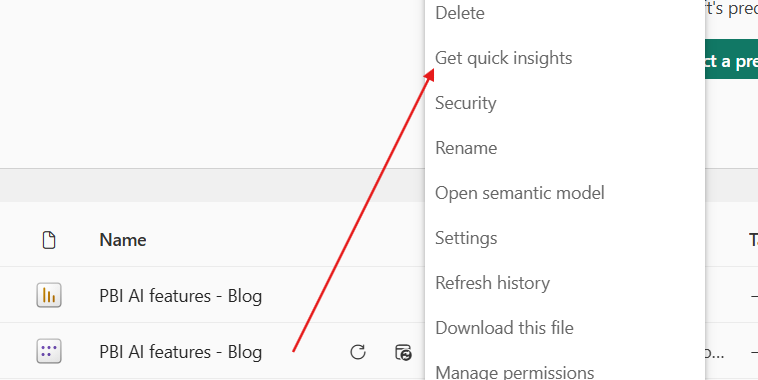
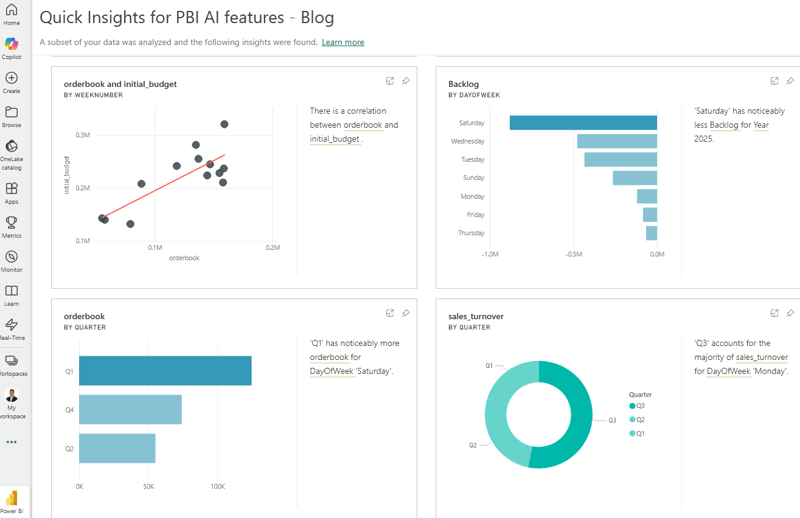
Quick Insights is well suited for discovering initial patterns or anomalies in the data model without much preparation. Since the analyses run directly on the data, this is particularly helpful if you are a technical developer who still has little insight into the technical details or terminology. The suggestions provide initial guidance, but do not replace an understanding of the subject area.
The "Explain increase/decrease" function - or "Identify differences in this distribution" in the bar chart - is much more practical. Both are part of AI Insights in Power BI Desktop and automatically generate a comparative analysis as soon as a value has changed between two points in time or groups. The functions check which dimensions could have influenced this change and suggest appropriate explanations.
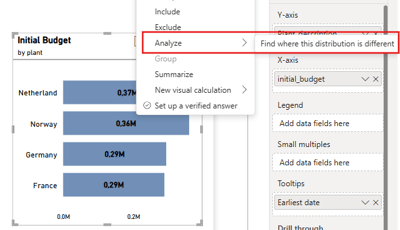
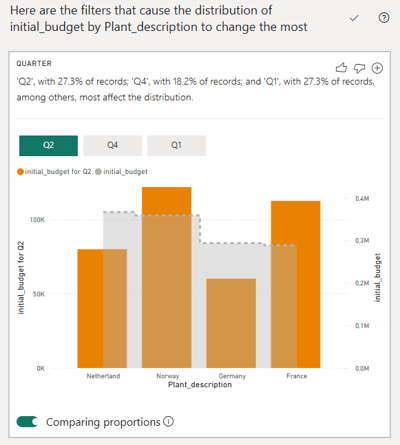
The results should be understood as initial hypotheses, not as proof of cause. You get potential explanations and alternative perspectives that can be incorporated directly into the report if necessary. Especially when you see an unexpected spike and don't yet have a starting point, these analyses provide quick guidance - without claiming statistical depth.
Watch the recording of our webinar: "Bridging Business and Analytics: The Plug-and-Play Future of Data Platforms"

Anomaly detection in time series visuals has a similar character. Power BI marks data points that are statistically outside of the expected range. This works reliably with evenly distributed time series, but fails when data is irregular or incomplete.
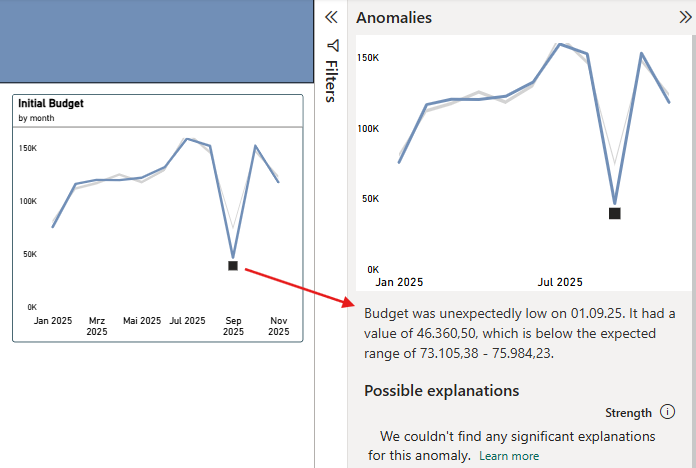
In addition, the model deliberately works conservatively: better no explanation than an unreliable one. Especially with small data sets, heavily smoothed time series, or artificially generated outliers, the explanation therefore often remains empty.
In practice, the feature is most useful for quickly highlighting unusual data points. However, the analyst is still responsible for evaluating the content, because the hints - if available at all-serve more as a starting point than as a reliable diagnosis.
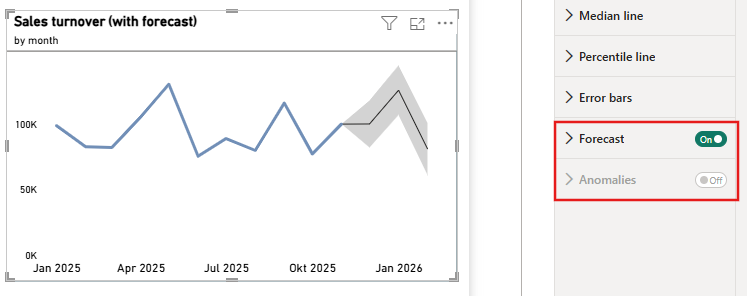
The forecast in Power BI supplements time series with a simple projection based on historical values. It is important to note that forecasting and anomaly detection are mutually exclusive - a line chart can only use one of them at a time. Forecasting is particularly suitable for rough trends over several months or quarters. The method is relatively simple, but provides sufficiently robust guidance for many business cases. In addition, you can set how far into the future the forecast should extend, what proportion of the latest data points should be ignored, and what the width of the confidence interval should be.
Visual AI - Interactive Analysis Tools
A central area of AI functions in Power BI is what are known as "AI visuals." These are designed to help users recognize correlations in the data without the need for complex modeling or statistical expertise. The added value lies less in "learning AI" and more in the intelligent linking of analysis logic and user interaction - in other words, in tools that make data more accessible and exploratory.

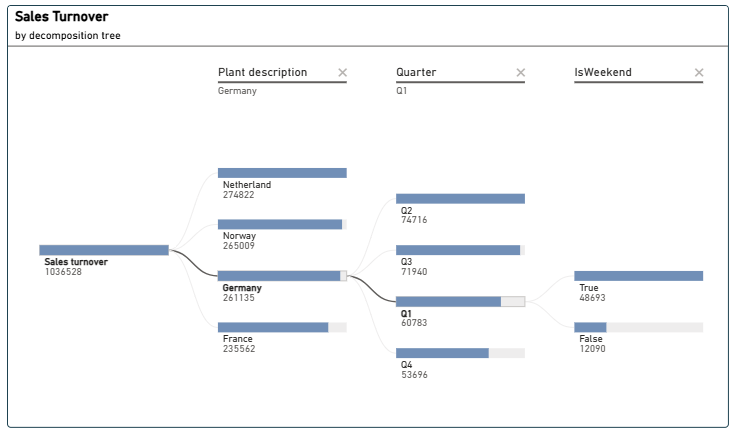
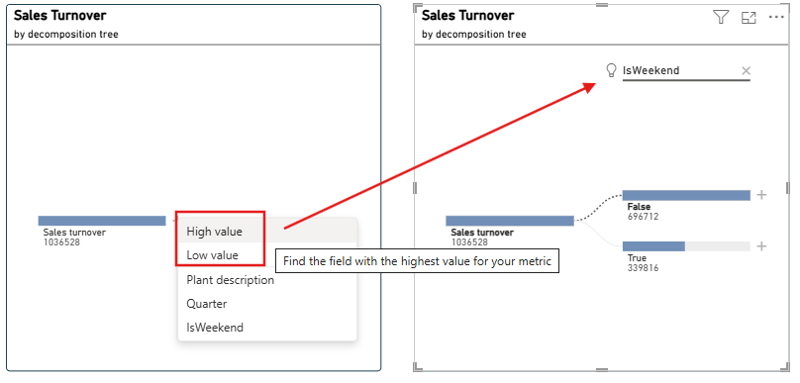
A frequently used example is the analysis tree. It allows key figures to be broken down along different dimensions, thereby identifying the most important influencing factors. If desired, Power BI can automatically suggest the "best" or "worst" breakdown - a helpful feature that provides quick orientation. We find that the analysis tree in Power BI is an interactive and exploratory visual that allows you to quickly identify the most important factors influencing key figures such as sales, costs, or churn without having to rely on fixed drilldowns.
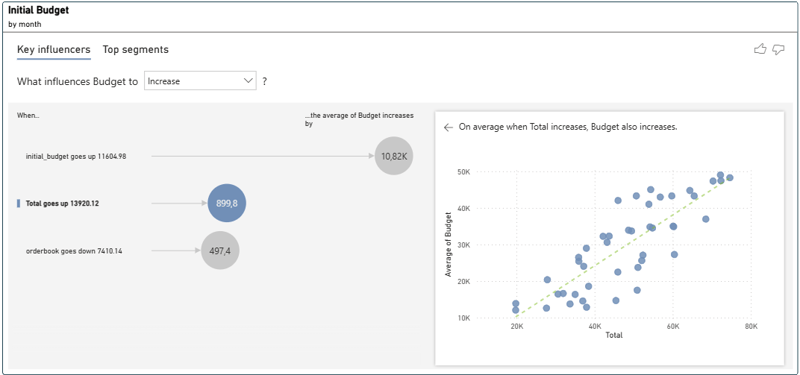
The Key Influencers Visual aims to reveal the strongest influencing factors for a specific key performance indicator - for example, which customer group generates the highest revenue or which characteristics are associated with a particular behavior. Simple statistical methods are used to evaluate and weight correlations. The visual provides a good orientation, but does not replace a more in-depth root cause analysis. In practice, it primarily helps to form hypotheses and identify data signals at an early stage.
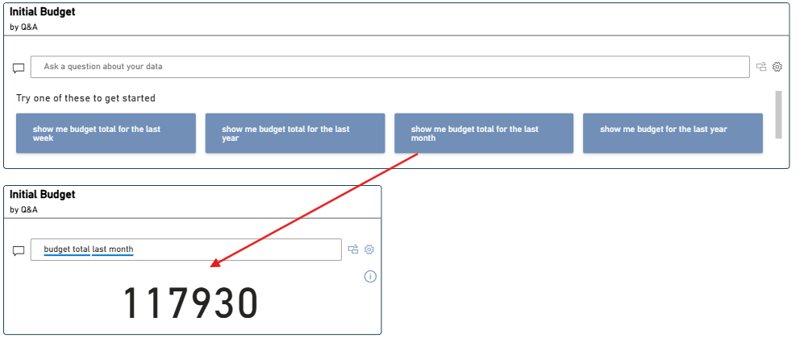
With the Q&A visual, questions can be asked in natural language – such as "How is revenue developing by region?" or "Which product group is growing the most?" However, the function is not based on generative AI, but on a semantic assignment of terms in the data model. This model can be expanded manually with synonyms, relationships, and term hierarchies. This creates a rule-based understanding of language that does not "learn" but can be specifically adapted to the company's language.
Smart Narratives Visual is a kind of text-based summary of key figures. It automatically generates short descriptions of trends, changes, or deviations—directly from the report data. Even though the texts are predefined and not generative, this feature was an early step toward automated storytelling. In principle, Smart Narratives is the conceptual precursor to today's Copilot approach: reports should be self-explanatory and provide context without the user having to interpret every number.

In the example on the left, we use the Report Narrative Visual. This analyzes the entire report context and summarizes key observations - i.e., multiple visuals, filters, and trends at the same time. On the right, however, intelligent storytelling is activated via the visual menu. This variant refers exclusively to the selected visual and provides brief notes or descriptions. Both functions generate automatic texts, but differ significantly in their scope: left report level, right visual level.
Copilot can now also be activated within the visual. This expands the classic, rule-based description with generative additions: Copilot formulates more freely, can refer to other visuals, and often provides more natural-sounding or more complete summaries. Nevertheless, the basic principle remains the same - the visual provides orientation but does not replace in-depth analysis.
Copilot - Generative support in report creation
With "Copilot," Power BI wants to take another step forward: away from classic visuals and toward generative assistance functions in which reports, texts, or visuals can not only be created but also influenced by natural language. There are a number of requirements that must be met:
• Capacity/licensing: To use Copilot in Power BI Desktop or in the service, the respective workspace must be assigned to a paid Fabric capacity (at least F2) or a Power BI Premium capacity (P1 or higher). Trial or test SKUs are not sufficient.
• Tenant settings: Copilot must be enabled at the tenant and capacity level in the tenant. If this setting is disabled, the button will appear in the ribbon but will remain inactive.
• Regional availability: Not all regions currently support Copilot or all Microsoft Fabric features. For example, if you are using a home region where Fabric workloads are limited, you may need to set up capacity in a supported region.
• Data and model preparation are not hard technological or licensing requirements like the ones mentioned above, but they are crucial: A well-maintained data model with clear metrics, synonyms, and semantic structure significantly increases the quality of Copilot queries.
Once these prerequisites are met, Copilot can be used in the Power BI service or desktop. Typical use cases are:
• Creating or customizing report pages via prompt ("Create a page with revenue and cost comparison by region")
• Questions in natural language ("Show me the top 5 products by margin last year") and immediate visualization
• Automated text creation or summarization of visuals ("Summarize the report in two sentences")
• Support in the development process: e.g., generation of DAX formulas or explanation of existing measures
We see Copilot's greatest strength not so much in the automatic creation of visuals, but in areas such as documentation, describing DAX logic, drafting ideas for data models, or general solution design. In other words, precisely where tasks are monotonous, tedious, or purely descriptive. Copilot is more like a "quality-of-life upgrade" for developers - but not a replacement.
PowerBI AI features: Our Conclusion - A good assistant, but not an intelligent analyst
The AI features in Power BI provide useful, quickly accessible insights without having to delve deeply into statistics or machine learning. Functions such as Quick Insights, Key Influencers, and Anomaly Detection provide initial clues and are particularly helpful when exploring a new dataset or when, as a technical developer, you are not yet familiar with all the technical details. Personally, we consider the Decomposition Tree to be one of the strongest features in the entire package because it really facilitates exploratory analysis. But ultimately, as always, the benefits depend heavily on the specific use case.
For "real" AI or ML applications, however, Power BI clearly remains a front-end tool. For tasks involving forecasting, model training, or intricate relationships, platforms like Databricks are particularly well-suited, as we have mentioned in one of our previous Blogposts. There, models can be systematically developed, versioned, and operationalized - something that Power BI is not designed to do and does not attempt to do.
We see Copilot's greatest strength not so much in the automatic creation of visuals, but in areas such as documentation, describing DAX logic, drafting ideas for data models, or general solution design. In other words, precisely where tasks are monotonous, tedious, or purely descriptive. Copilot is more like a "quality of life upgrade" for developers - but not a replacement.
The bottom line is that Power BI offers solid, practical AI support that makes everyday analysis more enjoyable - but it doesn't take over the role of full-fledged ML workloads. For anything beyond that, it's worth taking a look at specialized platforms such as Databricks.
Do you have questions about this or another topic? We are happy to support you! Book a non- binding consultation with one o our experts today.