/Logo%202023%20final%20dunkelgrau.png?width=221&height=97&name=Logo%202023%20final%20dunkelgrau.png)





















Your report is done and the numbers are correct, but the calendar labels display raw technical keys, calendar week is showing blank, and your business users are confused about what time period they are looking at. The standard time dimension in SAP Datasphere is the problem, but there is an easy fix.
What Is the Time Dimension and Why Does It Matter?
Every report that involves dates relies on a time dimension. It is the primary component of time-based analysis and tells your reporting tool what "last month" means, how to group data by calendar week and how to display a readable label like "January 2026" instead of a raw number like "202601".
SAP Datasphere ships with a built-in time dimension called SAP.TIME.*. It is well documented by SAP and covers the basic granularities: days, months, quarters, years. For many standard use cases, it is a solid starting point.
However, in real-world reports, the standard version often falls short. We have seen this across multiple projects and when it fails, it does not always fail loudly. Reports show technical keys instead of readable labels. Calendar periods have no human-readable text behind them. Business users look at the date description "20" and have to assume what month and year we are referring to.
The core problem: SAP's standard time dimension was built for broad compatibility, not for the specific, consistent reporting logic that demanding business environments require.
Where Does the Standard Version Break Down?
We have identified three critical gaps that appear repeatedly in customer projects:
1. Missing text associations: The standard time dimension does not ship with text associations for fields like calendar week or month. Without these associations, reports display raw technical keys instead of readable period names "202551" instead of "CW 51 2025", for example. You cannot add associations to SAP's standard views, so you are stuck.
2. Raw keys instead of readable labels: Instead of seeing "January 2026", business users see "202601" or “January”, since the Year is not respected. Instead of "Q1 2026", they see "20261". These are not just cosmetic issues, they are how business users navigate, verify, and communicate about their data. Raw keys or non meaningful text destroys trust in reports.
3. No room to customize: SAP's standard views are locked. You cannot modify them to add missing attributes, custom text logic, or additional associations. Any enhancement has to live somewhere else, which is exactly where our approach starts.
The screenshot below shows exactly what this looks like in practice:
-
The “Date” column shows the Date with a plain number for the day.
-
The "Calendar Quarter" column shows numbers like "20262", "20264" instead of "Q2 2026", "Q4 2026".
-
The "Calendar Week" column shows raw values like "202617", "202642" and not readable calendar week names.
-
The "Calendar Month" column shows the Text with no context for the Year, making it unusable when used alone.
The data is correct but it is completely unreadable.
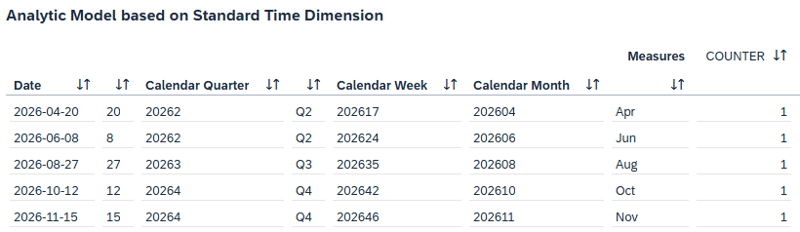
Figure 1: Wrong display with standard time dimension
The worst part? Reporting Tools like SAP Analytics Cloud (SAC) would love to display the correct text for fields like the date, respecting the User Settings for Date display, but Datasphere’s Metadata overwrites this as seen in this screenshot.
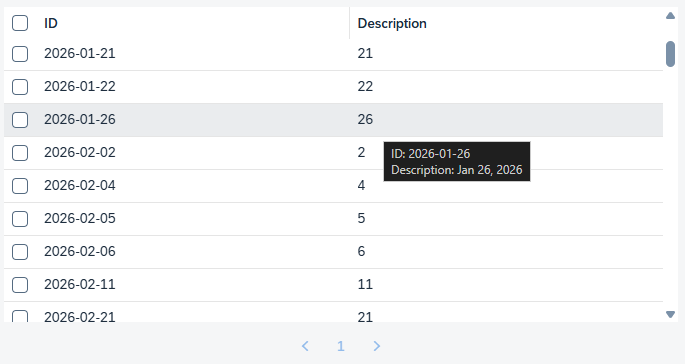
Figure 2: Date Format in SAC. Metadata has the correct text available
This issue directly affects business users and report consumers, anyone who relies on date filters, calendar-based comparisons, or time-series views in their daily work.
And since this is just such a fundamental core component of your reporting, every business will benefit from a good solution.
Watch the recording of our webinar:
"SAP Datasphere and the Databricks Lakehouse Approach"
How We Solve It: Wrapping the Standard with Our Own Views
The key insight here is that we do not throw away SAP's standard time dimension. We cannot modify it since SAP's standard views are locked, but we can build on top of it. The View SAP.TIME.VIEW_DIMENSION_DAY already contains the date data we need. What it lacks are the correct text associations that turn raw keys into readable labels.
So our approach is straightforward: we create our own custom views that use SAP.TIME.VIEW_DIMENSION_DAY as the data source, and we add the missing text associations in our own layer. With this approach we can add any attribute, association or text logic we need without needing to touch SAP's original Views.
The result is a custom day-level view that sits on top of the standard, enriches it, and gives every connected report a stable, readable, and fully customizable time reference. The approach can be used for every other granularity like months, quarters and years.
The Architecture in Four Steps
Create a custom view on top of SAP.TIME
We build a new view that reads from SAP.TIME.VIEW_DIMENSION_DAY and exposes all its date attributes with correct semantic types.
Build text views for each time granularity
We create separate text views for calendar month, calendar quarter, and calendar week. Each view generates a readable label, for example, "January 2026" for month, "Q1 2026" for quarter, "CW 01 2026" for week, in all needed languages. These text views also source their date keys from the SAP.TIME standard tables.
Add explicit text associations to our custom view
We associate each text view to our custom day dimension through explicit associations. With these associations in place, every connected reporting tool that supports this metadata can resolve raw keys into readable labels automatically.
Use the custom view as the time reference in reporting models
All reporting views that need time-based labels now point to our custom dimension instead of the locked SAP standard view. The underlying data still comes from SAP.TIME, we just control the associations and text on top.
The screenshot below shows the definition of the custom day dimension as implemented at one of our customers. Note that we leave the Association for Date empty, since our reporting Tool (SAC) handles this automatically based on the date as shown in our previous screenshot.

Figure 3: The custom day-level time dimension in Datasphere with correct associations
Under the Hood: Building Readable Text Labels
For each time granularity, we write a small SQLScript view that reads distinct period keys from SAP.TIME.VIEW_DIMENSION_DAY and generates a readable label for each one in all desired languages. The month text view, for example, turns "202601" into "January 2026" for English users and "Januar 2026" for German users.
The general pattern is always the same:
-
Read distinct keys from the SAP.TIME source
-
Cross-join with language codes
-
Map each key to a readable string using a case expression
-
Expose the result as a text view
-
Associate that view to our custom dimension
For those interested in the concrete implementation, we show the full SQL for the calendar month text view below. The same logic applies to quarter and week:
Click to show the full source code
/**
 * Builds CALMONTH texts (DE/EN) from SAP.TIME Dimension
 * Source: SAP.TIME.VIEW_DIMENSION_DAY
 */

lt_months =
    SELECT DISTINCT
        CAST("CALMONTH" AS NVARCHAR(6)) AS "IDENTIFIER"
    FROM "SAP.TIME.VIEW_DIMENSION_DAY"
    WHERE "CALMONTH" IS NOT NULL;


/**
* Can be anything, just need a single row result
*/
lt_dummy = SELECT DISTINCT MIN("YEAR") FROM "SAP.TIME.VIEW_DIMENSION_YEAR";

lt_langs =
      SELECT 'DE' AS "LANGUAGE_KEY" FROM :lt_dummy
UNION SELECT 'EN' AS "LANGUAGE_KEY" FROM :lt_dummy;

return
SELECT
    m."IDENTIFIER",
    l."LANGUAGE_KEY",
    CAST(
        (
            CASE l."LANGUAGE_KEY"
                WHEN 'EN' THEN
                    CASE SUBSTRING(m."IDENTIFIER", 5, 2)
                        WHEN '01' THEN 'January'   WHEN '02' THEN 'February'
                        WHEN '03' THEN 'March'     WHEN '04' THEN 'April'
                        WHEN '05' THEN 'May'       WHEN '06' THEN 'June'
                        WHEN '07' THEN 'July'      WHEN '08' THEN 'August'
                        WHEN '09' THEN 'September' WHEN '10' THEN 'October'
                        WHEN '11' THEN 'November'  WHEN '12' THEN 'December'
                    END
                WHEN 'DE' THEN
                    CASE SUBSTRING(m."IDENTIFIER", 5, 2)
                        WHEN '01' THEN 'Januar'    WHEN '02' THEN 'Februar'
                        WHEN '03' THEN 'März'      WHEN '04' THEN 'April'
                        WHEN '05' THEN 'Mai'       WHEN '06' THEN 'Juni'
                        WHEN '07' THEN 'Juli'      WHEN '08' THEN 'August'
                        WHEN '09' THEN 'September' WHEN '10' THEN 'Oktober'
                        WHEN '11' THEN 'November'  WHEN '12' THEN 'Dezember'
                    END
            END
            || ' ' || SUBSTRING(m."IDENTIFIER", 1, 4)
        ) AS NVARCHAR(30)
    ) AS "CALMONTH_NAME"
FROM :lt_months m
CROSS JOIN :lt_langs l;
What You Gain
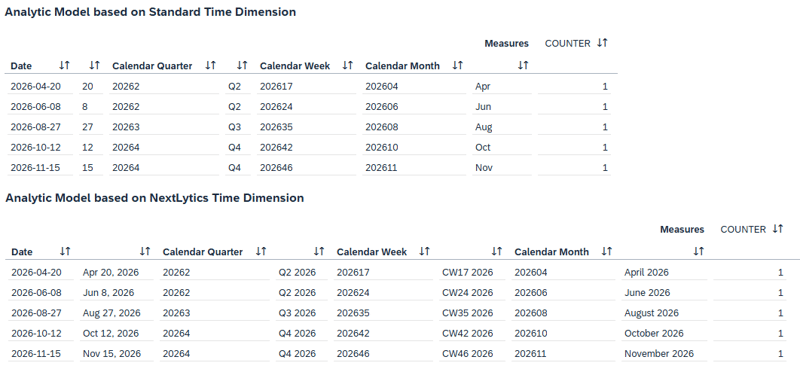 Figure 4: The same dataset in direct comparison.
Every connected report inherits the change automatically.
Business users stop questioning the dates and instead focus on the numbers again. That is exactly where their attention belongs.
Custom Time Dimensions in SAP Datasphere: Is this scalable? Our Conclusion
That is exactly what NextTables is built for. As business-first data maintenance on platforms like SAP Datasphere and Databricks, NextTables enables business teams to update reference data, classifications, mappings, and hierarchies directly where the data lives. Every entry is validated at the point of entry against enterprise master data. Access is controlled down to the row. Changes appear instantly in every connected report and dashboard.
If your team is already investing in getting Datasphere right, the natural next step is giving business users a safe, familiar way to maintain the data behind those reports. Ready to take that next step? Get in touch to see how NextTables can help your business users confidently manage data directly at the source.