/Logo%202023%20final%20dunkelgrau.png?width=221&height=97&name=Logo%202023%20final%20dunkelgrau.png)



















In our first blog post on Seamless Planning, we introduced the basics of this new integration between SAP Analytics Cloud (SAC) and SAP Datasphere and used our NextJuice model to demonstrate how external additional data can be seamlessly integrated into a planning scenario. The post received a lot of positive feedback - and at the same time raised many follow-up questions: What other possibilities are there? What has changed since then? And what are the limitations?
The good news: Since our first post, SAP has released a feature with the Q4 2025 release that takes Seamless Planning to a new level - External Live Version Data Sources. For the first time, this allows actual data from SAP Datasphere to be integrated directly into SAC planning models as versions, without the need for replication. The result: real-time access to actual data, plan data from other models, or even additional external data - all live, all without manual data import.
In this post, we revisit our proven NextJuice example model and this time demonstrate three specific ways to integrate external data - using discount information as an example - into a Seamless Planning scenario. Finally, we take a look at a fourth option, which we believe would be the most powerful - but is unfortunately not technically feasible at this time.
Our Blog Series: Focus on Seamless Planning |
|
| 1 Spotlight on seamless planning: SAC planning meets SAP Datasphere | |
| 2 SAP Seamless Planning: Three Ways to Integrate External Data |
The Use Case: Integrating Discount Data in the Planning Model
Our NextJuice model simulates the sales planning process of a fictional beverage company. Key planning metrics include sales volume (Quantity) and sales revenue (Sales Revenue). However, to ensure realistic and comprehensive planning, we also need discount information (Discount), which does not originate directly from the sales process but is maintained externally.
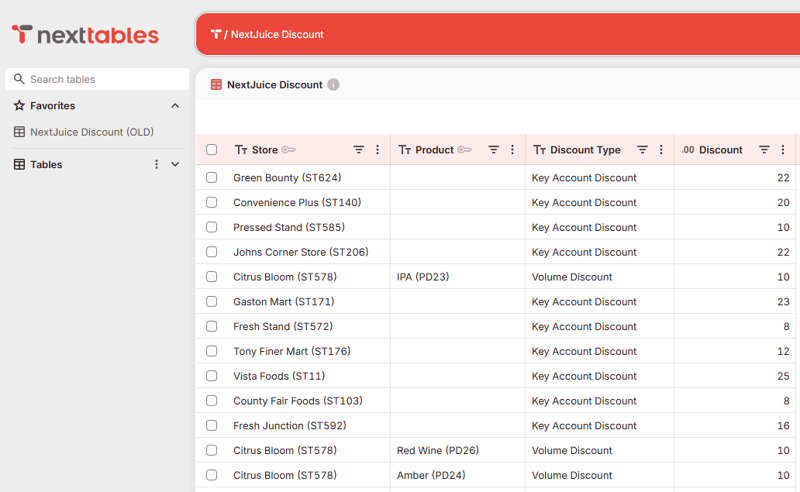
This discount data is not linked to actual sales data and also differs significantly in structure from the sales data. It consists of percentage discount rates that are maintained at the store level or at the store and product levels and are differentiated by discount type - key account discounts apply as a flat rate per store, while volume discounts are further differentiated at the product level.
The key point: They exist as a standalone dataset in Datasphere and must be integrated into the planning process so they are available there for calculations or as a reference.
In our scenario, the discount data is maintained using the NextTables solution. NextTables offers a user-friendly interface for manual data maintenance directly in SAP Datasphere - ideal for additional data that does not come automatically from a source system. Especially practical: NextTables can be embedded directly into the SAC Story as a web component, allowing planners to maintain discount data in the same context in which they plan.
Option 1: Integration via an Analytic Model
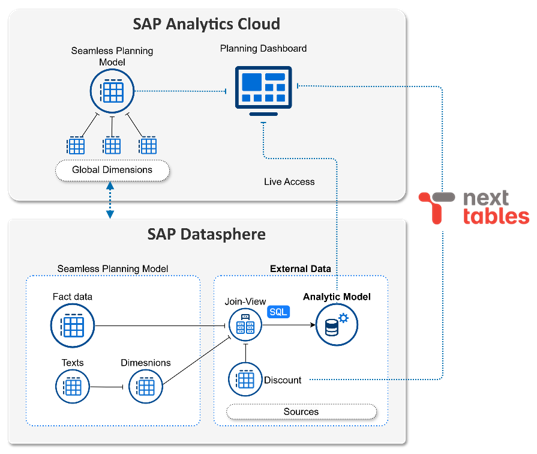
We have already presented this option in detail in our first blog post, so it has been available since the Q1 2025 release of Seamless Planning. The approach involves creating an Analytic Model in SAP Datasphere that combines both the planning data from the Seamless Planning model and the external discount data.
Technical implementation
-
Create a Datasphere view: In the Datasphere Data Builder, a view is created that joins the fact table of the Seamless Planning model with the discount table and virtually maps the entire calculation logic.
-
Analytic Model in Datasphere: Based on this view, an analytic model is created in Datasphere that provides the combined data as a consumable data source.
-
Dashboard Integration: Tables and charts can now be created in the SAC Story that jointly display data from the analytics model and the planning model.
Advantages
-
Full flexibility of Datasphere modeling: SQL joins, calculated metrics, unions - everything is possible
-
Ideal for complex calculation logic that would be difficult or impossible to implement using calculated measures or advanced formulas
Disadvantages
-
Discount data is not directly available in the planning model - no direct interaction with the planning process is possible
-
Planning data must first be published before the calculation via the Datasphere view reflects the current values
-
Dashboard setup requires combining two models into a single story
Conclusion: Option 1
This option is particularly well-suited for pure reporting and analysis purposes, where external data is virtually calculated against planned data and evaluated together - without the results needing to be actively incorporated into the planning process. Its strength lies in the flexibility of Datasphere modeling.
Option 2: External Live Version with Formula Reference
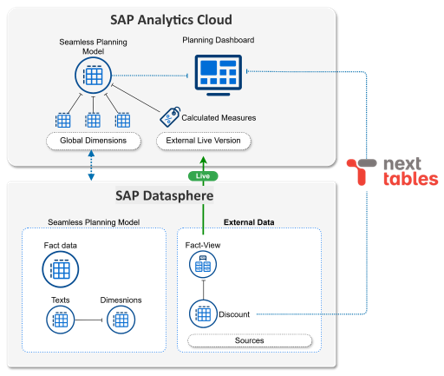
With the Q4 2025 release, SAP introduced external live versions for Seamless Planning models. This feature allows Fact Views from SAP Datasphere to be integrated directly into an SAC planning model as versions - without any data replication. The data is read live from Datasphere and, from the SAC perspective, behaves as if it were part of the model.
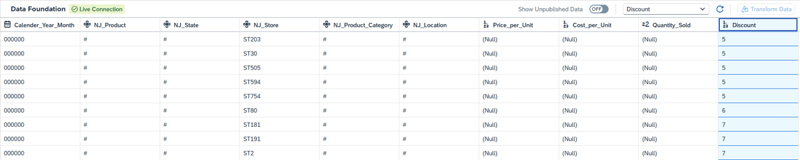
Option 2 uses this new feature to link the discount data to the planning model as an external live version and then incorporate it into the planning context via formula references.
Technical implementation
-
Prepare Datasphere View: The discount data must be made available as a fact view in Datasphere. This view must be located in the same space as the Seamless Planning model (or shared with that space) and must be exposed for consumption.
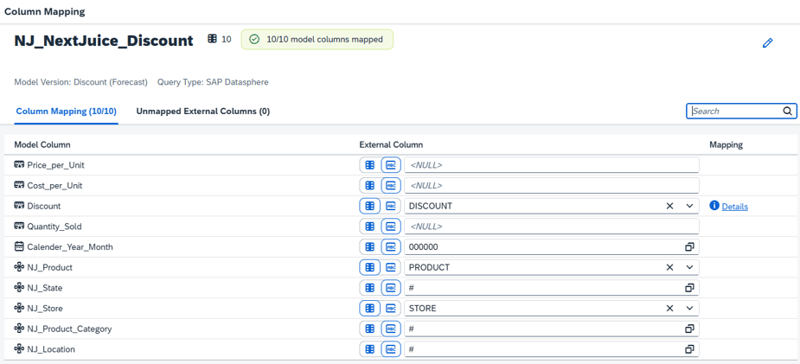
- Create External Live Version: A new external data source is added to the SAC planning model (e.g., “Discount_Live”). Important: The external view does not need to match the complete structure of the Seamless Planning model. Only the dimensions and measures that are actually contained in the external view need to be mapped - all other columns can remain mapped to NULL or a default value.
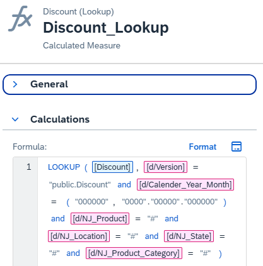
- Create calculated measures: Calculated measures are created in the planning model that access the discount data in the external live version via a LOOKUP formula.
Advantages
-
Unlike in Variant 1, the data is visible directly in the planning model - no separate Analytics Model is required.
-
The planner sees the effects of their entries immediately, without having to publish the plan data first.
-
Using the configuration CONFIG.READ_CALCULATED_MEMBER_VALUES = ON in Advanced Formulas, the calculated measures can also be read within Data Actions and used for calculations.
Disadvantages
-
The discount values from the External Live Version cannot be overwritten. These are purely reference data resulting from formulas - no persistence.
-
The calculation logic in SAC via Advanced Formulas / Calculated Members has limitations, e.g., with context-dependent calculations, NULL handling, or nested LOOKUPs.
Conclusion: Option 2
Option 2 is ideal when external reference data needs to be displayed live in the planning context and included in calculations. It combines real-time access with direct integration into the planning model, including usability in Data Actions. Its limitations arise with complex calculation logic and when values need to be persisted or manually overwritten.
Option 3: External Live Version with Data Action (Persistence)
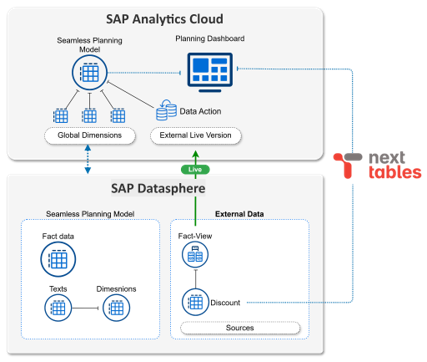
The third option also uses the External Live Version, but takes it a crucial step further: The external data is not simply referenced, but is actively copied into the planable version of the model via a Data Action. This makes the discount values available as “real” plan data, which can then be used in all subsequent planning steps.
Technical Implementation
-
Set up External Live Version: As in Option 2, the discount view from Datasphere is linked to the planning model as an External Live Version.
- Create a Data Action: A Data Action is created that copies the discount data from the External Live Version into the active planning version. This can be done via a copy step or an Advanced Script.
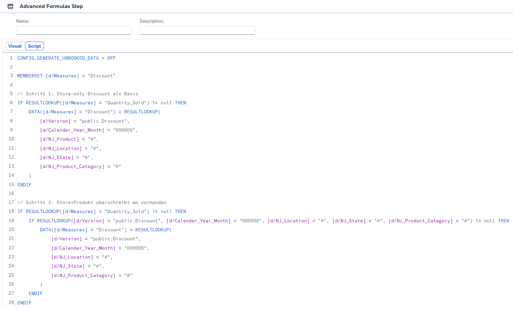
- Integrate a Trigger: The Data Action can be triggered manually via a button in the story or integrated into a Multi Action that orchestrates multiple steps.
- Further processing: Once the discount data has been persisted in the active version, it is available just like any other planning measure.
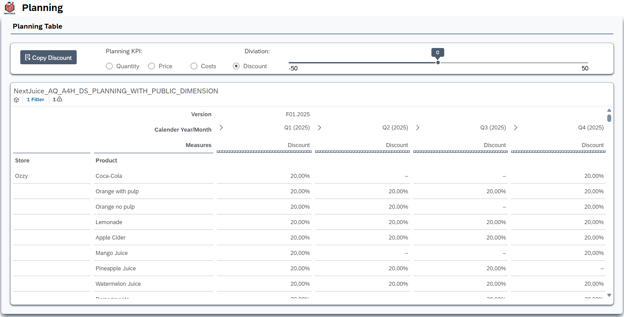
Advantages
-
As in Variant 2, the data is visible directly in the planning model without a separate analytics model, and the planner sees the effects of their inputs immediately, without first having to publish the planning data.
-
After the copy, the discount data becomes part of the planning data and can be used in all planning functions or manually overwritten if necessary
-
Persistence creates a snapshot of the discount data at the time of planning. If the external data in Datasphere changes subsequently, the planning result remains unaffected - an important aspect for the traceability and audit trail of the planning.
Disadvantages
-
The data is only as current as the last execution of the Data Action. Changes to the discount data in Datasphere only become visible after copying again.
-
A Data Action with script/copy logic must be developed and tested. In more complex scenarios (different granularities, missing members), this can be time-consuming.
Conclusion: Option 3
Option 3 is the most comprehensive solution when external data is to be not only displayed but also actively used in the planning process. It combines the live connection to Datasphere (no initial data import required) with the full planning functionality of SAC.
Comparison of all Integration Options
The following table summarizes the key differences between the three variants:
| Criteria | Option 1: Analytics Model |
Option 2: Formula Reference |
Option 3: Data Action Copy |
| Data actuality | Only after the plan data is published | Real-time, even on private versions | At the time the Data Action is executed |
| Planability of the key figure | No (read-only in the Analytics Model) | No (Calculated Member, read-only) | Yes (after copying to the active version) |
| Use in Data Actions | Not possible | Limited (Formula Reference) | Fully usable |
| Calculation logic | Datasphere View (SQL, joins, etc.) | SAC Calculated Measures | SAC Data Action |
| Complex calculations | Very good (SQL, joins, unions) | Limited (Formula Limitations) | Moderate (Data Action Scripting) |
| Development effort | Low (Join View + Analytics Model) | Low (Live Version + Calculated Measures) | Low (Live version + Data Action Script) |
Ultimately, choosing the right option depends on the specific use case. For reporting purposes alone, Option 1 is perfectly sufficient. If real-time reference data is needed in the planning model, Option 2 is the most elegant solution. And if the external data is to be actively incorporated into the planning process, Option 3 is the only way to go.
Option 4: The Ideal Option
Anyone who has read the three options carefully will notice that each has its strengths - but none combines all of them. Option 1 offers powerful Datasphere modeling, but the data is not included in the planning model. Option 3 offers full planning integration, but the calculation logic resides in SAC Data Actions, which reaches its limits with complex requirements.
The “dream option” would be a combination of the options: You leverage the full power of the Datasphere toolset for the calculation logic and then link the result to the planning model as an external live version. In the end, only a simple copy step via Data Action would be needed to transfer the calculated values into the active planning version.
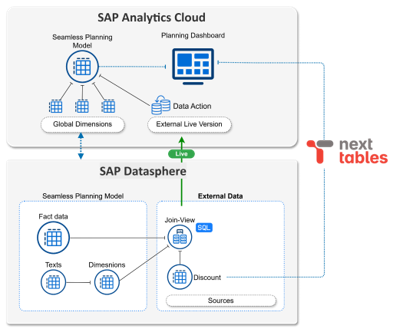
This approach would be particularly attractive when the calculation logic becomes complex and SAC Advanced Formulas are insufficient. Many companies have SQL experts who find the Datasphere toolset significantly easier to use than the SAC formula language. This would combine the strengths of Datasphere with the strengths of SAC Planning.
Why it doesn’t work (yet)
Unfortunately, this approach fails due to a technical limitation: You cannot link an External Live Version whose underlying Datasphere view is based on the fact table of your own planning model.
The reason for this limitation is likely to avoid circular dependencies: If a model integrates an external version that, itself, is based on its own data, a circular reference theoretically arises. From our perspective, however, this limitation is not mandatory. Because: The data of an external live version is not visible at all in the Seamless Planning model in Datasphere.
For example, if you link Actuals Live to a planning model, you can only see the Actuals data directly on the model in the SAC - it is not included in the model’s fact table in Datasphere. The external version is first “laid on top” of the model in the SAC as an additional layer, similar to a UNION. The underlying fact table remains unaffected.
To be fair: From the outside, it is not exactly clear which SQL the Seamless Planning model uses to build the external versions. So there may be technical reasons that are not transparent to us. But the fact is: If the external version merely acts as an additional UNION layer and does not alter the fact table, a self-reference would be technically feasible - provided the system handles the resolution order correctly.
Our suggestion to SAP: External live versions would be significantly more powerful if this self-reference were possible. The use cases in combination with Datasphere calculation logic would be enormously diverse. Perhaps this limitation will be addressed in a future release - the architecture allows for it, in our view.
Want to unlock the full potential of Seamless Planning in your organization? Get in touch with us to design the right integration strategy for your use case.