/Logo%202023%20final%20dunkelgrau.png?width=221&height=97&name=Logo%202023%20final%20dunkelgrau.png)
























Databricks has firmly established itself as one of the leading cloud data platforms, bringing the Data Lakehouse architectural paradigm to the market. Over the years, what started as a data science and machine learning platform built on Apache Spark has evolved into a comprehensive platform for enterprise analytics.
Since 2025, Databricks has increasingly focused on features that counter the perception that the platform is only suited for developers and highly technical users. AI/BI Dashboards and Genie Spaces enable intuitive data visualization and natural language interaction. With “Databricks One,” a simplified web interface is available that abstracts away technical complexity and makes the platform accessible without deep technical expertise.
The next major step is a graphical editor for data pipelines: assembling ingestion and transformation processes through a visual interface using drag-and-drop components on an interactive canvas. This is enhanced by AI-assisted capabilities that understand the full context of available Lakehouse data. This new editor is called Lakeflow Designer and is currently available in private preview.
Recently, we had the opportunity to test the Lakeflow Designer in a client project and gain first-hand insights into its current capabilities. In many organizations, graphical data integration tools are still deeply embedded in the data landscape - often as legacy systems. Replacing these with a unified platform like Databricks would be a major step toward modern, future-proof data architectures.
What can the Lakeflow Designer already do today and what is still missing for a full replacement of established tools? Here are our findings.
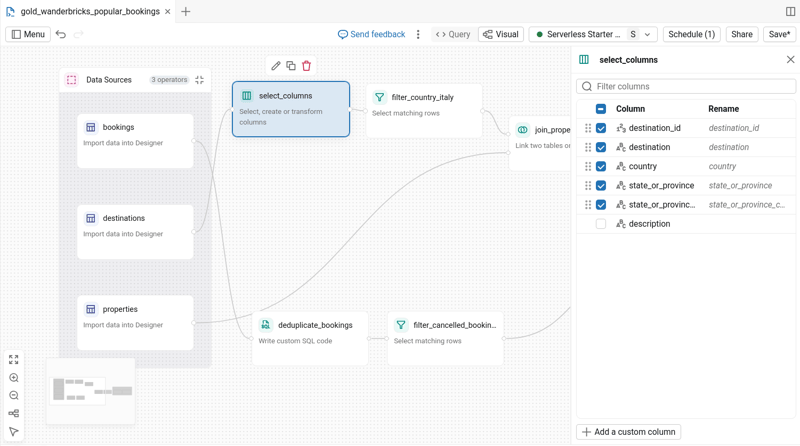 Databricks Lakeflow Designer: The New Graphical No-Code Pipeline Editor
Features and Positioning in the Databricks Ecosystem
The Lakeflow Designer, as a graphical editor for data pipelines, complements existing low-code building blocks within the Databricks portfolio. Through “Lakeflow Connect,” various data sources can be directly connected to the Unity Catalog, which serves as the central layer of the platform. In this way, federated access to traditional relational database systems is enabled, as well as querying REST interfaces of well-known cloud service providers. With Apache Spark Structured Streaming and the also newly introduced Zerobus ingest as an integrated event queue system, streaming data can additionally be ingested.
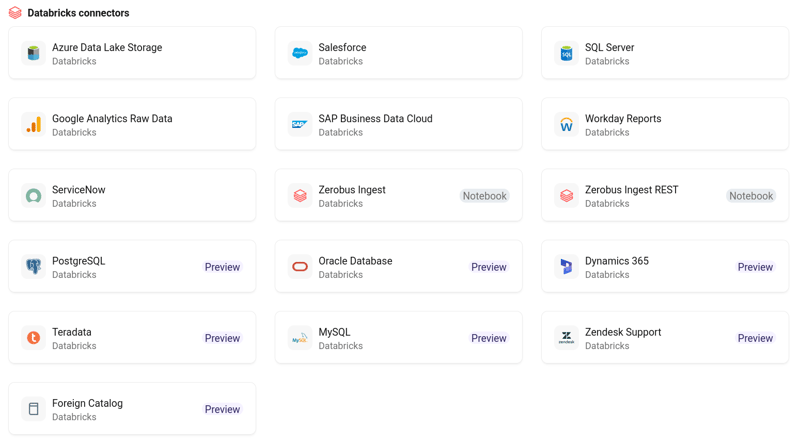 The low-code framework “Lakeflow Connect” for ingesting data from third-party systems into the Databricks Lakehouse is already an integral part of the platform. Lakeflow Designer complements this by enabling downstream transformation processes on data that is already available in the Unity Catalog. In addition to the sources shown, data can also be ingested from virtually any other source using Python frameworks such as dlthub.
User interaction with fully modeled data takes place via dashboarding tools or LLM-supported chat interfaces. Lakeflow Designer therefore fills precisely the gap between low-code data ingestion processes and low-code business intelligence and analytics.
The core function of the Designer editor is the transformation of datasets already available in the Databricks Unity Catalog - for example, as preparation for visualization in dashboards, or for use in machine learning applications or agent-based AI systems. “Agent Bricks,” the no-code interface for developing agent-based workflows on Databricks, is also reportedly close to a full release in Europe.
Watch the recording of our webinar "Bridging Business and Analytics: The Plug-and-Play future of Data Platforms"

Currently available features in Lakeflow Designer include:
-
Intuitive user interface: The Designer provides a graphical editor that we found to be highly intuitive and easy to use. Users can switch between a SQL code view (“Query”) and the new visual view (“Visual”).
-
Drag-and-drop: Pipelines are created by dragging and dropping nodes. A variety of operators are available, including sources, outputs, Databricks SQL AI functions, and classical SQL transformations such as aggregates, filters, joins, etc. Custom SQL code blocks can also be added for more complex statements.
-
Live data preview: A key feature is the interactive preview, which allows users to see data changes directly during the design process. At each node, both input and output states are displayed as a preview based on a small subset of the loaded data.
-
Annotations: In addition to standard transformations, notes can be added to the canvas, and nodes can be grouped and automatically arranged.
-
Orchestration: Once the pipeline reaches the desired state in the editor, execution can be configured directly as a scheduled routine via a Databricks job.
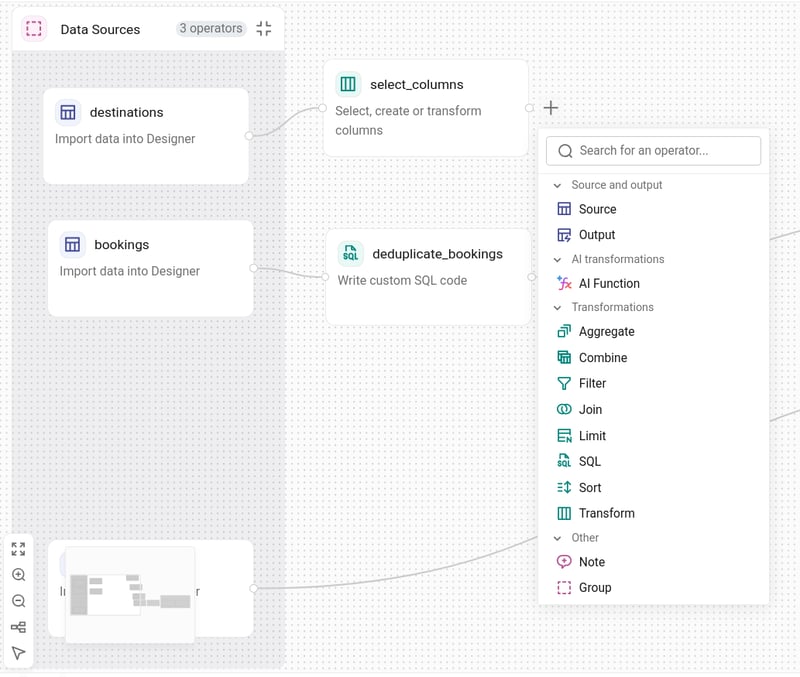 Operator nodes can be added to the pipeline via drag-and-drop or by selecting them directly on the canvas. In addition to data sources and sinks, typical SQL operations and Databricks SQL AI functions are available.
Lakeflow Designer User Experience: Working with the Visual Editor
The main entry barrier is actually finding the new Lakeflow Designer: the new editor is an extension of the Databricks SQL Editor interface, where users can switch between the standard code view and the visual editor for new queries via a rather unobtrusive toggle switch.
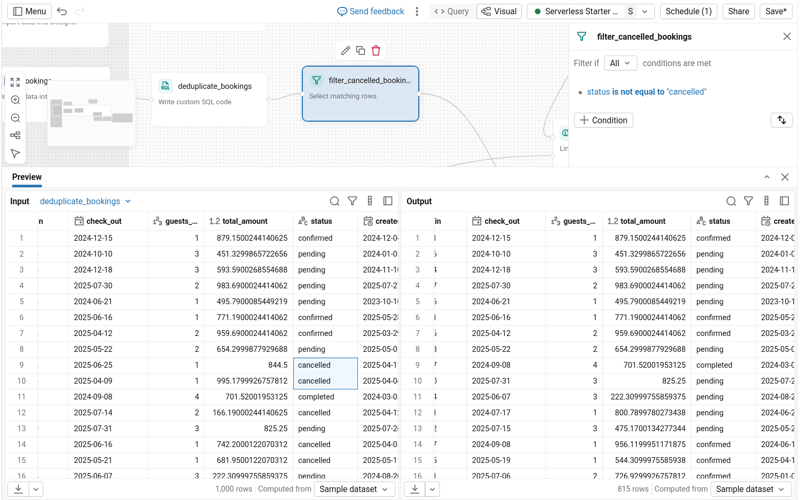 At each node of a pipeline, a live data preview can be accessed, showing both the input and output data formats.
Pipeline creation in the visual editor is intuitive and based on drag-and-drop functionality. Various operators are available, including data sources, outputs, AI functions, and classical SQL transformations such as filtering, joining, or sorting data. From the Unity Catalog side menu, all tables can be dragged directly onto the canvas with a single click to be used as additional data sources.
A key advantage for efficiently designing integration flows is the interactive live data preview, which makes changes to the data visible directly during the design process. For requirements beyond the standard operators, custom SQL nodes can also be integrated into the data flow.
On a technical level, each output node defined in the Designer automatically generates a Apache Spark Declarative Pipeline (formerly known as “Delta Live Table”), which creates a corresponding materialized view. Pipelines can be executed ad hoc directly from the editor and configured as scheduled routines.
In the background, SQL Declarative Pipelines are created for all output nodes, and execution workflows are generated as Databricks Jobs, including a refresh query task.
Professional development workflows are partially supported insofar as queries created in the editor can be stored in Git repositories and versioned. Designer pipelines are stored as special notebook file types (*.dbquery.ipynb).
Gaps and Future Potential
Despite its intuitive usability, the Databricks Lakeflow Designer still exhibits several functional limitations. In particular, complex transformations such as PIVOT operations are not yet supported purely through the graphical interface and still require the manual integration of SQL code nodes. Such custom code components in graphical pipeline editors often become long-term maintenance challenges and, based on experience, tend to age poorly in teams with a certain level of personnel turnover. A significant limitation is also the lack of navigation and linking within the Databricks user interface, as there are no direct back-links between the catalog view, Spark Declarative Pipelines, and the actual Designer query. Lineage visualization is currently also limited to individual pipelines that create a materialized view and does not provide any broader overview of related tables or other materialized views.
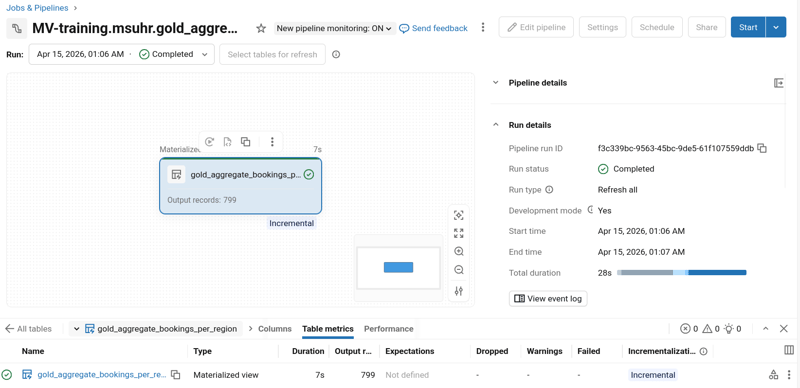 All “Output” nodes in Designer pipelines generate materialized views, which are created via automatically generated Spark Declarative Pipelines.
For use in professional enterprise environments, there is - based on our test - still a lack of clear best practices and seamless integration into established DevOps workflows or automated deployment cycles via Asset Bundles. A pipeline created with the Lakeflow Designer in the Databricks web interface can be easily executed and orchestrated as a scheduled job; however, automated deployment to separate test or production environments via CI/CD frameworks does not yet appear to be supported. Likewise, query artifacts created with the Designer cannot easily be treated as standard pipelines - such as Python notebooks or simple SQL files - to ensure full lineage tracking and transparency.
A prominently advertised feature is the natural language input capability directly within the editor, intended for creating and configuring pipeline nodes. In our evaluation, this feature was not available.
Databricks Lakeflow Designer: Our Conclusion
Based on our initial test of the new editor, the Databricks Lakeflow Designer represents a highly promising and extremely intuitive entry point for self-service data modeling. A particular highlight is the interactive live data preview in the editor, which significantly simplifies and accelerates the design process of data integration flows. The fact that every pipeline created in the Designer results in a clean SQL query that can, if necessary, be reused in more code-centric development workflows is an important prerequisite for sustainable usage and high-quality data models.
At the same time, it must be noted that the tool is still in an early stage of development, where further improvements can be expected. Complex transformation patterns still require manual SQL code, and key enterprise capabilities - such as end-to-end lineage visualization, seamless navigation between components, and integration into professional CI/CD cycles - are currently not fully mature or documented. As a result, the Designer is an excellent tool for fast, visual results but still needs to significantly mature in terms of orchestration and DevOps readiness to fully operate in complex enterprise architectures.
In scenarios where pure self-service is the primary focus, the current state of the Lakeflow Designer is already highly valuable - for example, when a business unit independently owns data models and analytics within a dedicated Databricks workspace using a pure no-code/low-code approach.
Databricks continues to evolve as an all-round platform and is already very well suited today for business departments and less code-centric user groups.
Are you evaluating whether Lakeflow Designer fits into your data architecture or planning to replace legacy ETL tools with Databricks? Get in touch with us for a tailored consultation - we support you from strategy to implementation.