/Logo%202023%20final%20dunkelgrau.png?width=221&height=97&name=Logo%202023%20final%20dunkelgrau.png)



















Databricks has long proven itself as a key player in the modern data landscape, offering a unified platform for data engineering, analytics, machine learning and AI through its lakehouse architecture. As more organizations continue to adapt Databricks to integrate data from various sources, create advanced analytics and support near real time data-driven decision-making, the importance of robust data security and governance has grown.
For a deeper look at how Databricks is used in practice to interact with data and derive insights, our previous blog on chatting with your data using Agent Bricks in Databricks.
A central topic in integrating the platform is the question of how exactly to manage the access to data. As teams scale and data becomes more complex, it is critical to ensure the right individuals and groups have the appropriate level of access, while maintaining control and compliance. This is where access control models like RBAC (role based access-control), RLS (row-level security), and ABAC (attribute-based access control) come into play.
In a Databricks environment, these models provide a way to enforce data access policies in a layered, scalable manner across users, data assets and business contexts. In this article, we want to explore these approaches to access control, explaining how they work and why they are crucial for building a secure, efficient and compliant data environment at scale.
The Databricks Security Stack
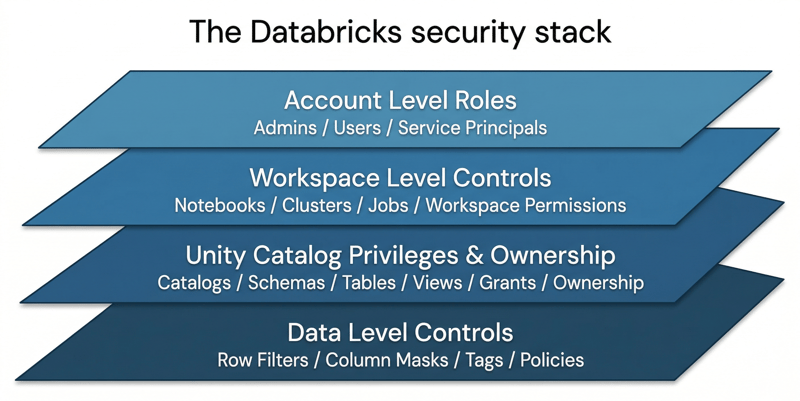
Account Level Roles
At the highest level of security within Databricks, account roles control who has access to the administrative features and data resources of the entire platform. These roles allow administrators to manage user permissions across different workspaces. Account level roles typically include Admins, Users, and Service Principals, each with different levels of access for configuring the Databricks environment and metastore.
Workspace Level Controls
Access management on the workspace level of databricks means restricting access to notebooks, clusters and jobs on the Databricks platform. This includes setting permissions to control who can create, modify, and view resources within a workspace. These controls provide a more granular level of access management, allowing teams to collaborate on shared assets while restricting sensitive resources to specific groups of users.
Unity Catalog Privileges and Ownership
Unity Catalog is a unified data management and governance solution, deeply ingrained in the databricks ecosystem, that is used to centralize the management of data, notebooks, and machine learning models across Databricks. With Unity Catalog, you can define and enforce fine-grained access controls based on specific data assets. Privileges include granting access to tables, views, and schemas to users or groups with varying levels of permissions, such as "SELECT", "INSERT", or "MODIFY". Ownership is another important principle of Unity Catalog, as it determines who can manage and delegate access to the data, ensuring that the right stakeholders always have full control over their data.
These permissions can be set via the SQL workspace, following common sql syntax. For example, this could be how permissions could be set for a group “finance_analysts”:
GRANT USE CATALOG ON CATALOG main TO `finance_analysts`;
GRANT USE SCHEMA ON SCHEMA main.finance TO `finance_analysts`;
GRANT SELECT ON TABLE main.finance.transactions TO `finance_analysts`;
Data Level Controls - Row Filters and Column Masks
Databricks includes a suite of data-level security controls that allow administrators to implement row-level security (RLS) and column-level security (CLS). Row filters allow managing access to data at a more granular level, restricting which rows a user can view based on certain conditions (e.g.: user role, geographic location). Column masks, on the other hand, allow organizations to obscure sensitive data within columns (e.g.: masking credit card information or private home addresses). Together these controls help ensure that only authorized users can access the appropriate data.
RBAC: The Foundation
What RBAC Means in Databricks
Role-Based Access Control (RBAC) is the foundation of security in Databricks. With RBAC, users are assigned roles, and each role has specific permissions that determine what actions a user can perform. This includes everything from creating clusters to accessing data assets. RBAC helps enforce the principle of least privilege, ensuring that users only have access to the resources necessary for their tasks.
Roles, Groups, Grants, Ownership, and Delegated Administration
In Databricks, RBAC is managed through roles and groups. Roles are assigned to users and define their permissions, while groups are used to aggregate users based on similar responsibilities. Permissions are granted using "grants", which specify which actions users can perform on resources such as notebooks or clusters. Ownership describes the ability to manage resources and assign permissions, while delegated administration allows certain users to manage specific aspects of the Databricks environment, creating a hierarchy of control. This layered structure helps simplify and scale access management.
Strengths and Limitations of RBAC Alone
RBAC is highly effective for managing broad access controls, such as which users can view or edit resources within Databricks. It is simple to implement and works well when user roles are clear and predictable. However, RBAC alone has limitations, especially when data access needs to be restricted based on more granular criteria, such as the data within a specific table or a particular row. This is where additional security models like RLS and ABAC become relevant, since they provide the fine grained control that RBAC lacks.
Watch the recording of our webinar "Bridging Business and Analytics: The Plug-and-Play future of Data Platforms"
RLS and Column Level Security
What Row Filters Do
Row-Level Security (RLS) is a feature organizations can use to restrict access to specific rows in a dataset based on characteristics or attributes of the respective user. For example, a user might only be allowed to see data related to their department or region. RLS policies are implemented using filtering conditions that limit the rows returned when a user queries a dataset, ensuring that users can only access data that they are authorized to view.
What Column Masks Do
Column-Level Security (CLS), through column masks, enables organizations to mask or obfuscate specific columns in a dataset, ensuring that sensitive data is hidden from unauthorized users. For instance, a user without the proper permissions may see a masked version of a customer’s full email address, with part of the data obscured (e.g. showing only the initial character and the provider address). Column masks allow organizations to ensure the completeness of their data while still providing controlled access to sensitive information.
Typical Examples with PII, Geography and Tenant Isolation
RLS and column masks are particularly useful for scenarios involving sensitive data such as personally identifiable information (PII), geographic data, or tenant isolation in multi-tenant environments. For example, financial institutions may use RLS to restrict access to customer accounts based on geographic location, ensuring that only users in a particular region can see local customer data. Similarly, column masks might be applied to obfuscate credit card information, allowing authorized users to see the last four digits but not the full number.
Where Manual Policies Fit
While RLS and column masks provide a powerful layer of data security, there are still cases where manual policies might be required. For example, certain exceptions or specific business rules may necessitate custom access controls that go beyond the general application of RLS or CLS. In such cases, manual policies allow data administrators to set fine-grained access rules on an individual table or column basis, ensuring compliance with organizational or regulatory requirements.
ABAC: Fine Grained Control at Scale
What ABAC Is in Unity Catalog
Attribute-Based Access Control (ABAC) is a more dynamic and flexible model that complements RBAC and RLS. ABAC uses attributes like user roles, data tags and other context to define and enforce access control policies. In Unity Catalog, ABAC allows organizations to apply policies based on these attributes, such as requiring that a user with a certain department tag can only access data tagged with the same department. This enables more granular access control, especially in large and complex data environments.
Governed Tags and Policy-Driven Enforcement
ABAC relies heavily on governed tags, which are used to classify and categorize data based on its sensitivity, purpose, or other attributes. These tags are then referenced by ABAC policies to enforce data access. For example, a tag like "PII" (Personally Identifiable Information) can be applied to columns containing sensitive data, and an ABAC policy can ensure that only users with the appropriate security clearance can access it. This policy-driven enforcement enables consistent and scalable governance across large datasets.
How ABAC Complements RBAC
ABAC works alongside RBAC to provide more fine-grained access control. While RBAC defines broad access at the user level (e.g., which users can access which resources), ABAC allows access decisions to be based on dynamic factors such as the user’s attributes and the data’s characteristics. Together, RBAC and ABAC provide a layered security approach, with RBAC managing roles and groups and ABAC enforcing policies based on context and attributes.
Why Databricks Recommends ABAC for Most Use Cases
Databricks recommends ABAC as the preferred approach for most use cases because it offers greater flexibility and scalability compared to traditional RBAC and RLS. As organizations scale and handle larger volumes of data with varying access requirements, ABAC provides a more adaptable model that can adjust to changing data contexts and user attributes. It enables a more efficient and consistent way to manage access across a wide range of data assets, improving both security and operational efficiency.
RBAC vs RLS vs ABAC
What Problem Each Model Solves
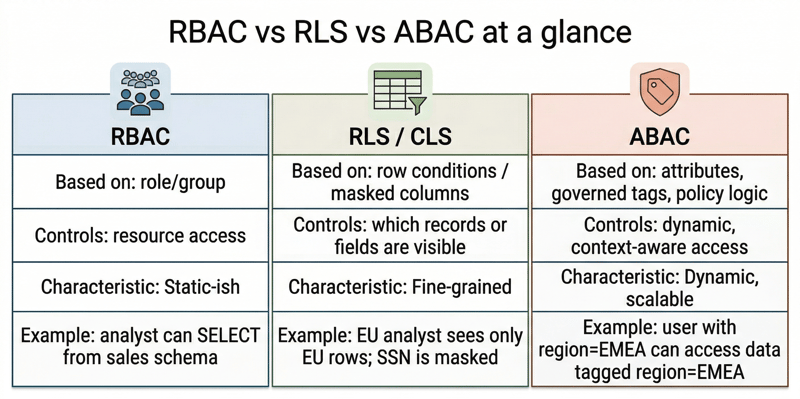
Each of the described security models RBAC, RLS, and ABAC solves a distinct problem in managing data access:
-
RBAC manages broad access to resources based on roles and responsibilities, ensuring that users only have the permissions needed for their work.
-
RLS restricts access to specific rows within datasets, ensuring that users can only view data that is relevant to their role or context.
-
ABAC offers a more flexible, dynamic approach by using attributes and tags to define access control policies, providing fine-grained control across both users and data assets.
How They Overlap
While these models each serve different needs, they are not mutually exclusive. RBAC provides the foundation for managing user roles and broad access, while RLS and ABAC layer on top to enforce more granular control. RLS ensures that sensitive rows are protected, and ABAC refines access based on dynamic attributes like user tags or data classifications. Together, these models create a robust security framework that can scale across complex environments.
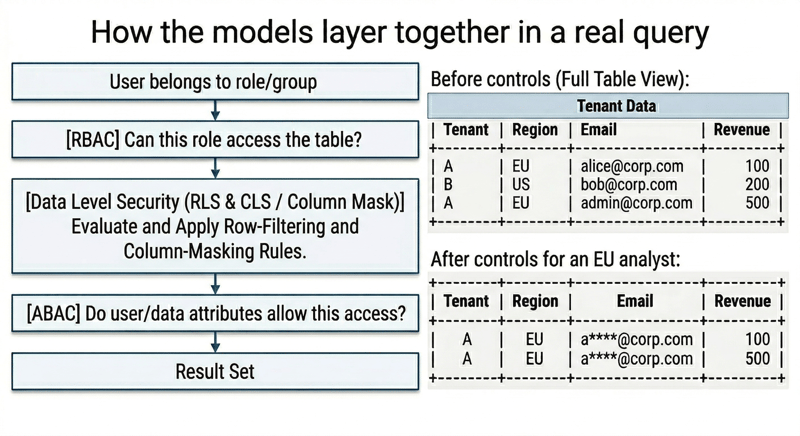
How They Should Be Layered Together
For optimal security, organizations should use these models in combination. Start with RBAC to manage user roles and grant broad access to resources. Then, implement RLS to restrict access to specific rows within datasets, ensuring that users can only see data relevant to them. Finally, apply ABAC for fine-grained control, using governed tags and policies to enforce context-based access decisions. This layered approach provides a comprehensive and scalable security solution that meets the needs of modern data environments.
A Simple Decision Framework
Use RBAC to define broad user roles and manage general access permissions.
Add RLS for data sets that require row-level restrictions, such as limiting access to customer data based on region or department.
Implement ABAC when you need more flexibility, such as managing access based on user attributes, tags, or complex business rules.
By using these models together, organizations can create a secure, compliant, and efficient data governance framework that scales with their needs.
Mastering Databricks Security: Our Conclusion
As Databricks environments grow, access control becomes a business decision as much as a technical one. RBAC, RLS and ABAC each address different aspects of the challenge and together can be utilized to provide a practical framework for protecting sensitive data, while still making sure teams can work efficiently. With Unity Catalog, this governance can be managed in a more structured and scalable way across the platform.
Looking ahead, data access models will continue to shift toward more automated, policy-driven governance as organizations expand their use of analytics and AI. For decision-makers, the key takeaway is clear: Putting the right access model in place early creates a stronger foundation for growth, compliance and trust.
For organizations now assessing their Databricks setup, this is a good moment to take a closer look at whether current access controls will still hold up as data volumes, users and regulatory demands increase. A clear governance strategy today can prevent costly complexity tomorrow.
If you would like an outside perspective on your setup, we would be glad to support you.