/Logo%202023%20final%20dunkelgrau.png?width=221&height=97&name=Logo%202023%20final%20dunkelgrau.png)




















It is Monday morning and three requests are already sitting with the platform team. “Add Sara to the EMEA pipeline view”, “Move Marco from US accounts to APAC, he changed teams two weeks ago”, “Audit wants the access list as of Q1, today.”
The Databricks side of the picture is usually in good shape: Unity Catalog with catalogs, schemas, grants and lineage. The part that decides who may see which rows often lives somewhere quieter e.g. in a spreadsheet on SharePoint, a sidecar SQL table, or a Power BI dataset that gets re-imported every night and hopes nothing changed.
Row-level security (RLS) for Power BI on Databricks really has two jobs. The first is enforcement: making sure a query returns only the rows a user is allowed to see. The second is maintenance: keeping the list of who is allowed to see what current as people join, move, and change regions. Enforcement is well understood and there are two solid ways to do it. Maintenance is where most setups quietly age.
This article walks through both enforcement approaches, compares them honestly and then turns to the maintenance question that neither one answers on its own. The implementation details (the SQL, the schema, the screenshots) are gathered in the final section, so you can read for the shape of the decision first and come back for the build.
What row-level security on this stack needs to get right
Keep these four questions in mind as you read. They are how you tell a healthy setup from a fragile one and they are exactly the axes the comparison later turns on.
-
Freshness: When access changes, how soon does the report reflect it?
-
Ownership: Who edits the access list, and can the people who know the answer do it safely?
-
Reuse: Does the rule live in one place, or is it copied across every dataset?
-
Audit: Can you show who had access to what, when, and on whose authority?
The approaches, compared
Approach 1: RLS in Power BI with DAX security roles
The most familiar approach keeps everything inside Power BI. You hold a mapping of users to the values they may see, import it into the model and write a DAX security role that filters the data based on the signed-in user. Assign people to the role in the Power BI Service, publish, and the report honours the mapping for each viewer.
Where it fits: Import-mode datasets where you want enforcement to stay entirely inside Power BI; smaller, self-contained reports owned end to end by a single BI developer; teams who want something they can stand up today with the skills they already have.
What to watch: The mapping is only as current as the last dataset refresh, so access changes wait for the next refresh to take effect. Maintenance lands on the BI team, turning routine joiner and mover requests into a ticket queue. Every dataset tends to carry its own copy of the roles, so the same rule drifts across reports. Each rebuild of the semantic model is a chance to silently drop a row filter. And the audit history of the list is something you assemble by hand.
This approach is genuinely useful and for a single report owned by one person it can be the right call. It starts to strain the moment the same access logic has to serve more than one dataset.
Approach 2: Platform-enforced RLS with Unity Catalog row filters
The second approach moves enforcement down to Databricks itself. The mapping lives in a table in Unity Catalog; a row filter function reads the signed-in identity and is attached directly to the data. Power BI then connects in DirectQuery with Microsoft Entra ID single sign-on, so the user’s identity reaches Databricks at query time and the filter fires on every query, not on every refresh.
Where it fits: Multiple consumers reading the same data, where you want one enforcement point for Power BI, notebooks and pipelines alike; teams who want access changes to take effect on the very next query; environments where the semantic model is rebuilt often and each rebuild should leave enforcement intact.
What to watch: Enforcement is solid, but the access table still needs an owner and a safe way to edit it. Editing a Unity Catalog table by hand or through scripts puts routine changes back on engineers, and a stray edit reaches every report at once. Validation of entries like real identities, known codes, sensible operators and value combinations, is still yours to build. And the change history of the list is still something you capture separately.
This is the stronger of the two enforcement models, because the rule lives once at the platform and every consumer inherits it. It leaves exactly one question open: who keeps the access table itself correct, and how do they do it safely?
The shared weak point: maintaining the access list
Both approaches solve enforcement well. Both leave the same gap. The lakehouse is centralised and controlled, while the list that decides who sees which rows is maintained by hand in a spreadsheet, a sidecar table, or a script that one person remembers to run. That gap shows up as three recurring costs:
-
Org change is constant. Joiners, movers, leavers, and region swaps age the list the day after it is built.
-
Routine updates land on the wrong team. IT or the platform team becomes the bottleneck for what are really HR-shaped requests and the people who know the answer are not the ones pressing the buttons.
-
Audit asks for the list, not the lakehouse. SOX, GDPR and DORA want a versioned, traceable record of who had access to what and when. A spreadsheet with no history struggles to answer that.
So the useful question is less about how to enforce row-level security (the two approaches above handle that) and more about how to keep the access list current, valid, and traceable, owned by the team that actually knows the answer.
Sign up as an Early Adopter!
How to choose
Lined up against the four questions, the three options separate cleanly:
| Question | DAX security roles | Unity Catalog row filter | Row filter + maintained access list |
| Freshness | Next dataset refresh | Next query | Next query |
| Who maintains the list | BI team | Engineers | The business team that owns the org chart |
| Reuse across consumers | Per dataset | One rule, every consumer | One rule, every consumer |
| Validation of entries | Manual | Build it yourself | Validated at entry |
| Audit of the list | Manual | Build it yourself | Full audit trail |
If you own a single report end to end, DAX security roles will get you there. If several consumers read the same data, a Unity Catalog row filter is the stronger enforcement model, and it is worth adopting on its own merits. Either way, the access list still needs an owner, which is where the third column comes from, and what the rest of this article builds.
The implementation, end to end
The rest of this article is the build: the schema, the SQL and what each piece looks like in practice. It follows Approach 2, since that is the model most teams converge on once more than one consumer is involved.
The access table
The mapping is a single operator-aware table: one row per grant, with a user, an operator and the value(s) it controls. The operator column lets one schema express “equals”, “in a list”, “between” and “all” without a column per rule.
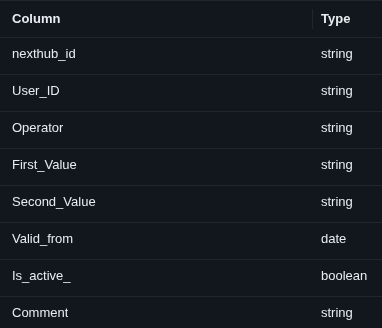 The operator-aware access table: one row per grant, expressed as user → operator → value(s).
The row filter
A Unity Catalog row filter function reads current_user() and joins to the access table, then is attached to each protected table with ALTER TABLE … SET ROW FILTER. Because the function is evaluated at query time, an edit to the table is visible on the very next query.
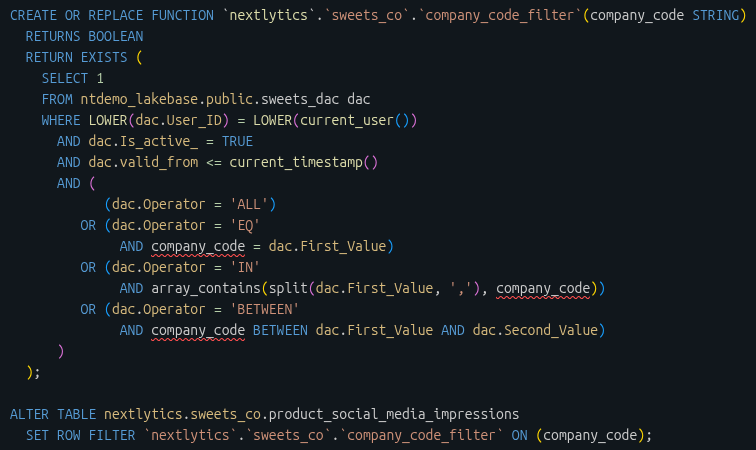 The row filter function and the ALTER TABLE statement that attaches it to the data.
For comparison, the Power BI native version of the same idea (Approach 1) is a DAX security role that looks up the signed-in user against an imported mapping:
[Region] =LOOKUPVALUE(UserAccess[Region],UserAccess[Email], USERPRINCIPALNAME())
What enforcement looks like
With the filter attached and Power BI connected in DirectQuery with Entra ID SSO, two people open the same report and see different data, each limited to the rows their identity allows. No per-user workspace, no duplicated dataset.
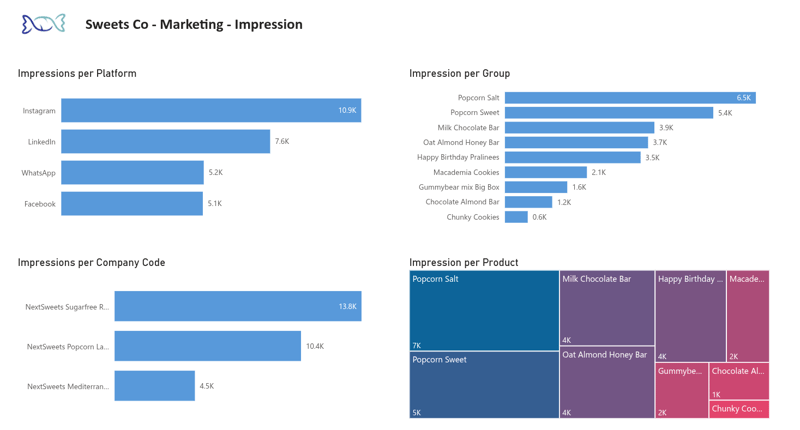 A user with broad entitlements sees the full set of platforms, groups, and company codes.
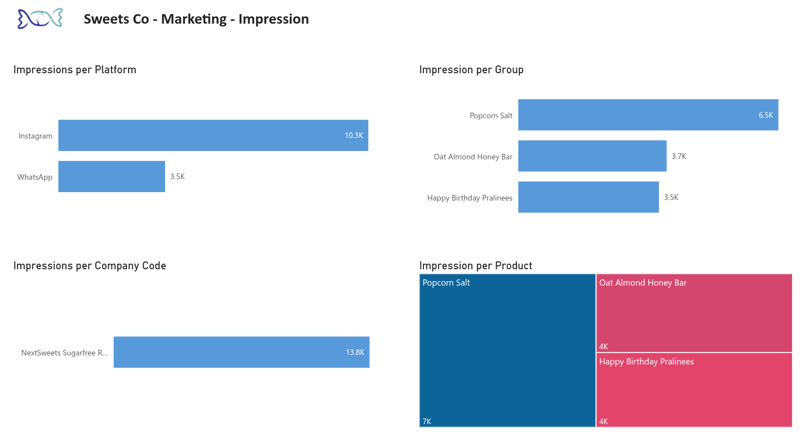 A user scoped to a single company code sees only their slice of the same report. Same dataset, same visuals, filtered at the platform.
Closing the maintenance gap
Enforcement is settled. The open question from the comparison i.e. who keeps the access table correct and how, is a maintenance problem, and it is the one most teams underestimate. One way to close it is to give the business a safe, validated surface onto the same access table, so the people who own the org chart maintain it directly instead of filing tickets. That is the role NextTables plays in the setup shown here.
The access table stays exactly where it is, inside Databricks. A folder-scoped data app exposes it as a familiar grid, with smart search resolving user identities and entitlement values against existing master data, so contributors pick the right value instead of memorising codes.
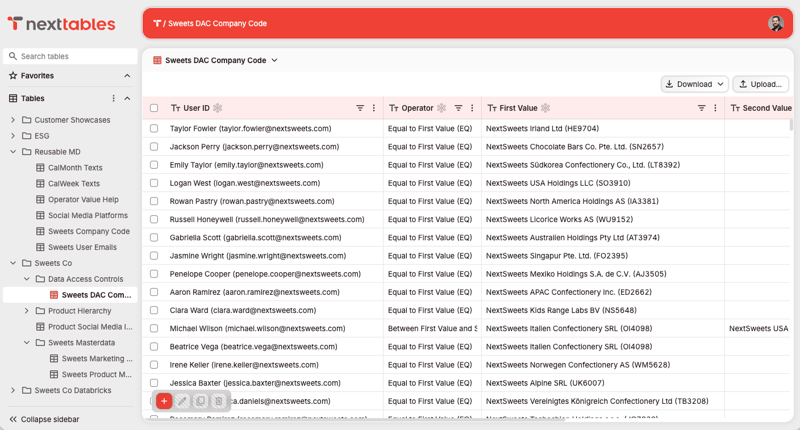 The access table exposed as a grid the team that owns the org chart can maintain directly.
Every entry is validated at the point of entry: invalid identities, unknown codes and mismatched operator/value combinations are caught before they reach the platform and folder-level permissions keep editing scoped, so the team maintaining EMEA access cannot accidentally change APAC.
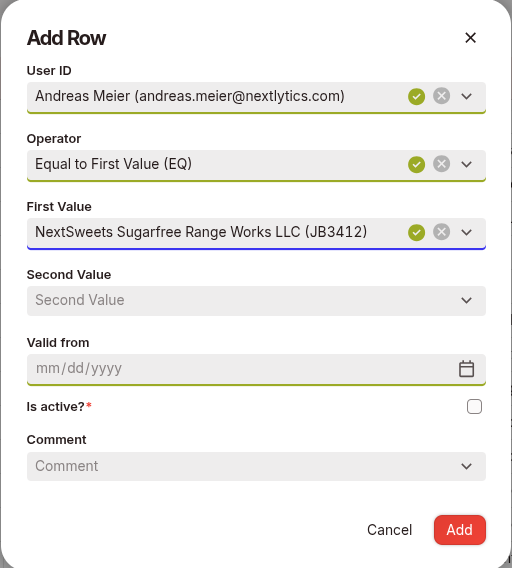 Guided entry with validation: the operator and its values are checked before the row is written.
Enforcement does not move. The same Unity Catalog row filter reads the table live, so an edit in the grid is visible on the next query and Power BI, notebooks, and pipelines all inherit the identical rule.
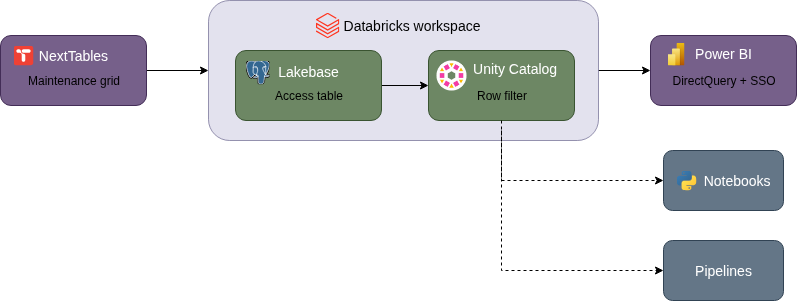 One access table on the platform; one row filter; every consumer inheriting the same rule.
Because the access table and its history stay in Databricks, this is not a new system of record and not a replacement for Entra ID or Unity Catalog. It enforces the model already in place and gives the business a validated, authorised, and auditable surface to maintain the data inside it. Remove it, and the platform remains the source of truth.
Row level security on Power BI: Our conclusion
The governance of the lakehouse must extend beyond technical metadata to the human logic of access. The mapping that dictates visibility should be managed by the department owning the organizational chart, hosted on the same platform where the underlying data resides. While enforcement through DAX or Unity Catalog is a solved technical challenge, the real operational edge is found in ensuring the access list remains current, valid, and fully traceable. By bridging the gap between platform engineers and business owners, the lakehouse can fulfill its promise of secure, accurate data delivery all the way to the final query, rather than stopping at the boundary of Unity Catalog. NextTables facilitates this governance by connecting the owners of the organizational chart directly to the platform's access control, ensuring that the human logic of the business is reflected accurately in the data layer.
Want to ensure your access governance stays as accurate and dynamic as your organization? Schedule a free consultation with one of our experts to see how business-managed access control can extend governance all the way to the final query.