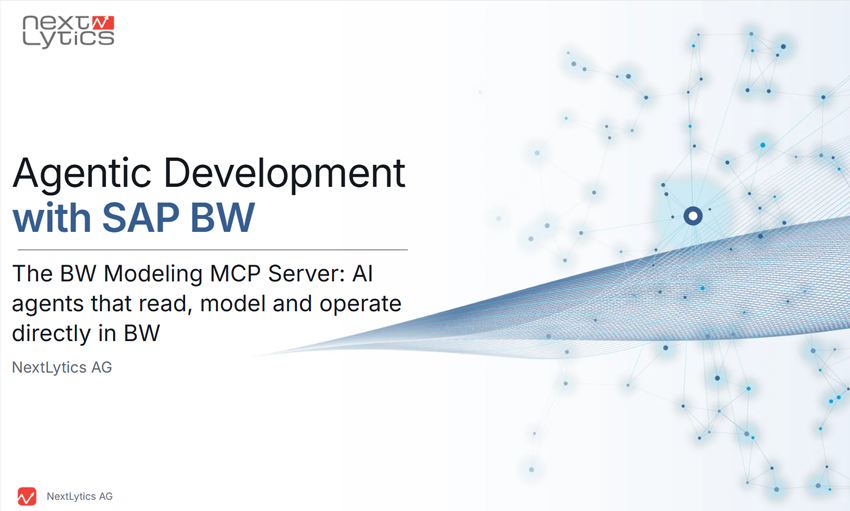
The BW Modeling MCP Server: AI Agents work directly in your SAP BW
SAP is investing heavily in AI and making Joule the centerpiece of its Business AI platform. SAP also has a clear modernization strategy for SAP BW.
BW/4HANA will receive regular maintenance through the end of 2030 and is guaranteed support through 2040, but SAP sees the true future in the Business Data Cloud (BDC). SAP intends to gradually transition customers who are still using BW to this platform. The first step involves the Private Cloud Edition, into which an existing BW instance is initially migrated so that it runs under SAP’s management. Only then are the prerequisites in place to use the Data Product Generator and the Query Template Generator. One synchronizes InfoProviders as Data Products into the BDC’s Data Lake Space, while the other generates ready-to-use analytic models in Datasphere from BW queries. This is a legitimate approach that brings the data into the cloud piece by piece.

However, this approach answers a completely different question. It moves the data to the cloud, but it does not open up an existing BW system to agent-based AI. SAP’s official MCP servers currently handle application development, such as ABAP, Fiori, CAP and UI5. For BW itself, SAP offers no solution that would allow an agent-based environment like Claude, Copilot, or Cursor to be directly connected to an existing system and used to read or develop within it.
This is exactly where the BW Modeling MCP Server comes in . It takes the internal interfaces - the same ones used by the BW Modeling Tools in Eclipse and the BW/4HANA Cockpit to communicate with the system - and makes them available to an agent as tools. This allows the agent to understand established data models, create new objects and transformations and initiate load processes. And this isn’t just a suggestion in a chat window, but actual work performed within the running system, resulting in an activated object on the transport request.
What can the MCP Server in BW actually do?
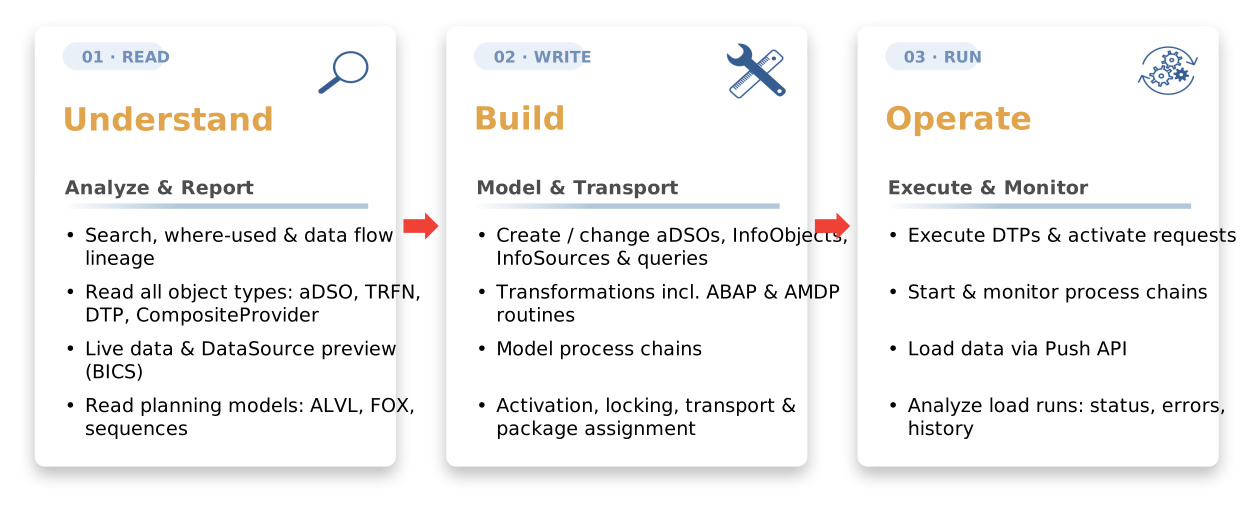
Understand
The agent doesn’t just read individual objects - it understands the relationships behind them. It scans the system, shows where an object is used throughout the system and traces the data flow across all levels and every object type, all the way down to individual routines, including planning models. In this way, it independently works its way backward through loading chains of any depth - from the query to the source system - and explains complex logic in clear, understandable language.
Build
Here, it covers everything involved in day-to-day modeling. InfoObjects and InfoAreas, aDSOs, DataSources and InfoSources, CompositeProviders, transformations including routines in ABAP and AMDP, DTPs, queries with their reusable building blocks such as variables, key figures and structures, aggregation levels and process chains. It creates, modifies and activates them, assigns packages and transport requests - all through the same interfaces and following the same locking protocol that Eclipse uses.
Operate
It executes DTPs, activates and deletes requests, writes data directly to an aDSO via the Push API, starts and monitors process chains, tracks remodeling and reviews load runs for status, errors and history. Only then is the cycle complete, because whatever the agent builds, it can also load, check, and, in the event of an error, investigate in more detail.
The Features of the MCP Servers At a Glance
The map below shows which objects and functional areas the MCP Server works with, organized by reading, creating and executing, and - for each area- how much of it is available in a classic BW 7.5 system. This is intentionally done at the group level, as the toolbox is constantly expanding. The Tools Reference in the GitHub repository documents the current status of each individual tool.
Talking with BW data: Talk to Your Data
Through the BICS interface, the agent also works directly with the data itself. It executes queries or queries an InfoProvider using variables, filters, and navigation through hierarchies - even if no query exists for that purpose yet. You can ask questions such as
“Show me the five top-selling products for each month”
the agent finds the appropriate provider, understands the data model, aggregates the data, and returns the result directly in the chat. For business users, there is a dedicated role for this in the central operations environment with a deliberately limited set of tools that includes only querying and understanding the data, leaving modeling out of the picture.
How does the server work
Technically, the server translates the agent's calls into requests to four SAP interfaces: the BW Modeling REST API for objects, queries and live data; the ADT API for the ABAP and AMDP routines generated by BW itself; the Manage API for the Request Monitor and runtime; and the Push API for data loads. This ensures that the agent follows exactly the paths into the system that SAP has designated for modeling. What a developer does in Eclipse, click by click, the agent formulates as a prompt. There is no second, custom-built access path into the system.
When writing, it follows the BW locking protocol. It locks the object, reads its current XML, applies the change, writes everything back in full, activates it, and unlocks it again - exactly the same mechanism that Eclipse uses. The same syntax and activation checks as in the standard system are applied, ensuring that the result is a properly activated and consistent object. Every change is added to a transport request and travels through the system landscape via the usual transport path all the way to Q and P.
The server is open source under the MIT license, written in TypeScript, and can be installed via npm. Development takes place openly on GitHub, so every line of code is visible and you can track what’s happening in your own system at any time.
Commissioning, local or central on the BTP
There are two ways to run the server, and both are considered equally valid.
Locally, the agent-based environment - such as Claude Code - starts the server as a Node.js process on the developer’s computer; the access credentials are stored in a local configuration file. This is the fastest way for a single person to get started. Despite its name, the server in this case is not a continuously running service, but rather a program that is active only during the work session. It only becomes a true service when run centrally.
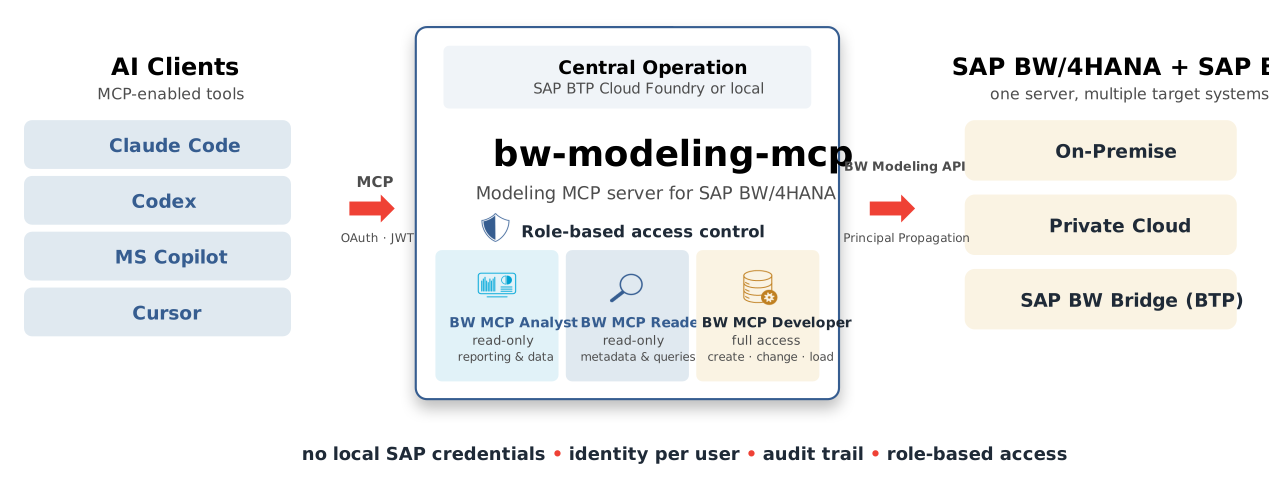
Centrally, the same server runs as an HTTP service on SAP BTP Cloud Foundry. Login is handled by XSUAA, the BTP authentication service that a company is already using, and behind the scenes, a BTP destination routes traffic to BW via the Cloud Connector. The client only needs the URL; the browser handles the rest of the login process. This allows multiple people to work with a shared service without anyone having to install anything locally.
In centralized operation, the server comes with three default roles. The BW MCP Analyst receives only what is necessary for querying and understanding the data; the BW MCP Reader receives all read-only tools; and the BW MCP Developer receives the full toolkit. A Reader is not merely denied write tools - they do not even appear in their tool list, so the AI cannot even suggest an unauthorized call. Below that level, BW itself still takes over. Through principal propagation, everyone works on behalf of their actual user with that user’s own authorizations - not via a shared technical collective user - and XSUAA logs every login. The MCP role is the first gate, and the BW authorization is the second.
This was made possible by the groundwork laid by Marian Zeis. He had already extracted the XSUAA mechanism for his own ABAP MCP server, ARC-1, as a standalone package and the BW Modeling MCP Server relies precisely on this.
Strength in Unity: A Customer Example
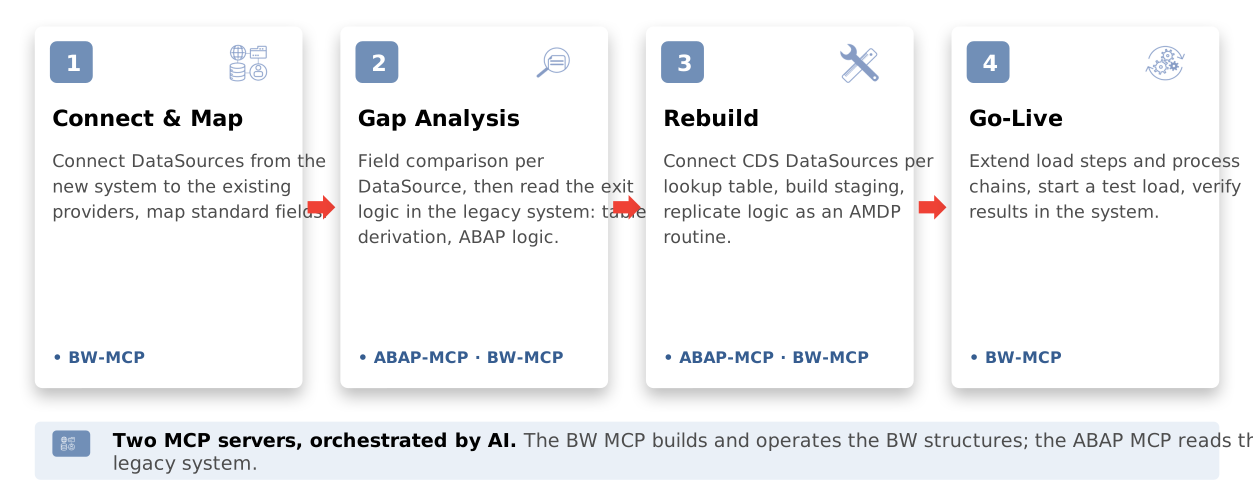
The server really shines when used in conjunction with an ABAP MCP server such as ARC-1. For logic in ABAP and SQLScript, the two work hand in hand - exactly the division of labor familiar from Eclipse between the BW Modeling Tools and the ABAP Development Tools. A real-world example illustrates just how beneficial this is.
An energy provider is phasing out its SAP IS-U environment - which has grown over the years - and migrating billing to S/4HANA for Utilities. The underlying BW/4HANA remains in place, while the source system beneath it is completely replaced. This eliminates all the data enrichment that used to be handled via customer exits in the source system - and that’s exactly what’s missing from the reports later on.
This is where the two servers really shine. First, the agent uses the BW MCP Server to connect the DataSources from the new system to the existing providers and maps the standard fields. Next comes the gap analysis. For each missing field, it queries the legacy system directly via the ABAP MCP Server to determine which table it originated from and what ABAP logic was used to derive it. To recreate the system, it connects a CDS-based DataSource to each lookup table, sets up the staging environment and ported the old logic into an AMDP routine on the new foundation. For commissioning, it extends the load steps and process chains, starts the test load, and verifies the results directly in the system.
At key points, the agent provides clear, easy-to-read interim results, which the team reviews before moving forward. This keeps control in human hands and transforms days of detective work in Eclipse into a guided, transparent process.
What you need, Compatibility and Limitations
The setup is intentionally simple. You’ll need an agent-based environment such as Claude, Codex, or Copilot; a BW system with access to the internal modeling interfaces; and Node.js installed on your computer. For central operation, you’ll also need a BTP subaccount. The server is installed via npm and configured with just a few settings - primarily the connection to the respective BW system. Both local and central operation are documented step by step in the GitHub repository.
The server works with all versions of BW/4HANA and with the SAP BW Bridge via cookie-based authentication. A classic SAP BW 7.5 on HANA can also be integrated. This is made possible by a small enhancement that requires no modification to the SAP standard and can be removed at any time. The server then automatically detects which platform it is communicating with and provides the agent only with the tools that the system is capable of using.
On a 7.5 system, the server uses this to read the entire repository, and anything the system does not publish via an interface, it retrieves directly from the metadata tables - including transformations, DTPs, process chains along with their execution history, planning objects, and even the Analysis Process Designer, for which there was never an interface. Modeling also works there for InfoAreas, InfoObjects, aDSOs, InfoSources, CompositeProviders and queries with their building blocks and aggregation levels - each of which is verified against a 7.5 system. Limitations remain where BW 7.5 simply does not provide an interface. Classic objects such as InfoCubes and MultiProviders, transformations, DTPs, and process chains can be read but not written to - as evidenced by the fact that even Eclipse opens the embedded SAP GUI for these objects. The server itself informs the agent, via a single call, which tools are available on the specific system.
Talk to our expert!
FAQ - Agentic AI for SAP BW
Here are some of the frequently asked questions about Agentic AI for SAP BW
Would you like to learn more about Agentic AI?
You'll find some interesting articles on this topic on our blog
The Agentic Turn in Data Engineering: Why Architecture Still Leads
In a previous article we built an AI agent inside Databricks that reads your data, reasons about...
Agentic AI in Practice: MCP Server for SAP BW/4HANA
Back in April, I introduced the bw-modeling-mcp here - an open-source MCP server that allows AI...
Agentic AI meets SAP BW
I’m looking at the UI and just staring at the screen: “Activation in progress… Editor not editable....
Agent Bricks in Databricks: Chat with Your Data and Gain Insights
The landscape of enterprise AI is shifting rapidly from simple "Generative AI" chatbots - which...
/Logo%202023%20final%20dunkelgrau.png?width=221&height=97&name=Logo%202023%20final%20dunkelgrau.png)