Skip to content
NextLytics
Megamenü_2023_Über-uns

Shaping Business Intelligence

Whether clever add-on products for SAP BI, development of meaningful dashboards or implementation of AI-based applications - we shape the future of Business Intelligence together with you. 

Megamenü_2023_Über-uns_1

About us

As a partner with deep process know-how, knowledge of the latest SAP technologies as well as high social competence and many years of project experience, we shape the future of Business Intelligence in your company too.

Megamenü_2023_Methodik

Our Methodology

The mixture of classic waterfall model and agile methodology guarantees our projects a high level of efficiency and satisfaction on both sides. Learn more about our project approach.

Products
Megamenü_2023_NextTables

NextTables

Edit data in SAP BW out of the box: NextTables makes editing tables easier, faster and more intuitive, whether you use SAP BW on HANA, SAP S/4HANA or SAP BW 4/HANA.

Megamenü_2023_Connector

NextLytics Connectors

The increasing automation of processes requires the connectivity of IT systems. NextLytics Connectors allow you to connect your SAP ecosystem with various open-source technologies.

IT-Services
Megamenü_2023_Data-Science

Data Science & Engineering

Ready for the future? As a strong partner, we will support you in the design, implementation and optimization of your AI application.

Megamenü_2023_Planning

SAP Planning

We design new planning applications using SAP BPC Embedded, IP or SAC Planning which create added value for your company.

Megamenü_2023_Dashboarding

Business Intelligence

We help you with our expertise to create meaningful dashboards based on Tableau, Power BI, SAP Analytics Cloud or SAP Lumira. 

Megamenü_2023_Data-Warehouse-1

SAP Data Warehouse

Are you planning a migration to SAP HANA? We show you the challenges and which advantages a migration provides.

Business Analytics
Megamenü_2023_Procurement

Procurement Analytics

Transparent and valid figures are important, especially in companies with a decentralized structure. SAP Procurement Analytics allows you to evaluate SAP ERP data in SAP BI.

Megamenü_2023_Reporting

SAP HR Reporting & Analytics

With our standard model for reporting from SAP HCM with SAP BW, you accelerate business activities and make data from various systems available centrally and validly.

Megamenü_2023_Dataquality

Data Quality Management

In times of Big Data and IoT, maintaining high data quality is of the utmost importance. With our Data Quality Management (DQM) solution, you always keep the overview.

Career
Megamenü_2023_Karriere-2b

Working at NextLytics

If you would like to work with pleasure and don't want to miss out on your professional and personal development, we are the right choice for you!

Megamenü_2023_Karriere-1

Senior

Time for a change? Take your next professional step and work with us to shape innovation and growth in an exciting business environment!

Megamenü_2023_Karriere-5

Junior

Enough of grey theory - time to get to know the colourful reality! Start your working life with us and enjoy your work with interesting projects.

Megamenü_2023_Karriere-4-1

Students

You don't just want to study theory, but also want to experience it in practice? Check out theory and practice with us and experience where the differences are made.

Megamenü_2023_Karriere-3

Jobs

You can find all open vacancies here. Look around and submit your application - we look forward to it! If there is no matching position, please send us your unsolicited application.

Blog
NextLytics Newsletter
Subscribe for our monthly newsletter:
Sign up for newsletter
 

NextTables Cloud: data maintenance apps for business teams

NextTables Cloud

On every data platform we build there is a set of tables the business owns and the architecture has no place for: mappings, classifications, corrections, the reference values that decide what a report actually says. NextTables Cloud is where those tables live.

Business teams maintain them in a familiar grid, every entry is validated before it is written, and the records stay on your platform. We design it, build it and run it with you.


NextTables started here

NextTables was built inside NextLytics. It began as an answer to a problem our consultants kept meeting on SAP Business Warehouse projects, it grew into a product in its own right, and since September 2025 it has been an independent company, NextTables GmbH. The first systems it ever ran in were our customers' SAP landscapes.


SAP BW/4HANA
SAP Datasphere
Databricks
PostgreSQl

The NextTables grid running inside SAP BW

The gap you hit on every data project

You know the pattern, because we run into it too. Business-maintained data surfaces during modelling, and again in UAT, with only a spreadsheet behind it. Every dashboard we deliver has a handful of these tables somewhere underneath it.

What happens today

A mapping changes. Someone asks around for the current version, maintains it in Excel, and hands the file over to be loaded. It fails in the pipeline run, the data engineering team has to pick it up, and by the time it lands the dashboard has already been wrong twice.

 What that costs on a project

 Spreadsheet maintenance gets rejected in UAT. Custom write-back development eats into project margin. Scope creep and post-go-live support pile up. And the next project starts the same problem again from scratch. It is the requirement that arrives late, carries no budget line, and lands on whoever is closest to it. 

 | The distinction that matters is not where the editing happens. It is whether a value is validated as it is entered, or loaded and hoped for. |

Where the common workarounds run out

By the time the requirement has a name, the options on the table are usually these three. We have costed all of them, and delivered most of them.

Icon Daten-Pflege

SharePoint Lists into SAP Datasphere

Quick to stand up, and it sits outside the platform. Value help, validation and row-level access have to be rebuilt around it or given up, and it strains the moment modelling and UAT push real volume through it.
Icon DQM

A custom app on SAP BTP

Fits the use case exactly, and carries a high build cost per use case. Validation, value help and row-level security get rebuilt every single time, and each app then needs an owner and a maintenance budget for as long as it lives.
Icon Pfeil Kreis

SAC Planning

Commercially heavy and built for planning, so it brings a large setup effort to something as ordinary as keeping a mapping table current, and it puts a licence question in front of a data-quality problem.

 | NextTables gives you one repeatable pattern instead: validation at the point of entry, access decided by role and by row, records that stay on your own platform, and a guided grid that embeds in the dashboard where the problem was spotted. One pattern, carried across every platform we work on, rather than a fresh build per project. |

Three things a maintenance layer has to be at once

Get one of these wrong and the other two stop mattering. Business teams abandon a tool they find slow, and IT blocks a tool it cannot account for.

Icon Daten-Pflege

Built for business teams

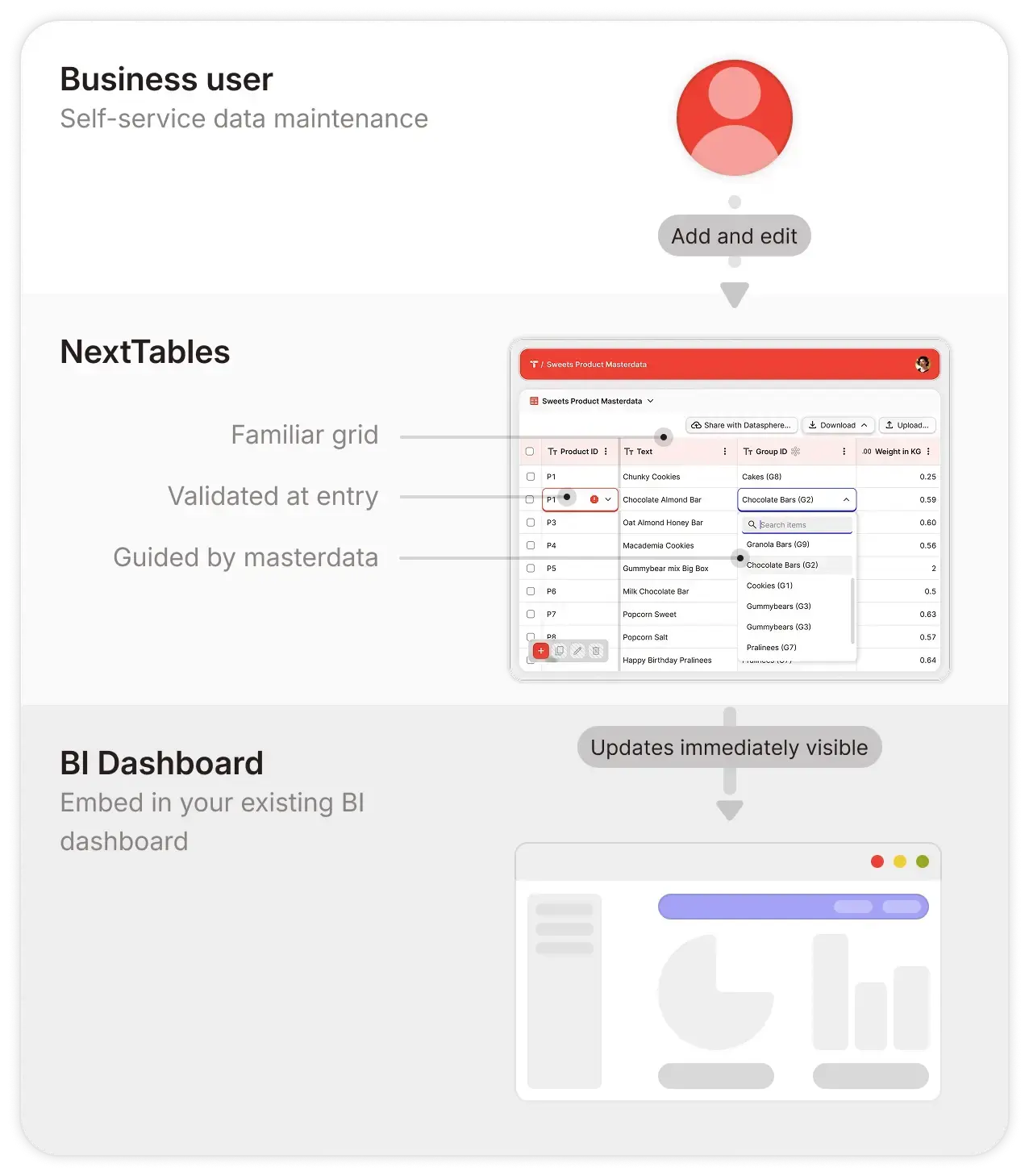
Familiar, guided, ready to use. Grid-based editing, filtering, sorting and import, in business terms rather than technical ones, so the people who own the data are productive on day one. Built-in value help and instant validation feedback mean a user finds the right value and knows immediately whether the entry was accepted. The team that owns the data owns the app, from idea to live.

Icon DQM

Governed

Validated and authorized, at the platform boundary. Every entry is checked against your rules and your master data before it reaches the platform, and errors surface on the spot so the business user fixes them there and then. Access is role-based with row-level rules, scoped to folders, and those row rules can reuse an access table you already maintain on your platform. Your business data stays on your platform throughout. One security perimeter, the one you already run.
Icon Pfeil Kreis

Powering AI

Business-maintained context for AI. The reference mappings, parameters and classification tables that models and agents need in order to answer correctly are maintained by the business, on the same platform the models read from. An AI answer is only ever as good as the classification table sitting behind it, and that table belongs to the business rather than to a data engineer with a ticket.

What your team can do

Work in a grid they already understand

Filter, sort, copy and paste, bulk update. The grid behaves the way a spreadsheet behaves, on data that lives in your platform rather than on somebody's desktop. Column setup, data types, required fields and locks are configuration, so a new table is a conversation rather than a build.

  • The people who own the data maintain it.
  • Column rules set as configuration, not code.
NextTables Maintenance Marketing Team
Zielscheibe

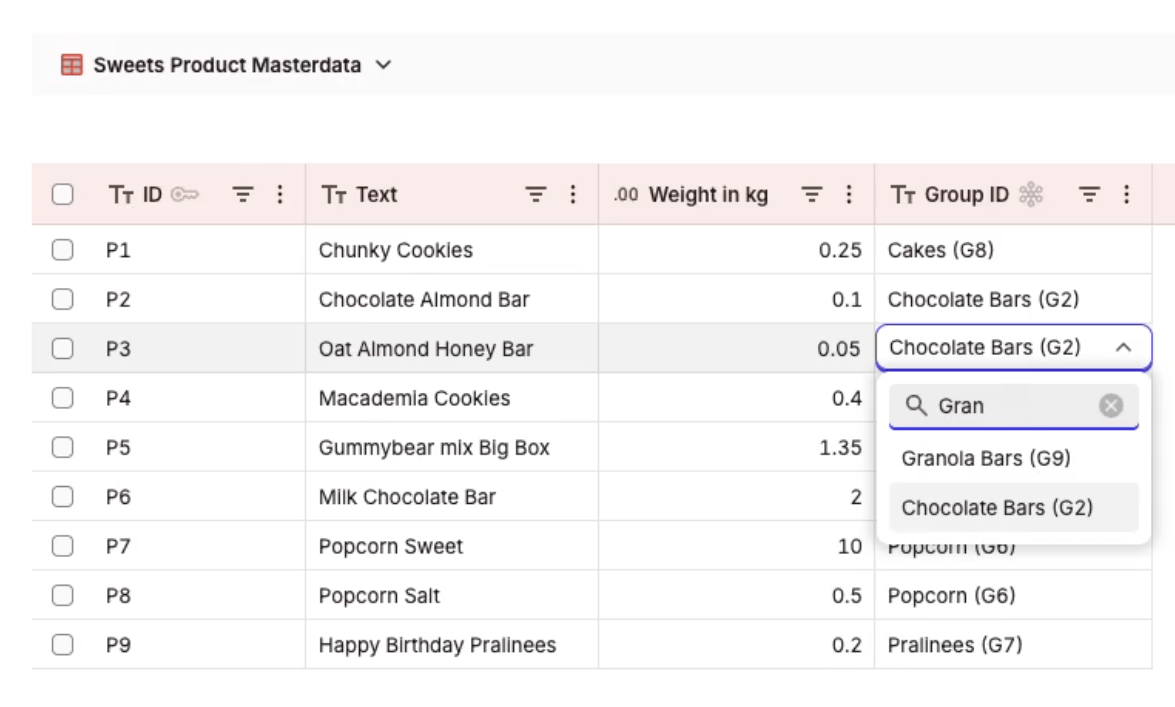
Guided entry, with search against your master data

Value help reads the master data tables the app is connected to, so people select a validated value instead of typing a code from memory. Feedback is immediate: a user knows on leaving the field whether the entry stands.
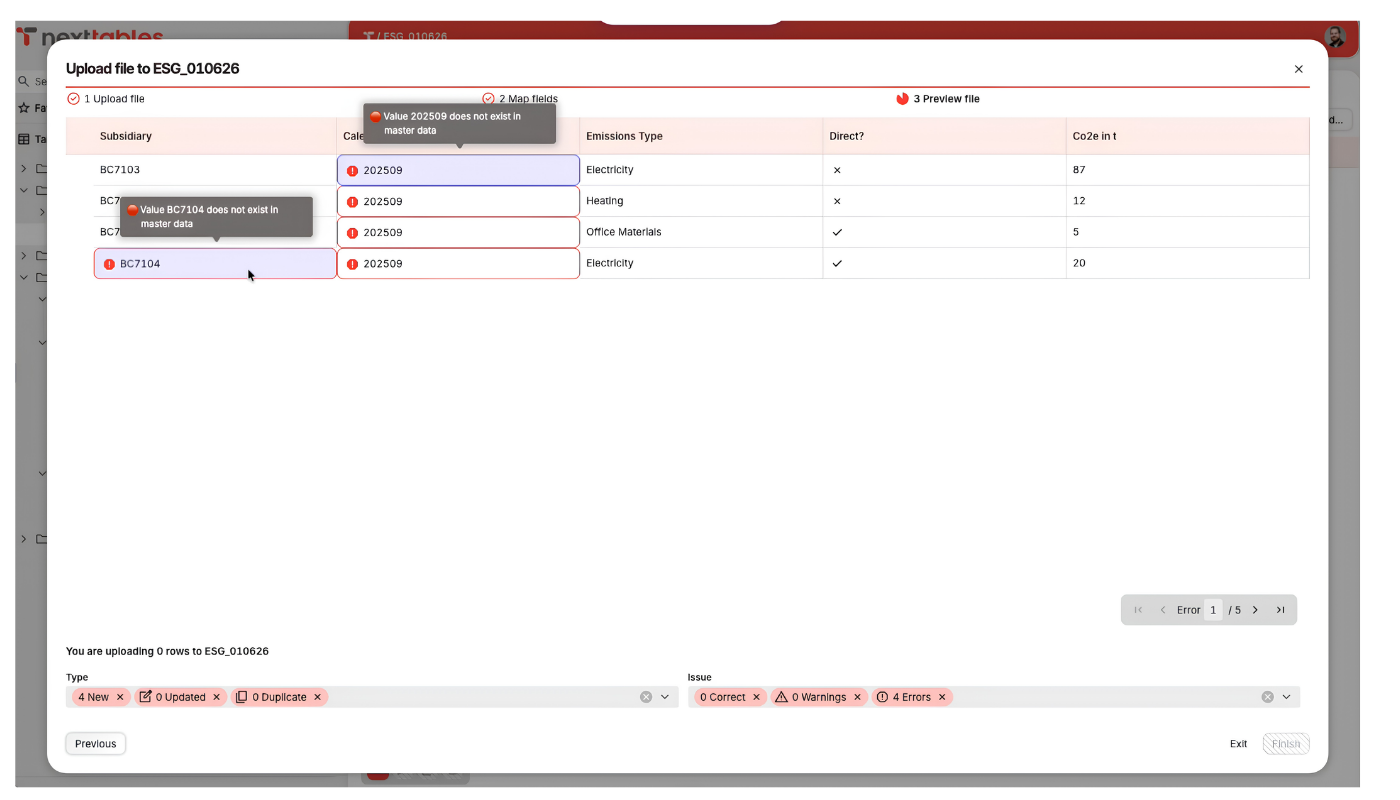
NextTables ESG validation

Import a file, checked as it lands

Bring larger changes in from Excel or CSV and every row is checked against the same rules the grid applies, before anything is written. Invalid rows come back with the reason, so the person who owns the data fixes them rather than a data engineer guessing at intent.

  • Bulk changes at spreadsheet speed.
  • Every row validated before it reaches your platform.

Build the entry form as configuration

A drag-and-drop form builder puts single-record entry masks together from the fields of a connected table, with validation rules and low-code logic attached where they are needed. A department gets the entry screen it asked for, and it stays configuration rather than a build.

  • Single-record entry, without a development project.
  • Validation rules attached where they are needed.
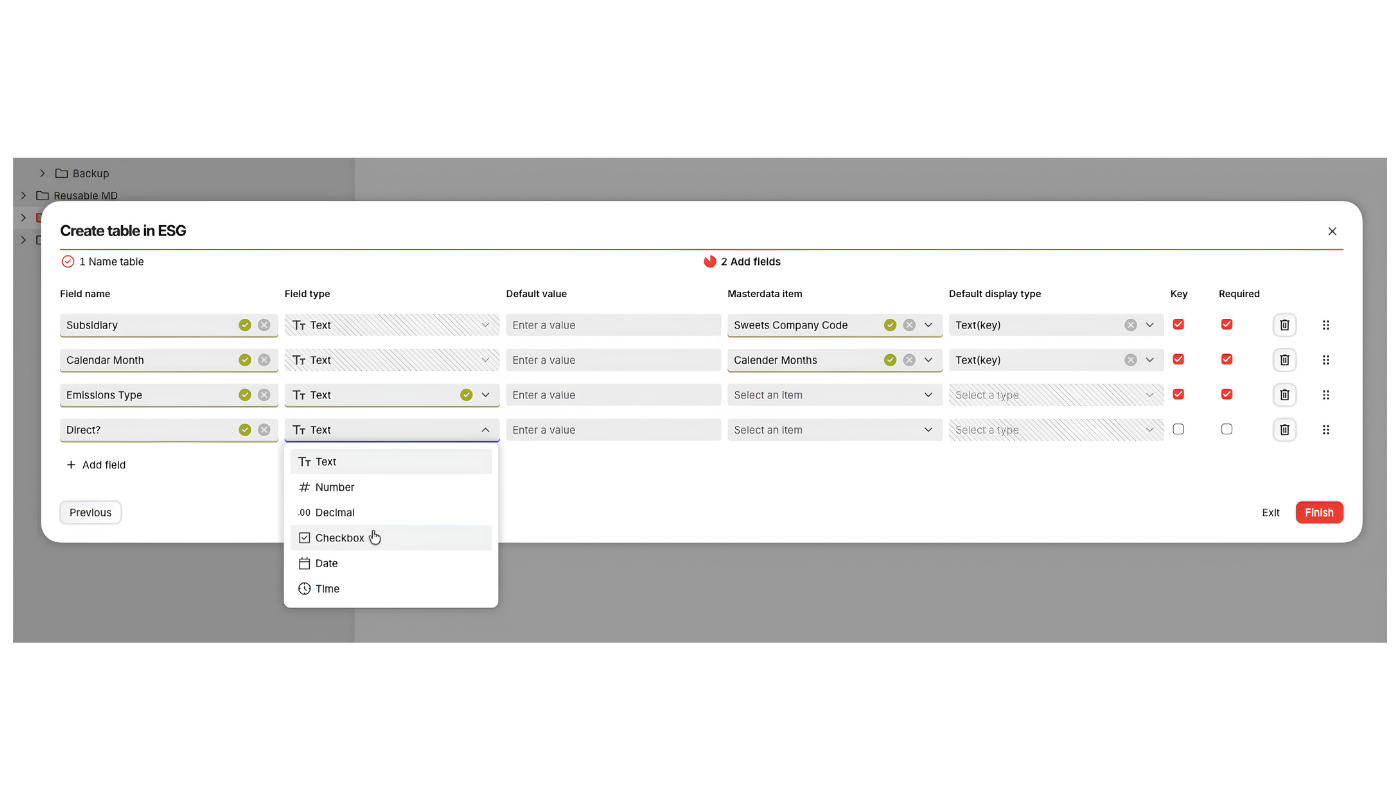
Row-by-row validation of an imported spreadsheet
NextTables Cloud Business Teams Roundtrip

Embed it in the dashboard where the problem shows up

Data maintenance apps embed into any BI dashboard, SAP Analytics Cloud, Power BI, Tableau or standalone. The update is validated, written to the platform, and visible in the dashboard, so maintenance happens where the decision is being made.

  • The correction happens where it was noticed.
  • Validated on the way in, either way.
Single Log-in

One login, the one they already have

Users sign in through your enterprise single sign-on with the credentials they already carry, on Microsoft Entra ID or Google Workspace. Identity stays with your identity provider, and access stays with the roles you set.
Your business data stays on your platform

This is the first question your platform owner asks, and it is worth answering before anything else.

NextTables connects through each platform's native interface and writes directly to your tables, so the platform you already run stays the single source of truth. Business data passes through during a read or a write and remains on your platform afterwards. What lives inside NextTables is configuration metadata: the apps, the table and column setup, the validation rules and the role assignments.

Three consequences follow, and they are the ones that matter in an architecture review. One security perimeter rather than two. One source of truth, with the maintenance layer sitting alongside it rather than in front of it. And because the records were only ever written in place, stepping away from NextTables is an access change rather than a migration project.

Tenant isolation
A dedicated database per tenant
Hosting and backups in the EU
Enterprise authentication: single sign-on, role-based, row-level
GDPR compliant, with a DPA available

Which platforms it runs on

NextTables connects to each one through the platform's own native interface and writes straight into the tables you already have there, so those tables stay your system of record.
SAP Business Data Cloud
The SAP estate, and the modelled data your reports already read.
SAP Datasphere
The warehouse most SAP clients are building on today, and the tables their models depend on.
Databricks
Lakehouse and engineering work, including the tables a pipeline reads at run time.
PostgreSQL
The databases that so often end up carrying operational reference data.
Those cover most of what we build. Validation can run against master data on one platform while the write lands on another, which helps when the two sit apart.

Where this fits in what we do

The maintenance gap is not one service line's problem. It turns up in all three of ours, and it is the same gap every time.

Icon Daten-Pflege

SAP Data Warehouse

SAP Datasphere · SAP BW/4HANA · SAP Business Data Cloud

The mapping and reference tables that a model depends on, maintained by the business rather than raised as a ticket against the warehouse team. On SAP Business Warehouse landscapes the on-premise SAP BW edition does the same job inside the SAP system, so a landscape mid-modernization is covered on both sides.

Icon Daten-Pflege

Data Science and Engineering

Databricks

The parameters, thresholds and classification tables that a pipeline or a model reads at run time, owned by the people who actually know what the values should be. Fewer hard-coded lookups in notebooks, and fewer tickets that are really just a value change.

Icon Daten-Pflege

Dashboarding and BI

SAP Analytics Cloud · Power BI · Tableau

A maintenance app embedded in the dashboard itself, so a wrong classification is corrected in the report where somebody noticed it, and the correction is validated on the way in.

How we engage, in four steps
1


Assess

Find the business data being maintained outside the platform, and work out which of it is worth an app.

2


Pilot

Stand up one governed data app on a real table with real users, often as a paid proof of concept.

3


Roll out

Extend across domains and platforms on the pattern the pilot proved.

4

Enable

Train the business teams who will own the apps, and hand over the configuration so they can add the next table themselves.

The same four steps carry across SAP Business Data Cloud, SAP Datasphere, Databricks and PostgreSQL, which is what makes this repeatable for us and predictable for you.

Why work with us on NextTables Cloud

NextTables was built inside our own practice, and although it is an independent company today, our consultants wrote it. On a tool whose whole value is configuration, that difference is practical rather than sentimental: it shows up in how quickly the first app is right.


What we bring to a NextTables Cloud project
  • Platform connection and tenant setup, on SAP Business Data Cloud, SAP Datasphere, Databricks or PostgreSQL.
  • The first data apps, built with the business team that will own them rather than handed to them finished.
  • Validation rule design, which is where a maintenance app either earns trust or loses it in the first week.
  • Role and row-level access design, mapped onto the access tables and the identity provider you already maintain.
  • Enablement, so your teams add the next table themselves.

And the judgement about which tables deserve an app at all, which is the part that decides whether anybody uses it six months later.

NextTables Berater

More than 20 NextTables customers

Across 30-plus releases and counting. Product details, pricing and the knowledge base are at nexttables.com

Tell us which spreadsheets your platform is leaning on. We will tell you which of them deserve an app, and what a pilot actually involves.

Questions your platform owner asks first

Where is our business data stored?

On your enterprise data platform, in your own tables. NextTables connects through the platform's native interface and writes directly to them. Business data passes through during a read or a write and stays on your platform afterwards. Only configuration metadata, meaning the apps, the table and column setup, the validation rules and the role assignments, lives inside NextTables.

Do our business users need an account on the data platform?

They sign in through your enterprise single sign-on with the credentials they already have, on Microsoft Entra ID or Google Workspace. NextTables holds the connection to the platform, so a business user needs one login, and the roles you have set decide what that login can reach. Adoption stays light, which is usually what decides whether a maintenance app survives.

How is access controlled?

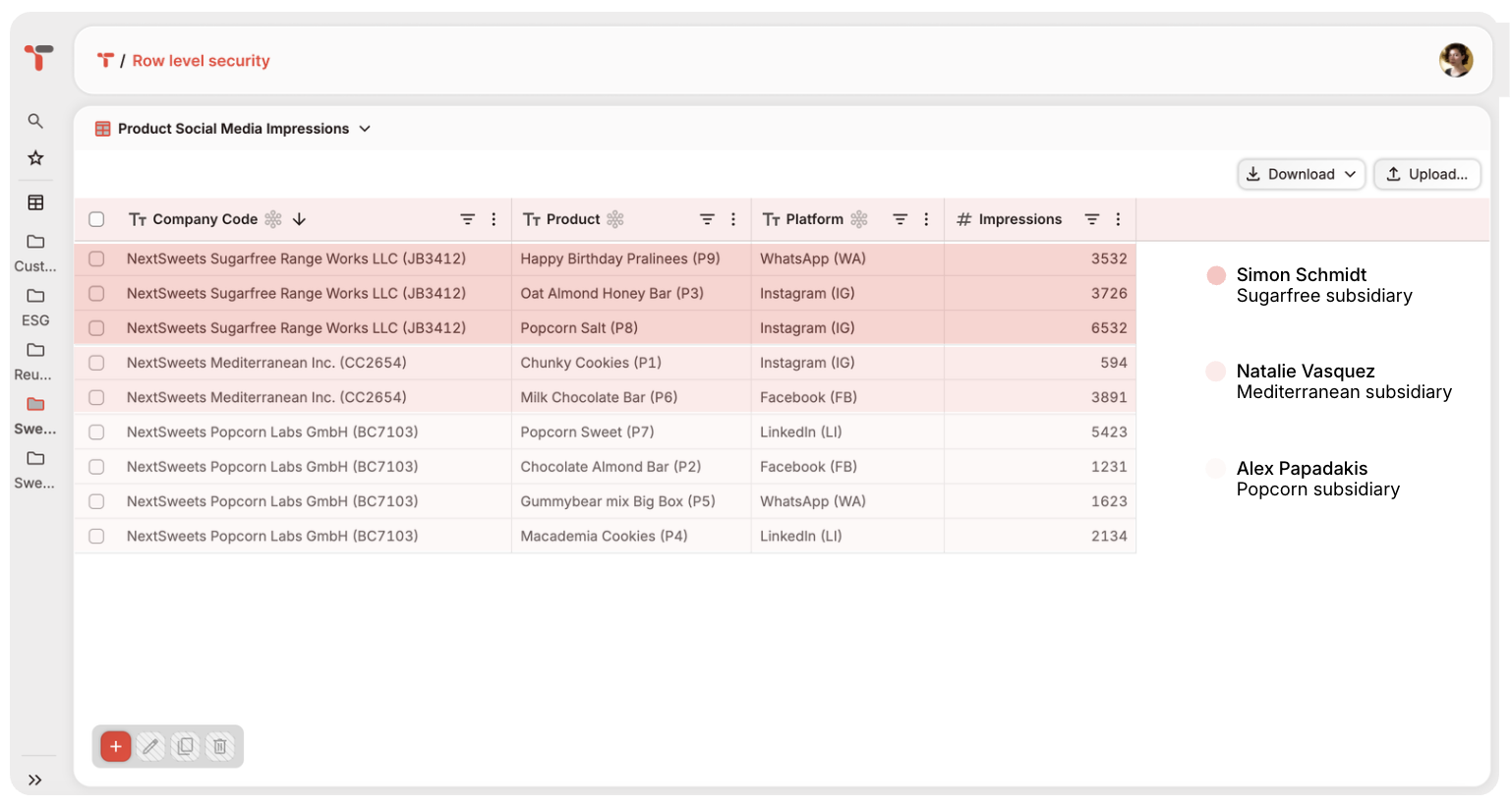
Identity stays with your enterprise single sign-on. Roles are assigned at folder level with read, write, create and delete rights, and they inherit down to the data sources connected inside each folder. Row-level access is driven by a control table saying which user may reach which rows. Maintain that table in NextTables, or point at an access-control table you already keep on the platform, so your existing policy is enforced automatically.

Is this another system for us to integrate and maintain?

It runs as a managed SaaS app, so upgrades and infrastructure are maintained by NextTables. Your team configures apps, validation rules and roles through the interface, in business terms. The platform you already run stays the single source of truth, with your tables, governance and security perimeter intact. NextTables sits alongside as the maintenance layer, and we do the configuration work with you.

Where are validation rules defined and run?

Rules live in NextTables as configuration. Each app validates entries against the master data tables it is connected to, so a value is checked against your source of truth before anything is written. Every rule runs at the point of entry, ahead of the write, so a user sees and fixes an invalid entry on the spot and only validated data reaches your tables.

How is this different from building a form in PowerApps or another low-code tool?

The form is the easy part. What takes the time is validation against your master data, access decided by role and by row, entry that guides a business user to the correct value, and a write that lands straight in the platform. A low-code tool asks you to build all of that per app and then own it. Here it is configuration, and the same pattern carries to the next table.

How do changes get from a test environment to production?

By promotion transport, a mechanism NextTables provides for exactly this. You build and test an app in one environment and promote the configuration to the next, so the app that goes live is the app that was tested. It follows the promotion pattern your platform team already uses elsewhere, and we set those environments up as part of the project.

Which platforms does it work with?

SAP Business Data Cloud, SAP Datasphere, Databricks and PostgreSQL. Connection is through each platform's native interface, with writes going directly into your tables. Validation can run against master data on one platform while the write lands on another, which is useful when reference data and reporting tables sit in different places. We connect the tenant to your platform as part of the setup.

What happens if we stop using it?

Your records were written in place on your own platform the whole time, so they stay there in your tables. Stepping away is an access change rather than a migration project, and the configuration metadata can be exported before you switch it off. Access is withdrawn, the apps stop, and the tables carry on being read by everything else that uses them.

More on NextTables from our blog

Row level security for Power BI on Databricks: enforce & keep current

It is Monday morning and three requests are already sitting with the platform team. “Add Sara to...

Row level security for Power BI on Databricks: enforce & keep current

How to Fix the Gaps in SAP Datasphere's Standard Time Dimension
Your report is done and the numbers are correct, but the calendar labels display raw technical...

How to Fix the Gaps in SAP Datasphere's Standard Time Dimension

SAP Seamless Planning: Three Ways to Integrate External Data
In our first blog post on Seamless Planning, we introduced the basics of this new integration...

SAP Seamless Planning: Three Ways to Integrate External Data

Start with the tables you already know about

Most teams can name the three spreadsheets holding their platform together. That is a good place to begin. We will look at what is being maintained outside the platform today, work out which of it deserves an app, and tell you what a pilot involves.


Table Of Contents
Pages Blogs