/Logo%202023%20final%20dunkelgrau.png?width=221&height=97&name=Logo%202023%20final%20dunkelgrau.png)




















It's getting dark earlier, the first pumpkins are sitting on the windowsills - only SAP Analytics Cloud is still as bright as broad daylight. Yet SAC can do things differently, if you know where the light switch is. Small spoiler: there is one, but it only turns off the lights in half the house. A dark dashboard is a theme of its own, a few hundred lines of CSS and a whole lot of small decisions about light.
Just in time for Halloween, we sent a dashboard into the dark: the daily business of a fictional cookie bakery in Cologne, two nights before the big rush. Pumpkin orange, neon violet, midnight blue - spooky and beautiful, but still a dashboard you can actually work with.
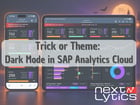
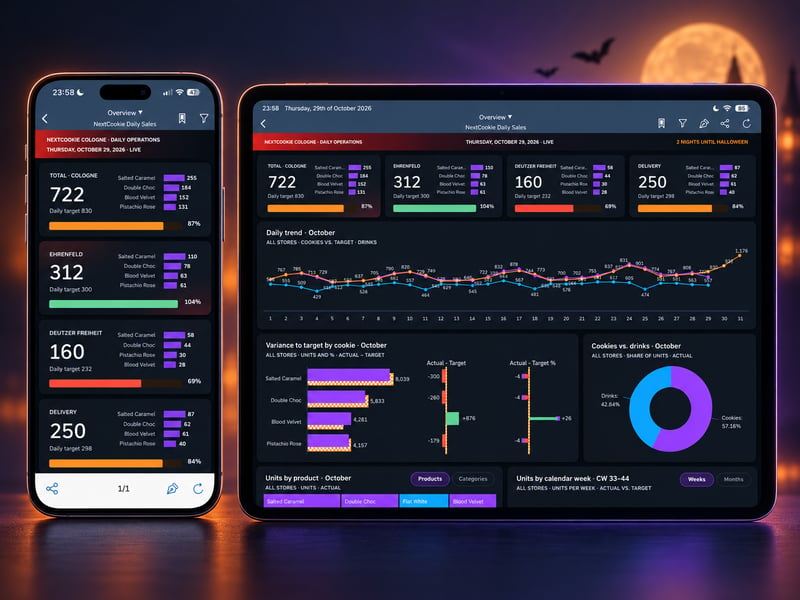 NextCookie Cologne in dark mode on tablet and smartphone
We look at what makes a good dark mode, what SAC brings to the table and where it gets spooky. Plus a checklist and a short detour to IBCS.
Why use dark mode for SAP Analytics Cloud dashboards?
In dimmed rooms, a dark mode is easy on the eyes, on wall screens and in control rooms it looks calm, and the data stands out like actors under a spotlight. For dashboards in particular, a dark design also sends a clear signal: this is a live operational view, not a printed monthly report.
But how common is dark mode, really? In polls among tech fans, more than 80 % use dark mode; measured by actual web traffic, it was closer to one page view in five in the early 2020s. Our estimate: today, somewhere between a quarter and a third of users prefer dark - more on smartphones and in the evening, less at the office desk. Whether a dark mode pays off only shows once someone actually uses it. Otherwise it lingers like an invisible ghost in the theme folder, slowly gathering cobwebs.
Where dark doesn't help: long texts, printed-out dashboards and screenshots for presentations still work better on a light background. So a dark mode is an option for the right context, not a replacement.
A good dark mode is not an inverted light mode
Probably the most common mistake: simply inverting the colours. Light behaves differently on a dark background, so a dark mode needs its own rules. The design systems of Google (Material Design) and Apple agree surprisingly well on the basics. For our showcase, we derived the following rules:
- No black, but a dark brand colour. Pure black makes every element look like a hole. We took the hue of our corporate dark blue and only changed the lightness: page #0B1018, cards #131A25, raised surfaces #1A2330
- Depth through lightness, not borders. The higher the layer, the lighter the surface. Shadows only work if they are soft and wide
- Bright means saturated, not light. Pastel colours look washed out on a dark background. A strong violet glows, a light beige just looks grey
- Every colour has exactly one job. No colour stands for two things
- No hard lines. On a dark background, every thin bright edge jumps out immediately
- Text one step brighter than you think. Grey labels that are easy to read on your own monitor while building often disappear on a projector or other devices, especially on weaker screens
As a general rule: The WCAG (Web Content Accessibility Guidelines), the international guidelines for accessible web content, require a contrast ratio of at least 4.5 : 1 for normal text. In plain terms: the text has to be clearly brighter than the surface behind it. A medium grey on dark blue fails quickly, and a free contrast checker tells you in seconds.
Important, because the two are often confused: Dark mode is not high contrast. Dark mode is about comfort and atmosphere, high-contrast modes are an accessibility feature for people with low vision. A dark dashboard with soft glows and layered greys is almost the opposite of high contrast and shouldn't be sold as an accessibility measure.
Does SAP Analytics Cloud have a dark mode? Interface vs. story theme
Yes, SAC has a dark mode, out of the box. Since the Horizon redesign, every user can choose in their profile between Morning Horizon (light), Evening Horizon (dark) and the two high-contrast variants. The catch: this only applies to the SAC interface, i.e. home screen, menus, toolbars and dialogs. Switch to Evening Horizon and you sit in a dark SAC in front of a light dashboard. The look of the dashboards is controlled by the story theme alone. So light and dark in SAC always means two themes, for example Company_Light and Company_Dark.
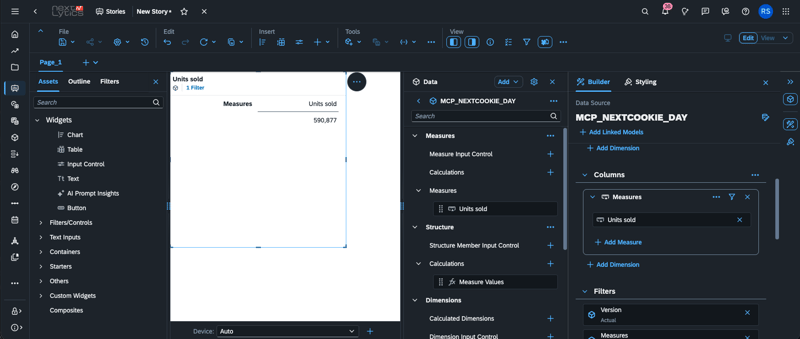 A dark interface is not a dark dashboard yet
And this is where it gets a little spooky. The obvious idea would be for the story to follow the interface: user A works with Morning Horizon and gets the light company theme, user B with Evening Horizon automatically gets the dark one. As of QRC3.2026, this isn't possible, because the story cannot query which interface theme the user has selected. Scripting only knows the theme of the story itself (Application.getTheme()), and Application.getUserInfo() only returns ID and display name. So the story simply doesn't know whether it's light or dark outside.
What remains is a switch in the story that lets users toggle between light and dark themselves (Application.setTheme()). For a fixed entry point, for example on a wall screen, the theme can also be passed as a URL parameter. What we'd like to see is a command that reads the user's interface theme. The story could then load the matching theme automatically on opening. We'll see…
And the mobile app? It stays light, whether you like it or not. The SAP Analytics Cloud app for smartphone and tablet has no dark mode and is neither Morning nor Evening Horizon - it's still stuck in the old design. Next to the browser in its new Horizon look, it feels a bit like the guest who missed the invitation to the costume party. An update is badly needed.
Dashboarding with SAP Analytics Cloud - Download the whitepaper here!
Which SAC story theme works best for dark mode?
If you don't choose a theme of your own, you now automatically get a Morning Horizon look. SAP delivers the story theme “SAP Morning Horizon (Light)” as standard - a solid, light starting point without much complexity. There is no dark counterpart yet, but the “(Light)” in the name already hints at where this is heading: SAP is working on bringing the Horizon themes from the community into the standard.
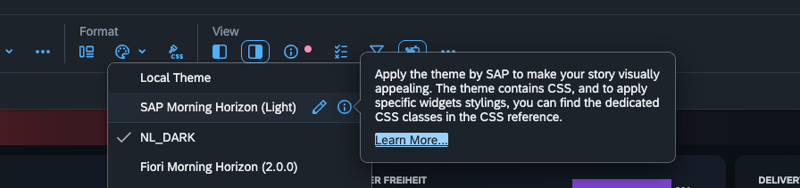 Theme selection in the story - “SAP Morning Horizon (Light)” comes from SAP, followed by community and custom themes
Everything below the divider is imported or self-built, including “Fiori Morning Horizon” and “Fiori Evening Horizon”. They come from the SAP Community, were published on GitHub together with story templates in April 2024 and have been developed further since. That makes Fiori Evening Horizon the most obvious starting point for a dark dashboard, and it already comes with CSS classes for cards, buttons and texts. Our theme NL_DARK started exactly like that: as a copy in which we mapped every SAP colour to a brand colour.
Besides the theme, there are a few more knobs to turn:
| Where | What you control | Good to know |
| Theme | Colour palettes, canvas background, widget defaults, corner radius | The foundation, this is where most of the look comes from |
| Theme CSS | Styling of entire widget classes, including SAC-internal elements | More permissive than story CSS: gradients, hover shadows, overflow and outline work |
| Story CSS | Styling via your own classes | Strict allow list: no gradients, no padding/margin, no animations |
| Layout | Panels, flow layout panels, widths in %, breakpoints | The only way to control spacing |
| Scripting | CSS classes, sizes and filters at runtime | Makes tiles clickable and progress bars move |
Treats - what works well
-
A complete dark theme that recolours existing stories without touching a single widget
-
Soft glows with radial-gradient and box-shadow in theme CSS
-
Fixed colours per member and measure, plus patterns per version (actual solid, target hatched)
-
Responsive layouts with flow layout panels and breakpoints
Tricks - where it gets spooky
-
No custom fonts, no animations, no spacing via CSS
-
Panels have neither a hover state nor a click event. So we placed transparent buttons on top of the tiles
-
Time axes with hierarchies always show their parent levels (Oct / Q4 / 2026) below the labels, and flat time attributes sort as text (1, 10, 11 … 2)
-
Theme CSS needs care. A single invalid rule, for example :hover on a panel, and the entire stylesheet is discarded. On top of that, stories keep their own copy of the theme CSS
-
Lots of eye candy costs performance
By the way, the dark side of SAC isn't new. Back in 2021, the SAP Community showed a light/dark switch for Analytics Designer, and dark dashboards were already possible in SAP Lumira Designer. It just never really caught on. What we added is light - gradients, glow effects and hover states in theme CSS.
The showcase: NextCookie Cologne
The dashboard shows Thursday, 29 October 2026, two nights before Halloween. A fictional bakery chain with two stores and a delivery service wants one question answered above all: are we on target today? Everything else on the page explains why.
Reading order: from today backwards
-
Four KPI tiles - total plus one each for the two stores and the delivery service, each with units sold, daily target, progress bar and the top 4 cookies. A click on a tile filters all charts below
-
Daily trend in October - cookies actual, cookie target and drinks. The target line continues to 31 October, so you can see the Halloween peak that is still ahead
-
Variance to target by cookie, next to a donut cookies vs. drinks
-
Units by product as a treemap (switchable to categories), next to units by calendar week (switchable to months)
Colours with exactly one job
| Colour | Hex | Meaning |
| Neon violet | #9D4BFF | Actual (cookies) |
| Pumpkin orange, hatched | #F28C28 | Target (recognisable by the hatching) |
| Light blue | #1EA7FF | Drinks |
| Red | #EF4135 | Highlight of the active tile |
| Traffic light: red / orange / green | #E5533D / #F28C28 / #6CC08B | Progress towards the daily target: below 75 %, 75–95 %, above |
You won't find any legends. Instead, every card has a short subtitle in capitals that says what you are looking at, for example “ALL STORES · COOKIES VS. TARGET · DRINKS”.
Light instead of lines
The tiles have no visible border; a soft shadow lifts them off the page. On hover, a tile lights up from the top left, and the active tile gets a subtle red highlight from the bottom right. It took a good dozen rounds to get there.
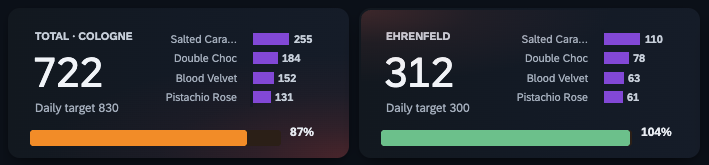 KPI tiles – left one active with red highlight
Fixes in the model, not in the chart
Two details could only be solved in the data model. For cookies vs. drinks, the products got a category hierarchy. And for clean, correctly sorted time axes, we added two small helper dimensions: day of month (01–31) and calendar week (CW 1–53). Sometimes the shortest way to a nice chart is a detour through the model.
Is a dark dashboard IBCS-compliant?
Anyone who works a lot with financial reporting will be asking this question by now. The short answer: nothing. The IBCS Standards have no rule of their own on dark mode. The closest is the recommendation to avoid coloured or filled backgrounds - and strictly speaking, a dark page is exactly that.
On top of that, IBCS notation assumes a light page: actuals in dark grey, previous year in light grey, plan as an empty outline. On a dark background the greys have to be swapped and the empty outline loses its meaning – SAC even fills it white in a dark theme. That's why the target in our showcase is hatched, a pattern IBCS actually reserves for forecasts. So our dashboard borrows ideas from IBCS, but is deliberately not an IBCS report.
To avoid any misunderstanding: SAC can do IBCS, and does it pretty well. It is certified by the IBCS Association and comes with the necessary building blocks, such as variance charts, consistent scaling across multiple charts and patterns for versions like actual, plan and forecast.
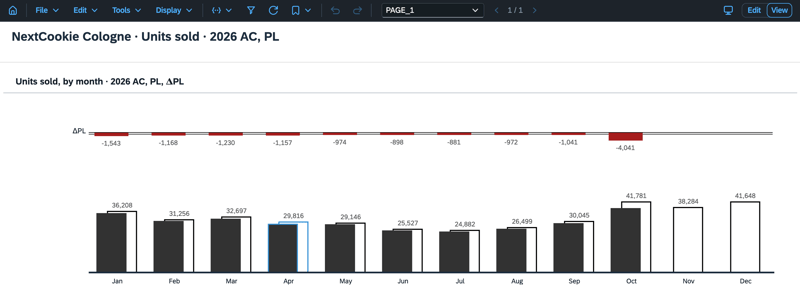 IBCS-compliant dashboard in SAP Analytics Cloud
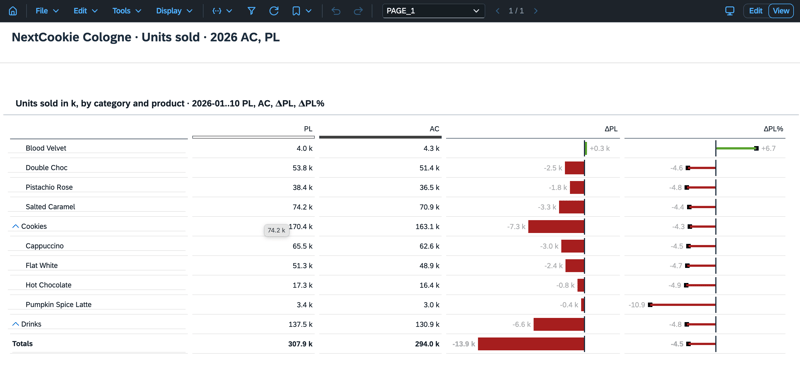 Variance analysis according to IBCS in SAC
Our recommendation: for day-to-day operations on a wall screen, dark is perfectly fine. For the IBCS-compliant management report, better stay in the light.
Checklist: building a dark story in SAP Analytics Cloud
-
For light, the standard “SAP Morning Horizon (Light)” is often enough; for dark, start with Fiori Evening Horizon and map its colours to your own brand
-
Dark brand colour instead of black, separate layers by lightness
-
Saturated data colours, each with exactly one meaning
-
Put effects in theme CSS, maintain them in one file and test after every change
-
Replace legends with clear subtitles
-
Build the page from today backwards: KPIs, trend, breakdown, history
-
Toggles instead of near-identical charts
-
If a chart fights back, check the model first
-
Solve light and dark with two themes and a switch - the interface's dark mode doesn't recolour the story
-
Don't sell dark mode as accessibility, that's what the high-contrast themes are for
SAP Analytics Cloud Dark Mode: Our Conclusion - spooky beautiful instead of just dark
SAC can look much darker - and much better - than its defaults suggest. The theme does most of the work, layout and a little scripting do the rest. The real challenge isn't the technology, it's restraint: fewer colours, no hard lines and one clear starting point. Or, to stay with Halloween: a few well-placed pumpkins do more than a fully dressed-up front garden.
One more spooky thought before we go. This story, the data model and the theme were built by a ghostly hand… what exactly that means, we'll only reveal next week.
Would you like to put your SAC stories in the right - or dark - light too? Whether it's dark mode, a corporate theme or the redesign of an existing dashboard: Just get in touch with us - we look forward to hearing from you!
Happy Halloween!