Skip to content
NextLytics
Megamenü_2023_Über-uns

Shaping Business Intelligence

Whether clever add-on products for SAP BI, development of meaningful dashboards or implementation of AI-based applications - we shape the future of Business Intelligence together with you. 

Megamenü_2023_Über-uns_1

About us

As a partner with deep process know-how, knowledge of the latest SAP technologies as well as high social competence and many years of project experience, we shape the future of Business Intelligence in your company too.

Megamenü_2023_Methodik

Our Methodology

The mixture of classic waterfall model and agile methodology guarantees our projects a high level of efficiency and satisfaction on both sides. Learn more about our project approach.

Products
Megamenü_2023_NextTables

NextTables

Edit data in SAP BW out of the box: NextTables makes editing tables easier, faster and more intuitive, whether you use SAP BW on HANA, SAP S/4HANA or SAP BW 4/HANA.

Megamenü_2023_Connector

NextLytics Connectors

The increasing automation of processes requires the connectivity of IT systems. NextLytics Connectors allow you to connect your SAP ecosystem with various open-source technologies.

IT-Services
Megamenü_2023_Data-Science

Data Science & Engineering

Ready for the future? As a strong partner, we will support you in the design, implementation and optimization of your AI application.

Megamenü_2023_Planning

SAP Planning

We design new planning applications using SAP BPC Embedded, IP or SAC Planning which create added value for your company.

Megamenü_2023_Dashboarding

Business Intelligence

We help you with our expertise to create meaningful dashboards based on Tableau, Power BI, SAP Analytics Cloud or SAP Lumira. 

Megamenü_2023_Data-Warehouse-1

SAP Data Warehouse

Are you planning a migration to SAP HANA? We show you the challenges and which advantages a migration provides.

Business Analytics
Megamenü_2023_Procurement

Procurement Analytics

Transparent and valid figures are important, especially in companies with a decentralized structure. SAP Procurement Analytics allows you to evaluate SAP ERP data in SAP BI.

Megamenü_2023_Reporting

SAP HR Reporting & Analytics

With our standard model for reporting from SAP HCM with SAP BW, you accelerate business activities and make data from various systems available centrally and validly.

Megamenü_2023_Dataquality

Data Quality Management

In times of Big Data and IoT, maintaining high data quality is of the utmost importance. With our Data Quality Management (DQM) solution, you always keep the overview.

Career
Megamenü_2023_Karriere-2b

Working at NextLytics

If you would like to work with pleasure and don't want to miss out on your professional and personal development, we are the right choice for you!

Megamenü_2023_Karriere-1

Senior

Time for a change? Take your next professional step and work with us to shape innovation and growth in an exciting business environment!

Megamenü_2023_Karriere-5

Junior

Enough of grey theory - time to get to know the colourful reality! Start your working life with us and enjoy your work with interesting projects.

Megamenü_2023_Karriere-4-1

Students

You don't just want to study theory, but also want to experience it in practice? Check out theory and practice with us and experience where the differences are made.

Megamenü_2023_Karriere-3

Jobs

You can find all open vacancies here. Look around and submit your application - we look forward to it! If there is no matching position, please send us your unsolicited application.

Blog
NextLytics Newsletter
Subscribe for our monthly newsletter:
Sign up for newsletter
 

NextTables for SAP BW: validated, authorized and auditable data maintenance

NextTables for SAP BW

Your business teams can read SAP Business Warehouse (BW). Changing what is in it has always been IT's job. NextTables is an SAP add-on that gives them the maintenance grid SAP BW never had: a familiar spreadsheet-style grid, with search help that finds the right value in your master data. Your SAP authorizations keep every change in scope.

It runs inside your own SAP system. We install and configure it, we extend it where a table needs it, and we support it in the landscapes we build for you.


NextTables started here

NextTables was built inside NextLytics. It began as an answer to a problem our consultants kept meeting on SAP Business Warehouse projects, it grew into a product in its own right, and since September 2025 it has been an independent company, NextTables GmbH. The first systems it ever ran in were our customers' SAP landscapes.


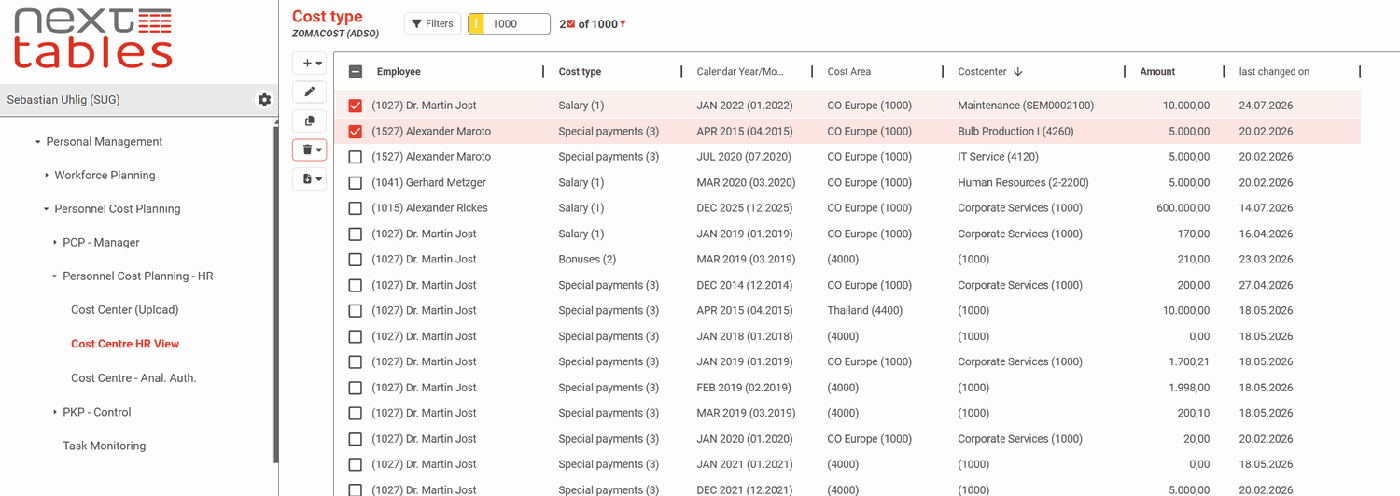
The NextTables grid running inside SAP BW

The maintenance gap you work around on every project

 We meet this on nearly every SAP BW project we run, usually somewhere between the second modelling workshop and UAT. 

What happens today

A cost centre mapping changes. Someone asks around for the current version, maintains it in Excel, and hands the file to IT to load. It fails somewhere in the ETL run, the SAP team has to pick it up, and by the time it lands the report has already been wrong twice.

Why it keeps happening

The process simply has no step in it where a business user changes a value. Every row in your SAP BW is authorized and audited. The way people change those rows is a spreadsheet and a handover.

 | The distinction worth holding on to is not where the editing happens. It is whether a value is validated as it is entered, or loaded and hoped for. |

The failed load, the correction cycle and the report that was wrong twice all follow from that one difference. NextTables closes the gap inside the system you already run, and we are the people who put it there and keep it running.

An add-on inside the SAP system you already run

NextTables sits in its own dedicated namespace alongside your objects, and runs on the hardware your Basis team looks after. Your users open it in their browser.

  • Everyone signs in with their own SAP user, and sees exactly the apps, tables and rows their SAP authorizations allow.
  • Configuration travels by transport request, so your release process stays your release process.
  • Installation, the first tables, the authorization design and the transport route are part of the work we do on a project.

Out of the box

Out of the box

Your Basis team imports the transports the same way it imports everything else.

 
SAP BW/4HANA built and tested
SAP S/4HANA built and tested
SAP BW on HANA built and tested

From reading SAP BW to maintaining it

Your business users could only read SAP BW. Now they maintain it, right where the data lives.

Icon Daten-Pflege

Built for business teams

Inline edits, multi-row changes, paste straight from Excel, and imports that come back with a row-by-row validation report. Search help resolves the right value against your SAP BW master data.
Icon DQM

Validated, authorized, auditable

Every entry is validated before it is written. Access is your SAP analysis authorizations, inherited unchanged, down to the row. And every change is accountable, through the ADSO change log or locked "last changed" fields we set up by configuration.

Icon Pfeil Kreis

Ready for what comes next

When you modernize onto SAP Business Data Cloud or SAP Datasphere, the same maintenance capability is there in the cloud edition. Both editions are current products, and we implement both.

What your team can do

Edit SAP BW data like a spreadsheet

Your team changes a mapping, a classification or a figure that needs correcting, one cell or a thousand rows at a time. Multi-row edits, clipboard paste from Excel, and validation running field by field as people work.

  • The business maintains its own data.
  • On your analysis authorizations, down to the row.
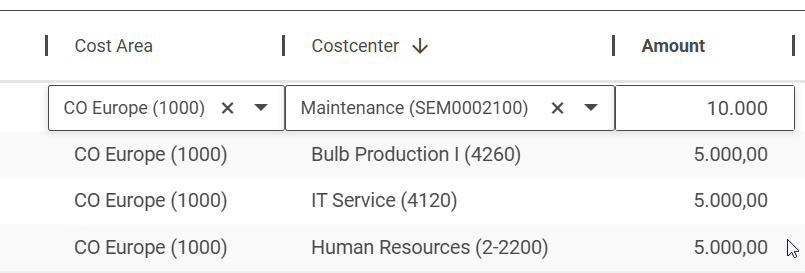
Editing SAP BW data in the NextTables grid
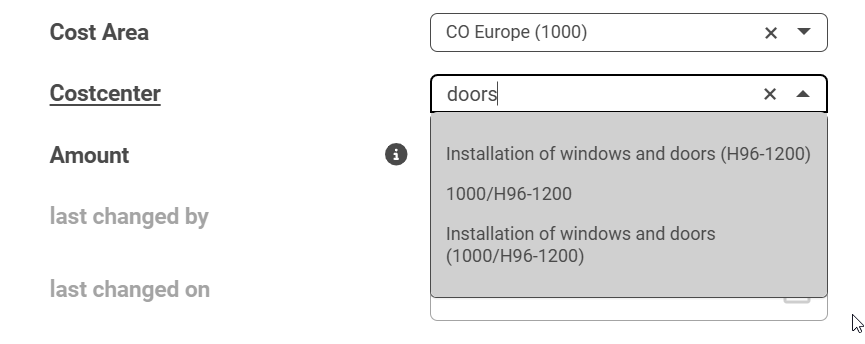
Search help resolving a value against SAP BW master data

Land on the right value, every time

Search help reads your SAP BW master data as your team types. Fuzzy search finds near matches on SAP HANA even with a typo, and a column can be set to require a valid value before the row saves.

  • The right code, found by name.
  • Values that already exist in your master data.

Bring in a spreadsheet, checked as it lands

Drop an Excel or CSV file into the grid and every row is checked against your rules before anything is written. Currency symbols stripped, formats normalized, duplicate keys flagged. Rows that still fail stay out of SAP BW.

  • Bulk changes at spreadsheet speed.
  • Every row validated before it reaches SAP BW.
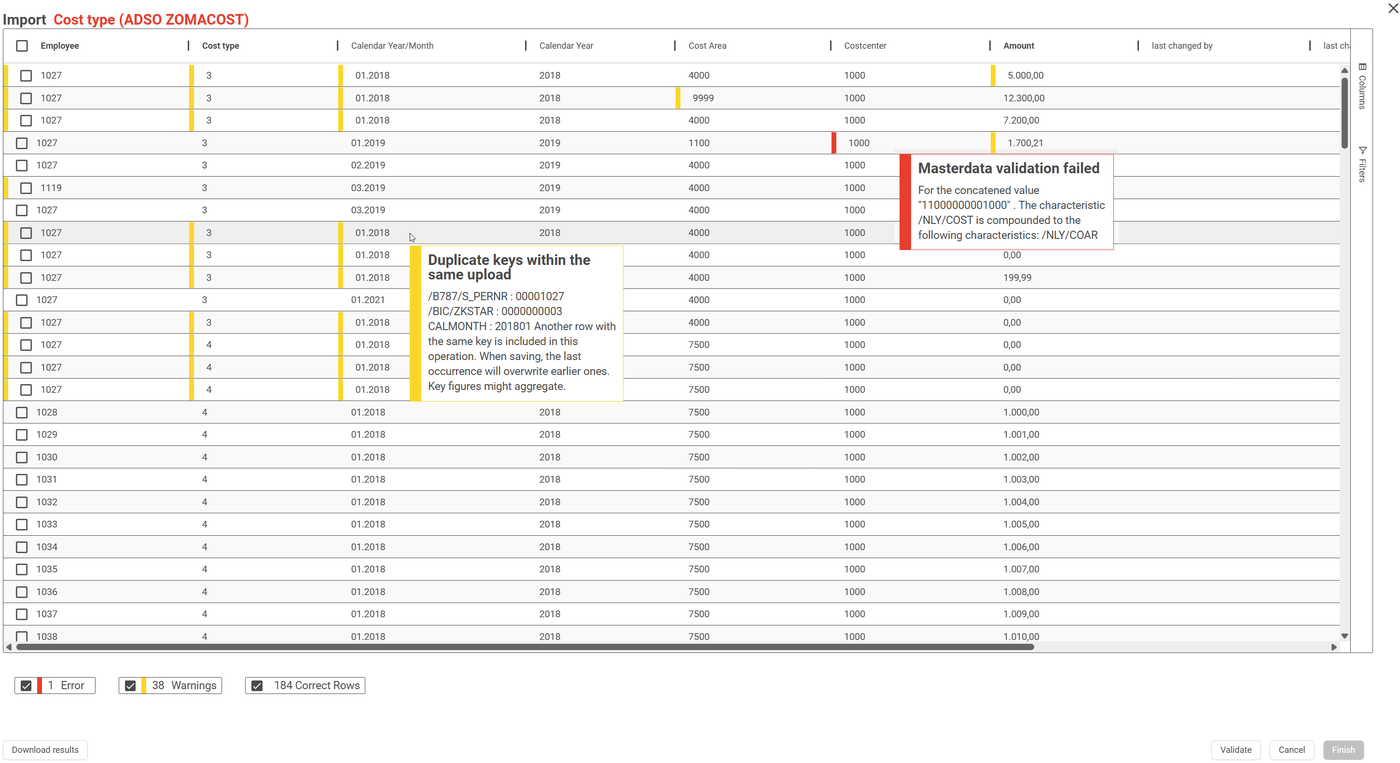
Row-by-row validation of an imported spreadsheet
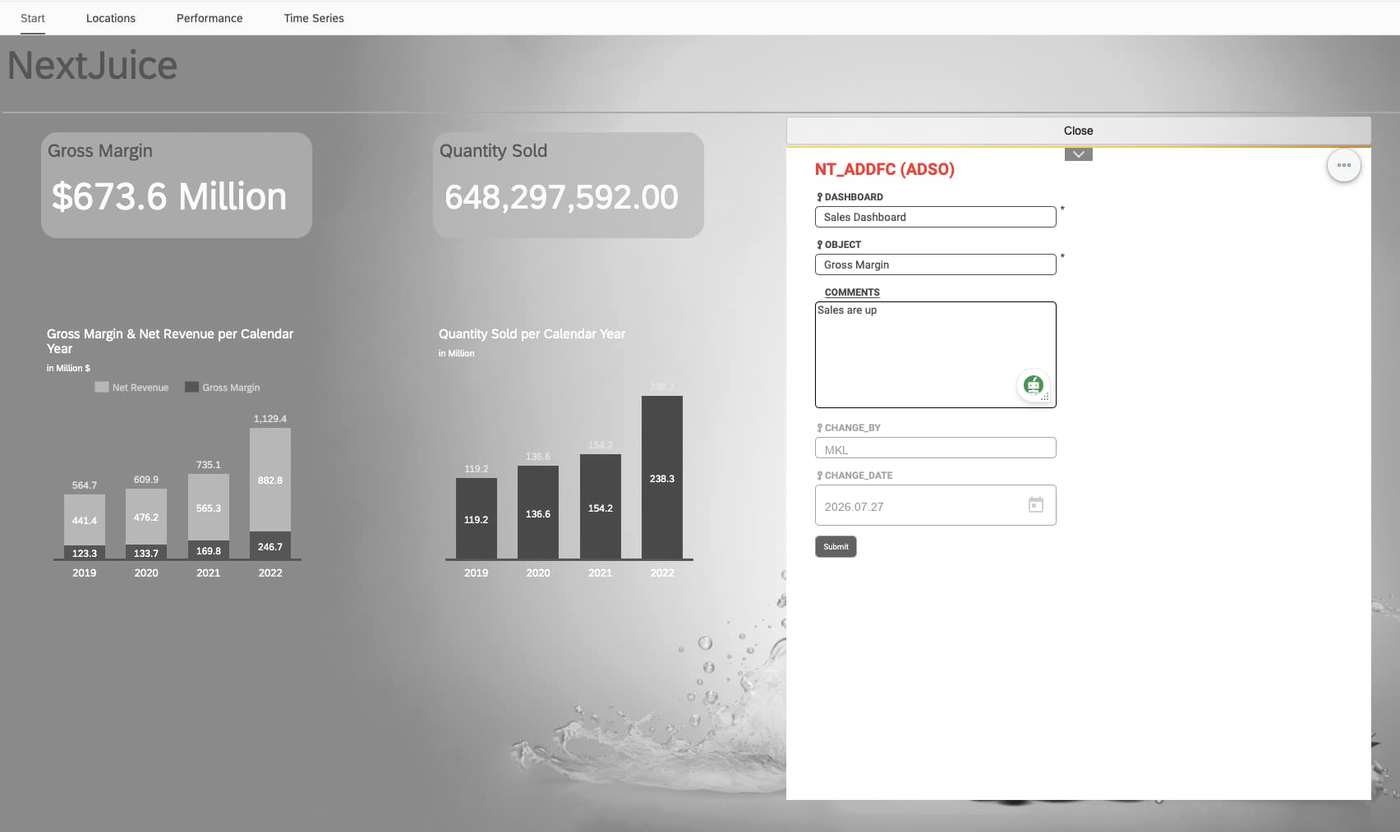
A NextTables entry form embedded in a dashboard

Maintain the data from inside the dashboard

The grid embeds as a web object in any BI tool that supports them, so someone fixes a number in the report where they spotted it. URL parameters open the embedded grid filtered to the record in view.

  • Maintenance happens where the decision happens.
  • The same validation, embedded or standalone.
What else is in the grid

More that your team gets, beyond the four above.
Fuzzy search Finds near matches on SAP HANA, even with a typo.
Pivot and export Reshape the grid, take it out to Excel.
Global filters Filter once, across the whole application.
Bookmarks Save a view and come back to it.
User templates Per-user starting points for repeat work.
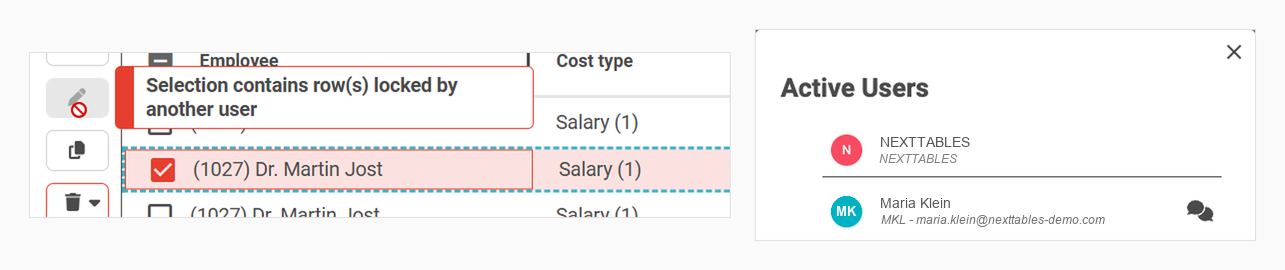
Real-time presence Rows lock live while a colleague edits.
Documentation per language Held with the table, not in a separate file.
Header and item tables Both on one screen.
Applications A menu your team arranges.
Table aliases One table, several business-facing names.
Import monitor Every import, and what happened to it.
Your own branding Your logo, palette and fonts.
Real-time presence: a row locked while a colleague edits itReal-time presence. A row locks while a colleague edits it, and you can see who.
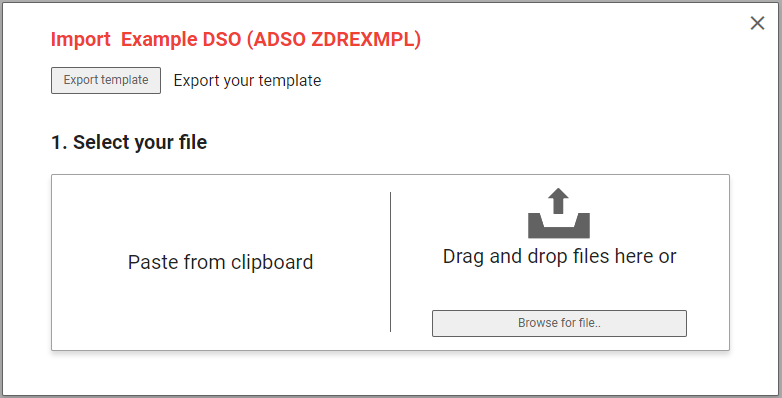
The NextTables import dialog, with paste and drag-and-drop optionsThe import monitor. Paste or drag a file in, and watch every row as it lands.

How a change moves, from a business edit to a trusted report

1


A business user edits

In the grid, or as a bulk import from a file.

2


Validated at entry

Checked against your master data and your rules before anything is written.

3


Written to your ADSO

Straight into SAP BW, on your analysis authorizations.

4

Live in every report

Your report picks the change up on the next refresh.

 |The step that changes the economics is the second one: a value validated at entry never becomes an overnight load failure and a morning of somebody's time.|

Live in minutes, and shaped in ABAP where it matters

Most tables

In minutes, by configuration

Add a table, an ADSO or an InfoObject through the wizard, set the column rules, and it is live.

The exceptions

Extended with ABAP

The high-value few.

Your ABAP team stays free for the exceptions, and that is where the value is.

Most tables: by configuration

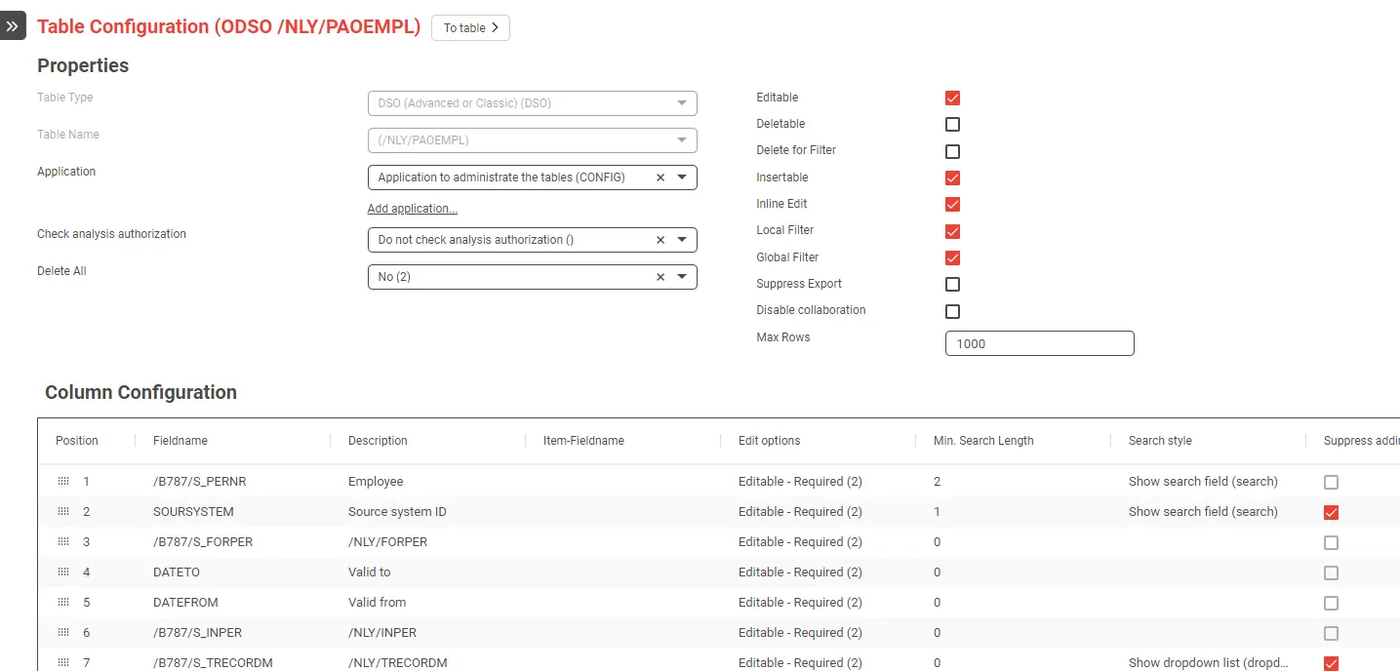
Most tables are ready to maintain in minutes, through configuration alone: add a table, an ADSO or an InfoObject through the wizard, set the column rules, and it is live. Your ABAP team keeps its backlog for the work that needs them.

  • Bring in a DDIC table, a DataStore object or an InfoObject through the wizard.
  • Set per-column rules, value help, locks and required fields as settings.
  • Group tables into applications a department recognizes.
  • Ship it the way you ship everything else, by transport request.

Time saving

Set up by wizard

The common case is a configuration job, and it travels by transport like the rest of your SAP changes.
008-comments-summary


The exceptions: extended with ABAP
For those exceptions, NextTables opens up through standard SAP BAdIs, so your team shapes exactly how a table behaves. This is ordinary ABAP work in your own system, and it is the part of an implementation we most often do for you.
Icon Daten-Pflege

Validation as far as ABAP goes

Any rule you can express, from a required field to a cross-system lookup, before the row is written.

Icon DQM

Shape the read, write and metadata

Derive a field on save, or go as far as a fully virtual table your own logic composes and writes back.

Icon Pfeil Kreis

Custom buttons and process chains

When you modernize onto SAP Business Data Trigger an SAP BW process chain the moment data lands, so the next load starts itself.

 All three are Enterprise edition. 

Why work with us on NextTables

NextTables was built inside our own SAP practice, and although it is an independent company today, our consultants wrote it. That shows up in the two things hardest to buy in: knowing which tables are worth onboarding first, and knowing what the product does when a table is awkward.

Most of the time the alternative is a custom write-back build. We have delivered plenty of those, and we know what they cost after go-live. The form is the easy part. Validation that holds against your master data, row-level access that survives an authorization review, and a change record somebody can read in two years are what take the budget, and they get rebuilt from scratch on the next project. Configuring NextTables gives you all three once, and again on the project after that.

NextTables consultant

20+ customers

Across 30-plus releases and counting.

What we do on a NextTables engagement
  • Installation and system setup. Transports, the namespace, and the connected development, QA and production systems.
  • Table onboarding. Choosing the tables that carry real maintenance load, and grouping them into applications a department recognizes.
  • BAdI development. The high-value exceptions, in ABAP, in your own system, under your transport process.
  • Authorization design. Mapping your SAP analysis authorizations onto who may maintain what.

  • The path to the cloud edition. If your platform is heading for SAP Business Data Cloud or SAP Datasphere, we plan the crossing with you.
Four ways we engage


Assess

A short review of where business-maintained data is costing you time today, and which tables are worth starting with.

Pilot

One department, a handful of tables, live in your development system, so the business sees it working before you commit.

Roll out

Installation across development, QA and production, the authorization design, and the tables that carry real maintenance load.

Enable

Your team takes over the configuration, and we stay for the exceptions.

Tell us which tables are costing your team the most time. We will tell you what an implementation looks like on your landscape.

Icon DQM
Running on SAP S/4HANA?

Business teams maintain custom tables directly, in a validated grid, with access decided by the SAP authorizations you already run.

  • Any custom table, your own Z tables included.
  • The data in your embedded SAP BW, the same way.
  • The same add-on, the same licence, the same transport route.

Icon DQM

Or the cloud edition

Both editions are current products and the maintenance capability is the same on each. Start where your data is.


  • SAP BW: inside your SAP system, your SAP users.
  • Cloud: on your data platform, enterprise SSO.

See NextTables Cloud

Read the full comparison on NextTables.

A product with a track record

NextTables is used by more than 20 customers across 30-plus releases and counting. It now has a published release history of its own, and product details, pricing, the knowledge base and the release notes all live at nexttables.com. We have been implementing it since the first version, and we still do.

See the release notes

Questions a platform owner asks first

Where does our business data live?

Inside your own SAP system. NextTables for SAP BW is an add-on that runs there, writing to your ADSOs, DDIC tables and InfoObjects in place. The data your reports read is the data your business users edited, in the system your Basis team already backs up and audits.

How is access controlled?

Through your existing SAP analysis authorizations, inherited unchanged, down to the row, plus a thin app-access layer deciding which apps and tables a role may open. People sign in with their own SAP user. When the authorization values themselves need maintaining, they are a table like any other, and teams keep them current in NextTables.

How do we see who changed what?

Through your ADSO change log, or through locked "last changed" fields we add by configuration and the system stamps on every row. Both sit inside your own SAP system, on the same backup and the same audit regime as everything else in it.

How is data validated day to day?

Checks run at entry, field by field, against your SAP BW master data, so a wrong value is caught before it is written and the user has the answer on leaving the cell. One field's rule can depend on what another field holds. Imports are checked the same way, row by row.

How far can we take custom validation?

As far as ABAP goes. Validation runs in a standard SAP BAdI, so any rule your team can express runs before the row is written, from a required field to a cross-system lookup. Errors block the save; warnings let the row through with a note. Custom BAdI logic is part of the Enterprise edition, and it is work our ABAP consultants do.

Can it maintain data that lives in more than one table?

Yes. With your own read logic, NextTables composes the grid from wherever the data actually lives, a join, a calculation, a value from another system, and writes changes back where they belong. If it fits in a grid, your team can maintain it. This uses the standard editor BAdI and is part of the Enterprise edition.

How do changes reach production?

Through your SAP transport system. Application settings, menu entries, table and field configuration and templates travel by transport request, and BAdI implementations are standard enhancements that move with everything else your team ships. Your existing release process is the release process for NextTables.

Can a table sit inside a dashboard?

Yes. The grid embeds as a web object in any BI tool that supports them, so someone corrects a figure in the report where they spotted it. Pass parameters in the URL and the embedded table opens filtered to the record in view. A single-record entry form embeds the same way.

Which SAP releases are supported?

SAP BW/4HANA, SAP S/4HANA and SAP BW on HANA. In an SAP S/4HANA system it maintains your own custom tables and the data in an embedded SAP BW. DDIC tables, DataStore objects and InfoObjects are read and written; ABAP CDS views are read through DDIC.

How is it licensed?

One licence per productive system, covering the connected development, QA and sandbox systems too. Every authorized SAP user can work in it, so user numbers stay out of the calculation. Choose an annual subscription or a one-time purchase. Professional covers everyday maintenance. Enterprise adds the ABAP extension points, which is where our BAdI work sits. The current split and the prices are published at nexttables.com/en/sap-bw/pricing.

More on NextTables from our blog

Row level security for Power BI on Databricks: enforce & keep current

It is Monday morning and three requests are already sitting with the platform team. “Add Sara to...

Row level security for Power BI on Databricks: enforce & keep current

How to Fix the Gaps in SAP Datasphere's Standard Time Dimension
Your report is done and the numbers are correct, but the calendar labels display raw technical...

How to Fix the Gaps in SAP Datasphere's Standard Time Dimension

SAP Seamless Planning: Three Ways to Integrate External Data
In our first blog post on Seamless Planning, we introduced the basics of this new integration...

SAP Seamless Planning: Three Ways to Integrate External Data

See it on your own SAP BW

Every month it waits is another month of exports, failed loads and handovers. We will walk your landscape with you, name the tables worth starting with, and tell you plainly what an implementation involves and what it does not.


Table Of Contents