/Logo%202023%20final%20dunkelgrau.png?width=221&height=97&name=Logo%202023%20final%20dunkelgrau.png)


















Hardly any other topic is currently shaping the SAP Analytics Cloud roadmap as much as artificial intelligence. With its AI Premium features, SAP is tackling precisely those tasks that consume the most time in day-to-day work: writing scripts, documenting logic that has evolved over time, analysing planning comments and creating presentations.
We have put the AI features through their paces. With mixed results. In this article, we describe which features are already ready for productive use and where further improvements are still needed.
How does SAP Analytics Cloud AI create and document Advanced Formulas in Data Actions?
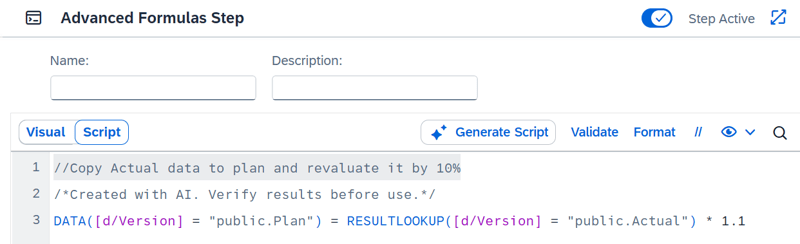
The first premium feature is aimed at developers who work with data actions for planning applications. The ability to create scripts using natural language is particularly useful. Users can describe what the calculation is intended to do in a comment and the AI generates the appropriate script from this.
It is a particularly welcome aid for power users in the business departments. Instead of having to memorise syntax and function libraries, you simply state your business requirements and receive a ready-to-run script suggestion.
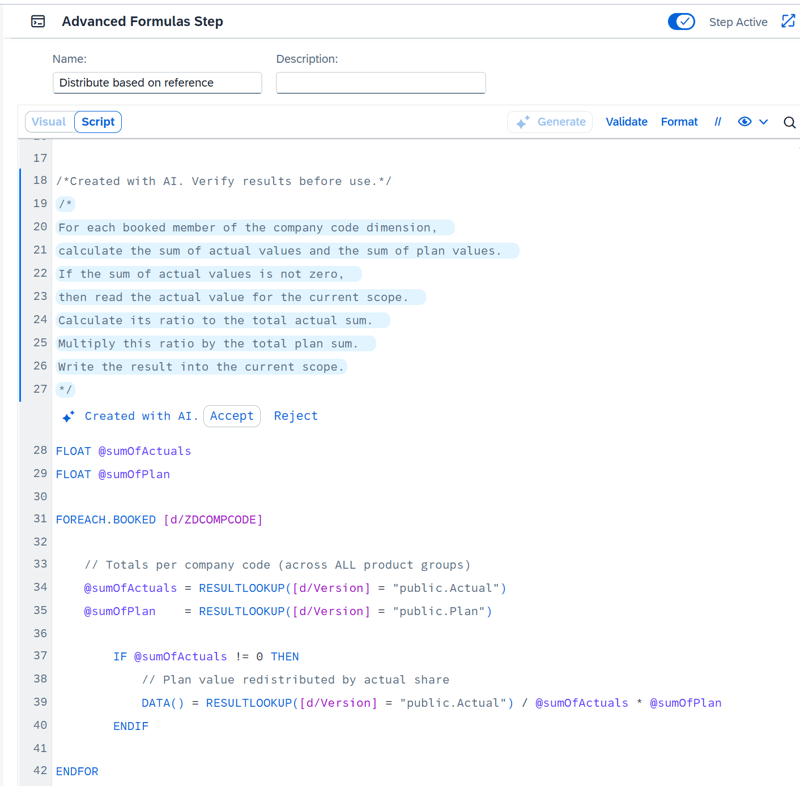
The reverse process works as well. AI generates understandable comments from an existing script. This is particularly helpful for data actions where the logic is not documented or where the original authors are no longer involved in the project.
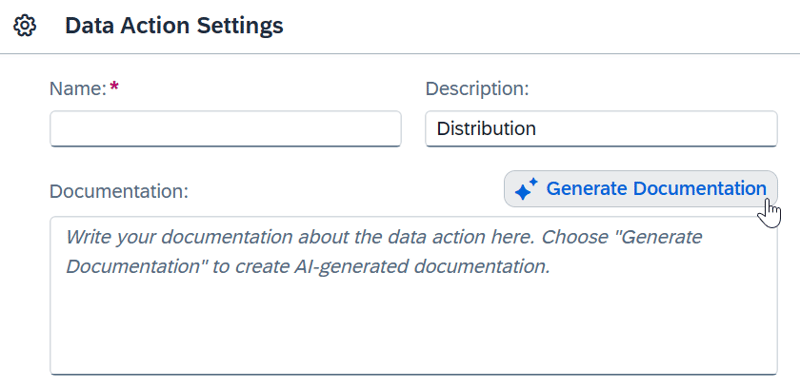
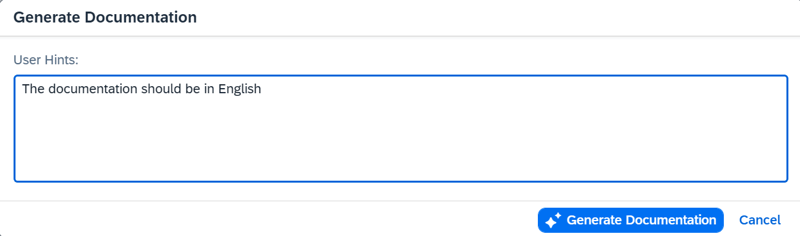
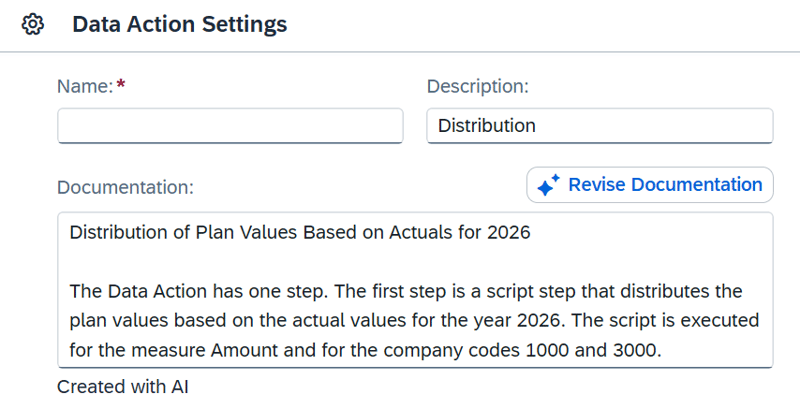
Furthermore, AI can also be used to document the entire data action. At the touch of a button, a detailed description is generated. Something that, in practice, is often rather brief, if it is provided at all, due to time constraints.
When making subsequent adjustments to the data action, you can use AI to check the documentation and also provide hints to rewrite the documentation.
With these features, SAP promises significant time savings when working with data actions. Creating Advanced Formulas scripts should become noticeably faster, as a comment written in natural language is sufficient as a starting point and the AI derives the script suggestion from this. At the same time, AI automatically generates clear comments from existing code, thereby reducing the effort involved in documentation and knowledge transfer. As a result, valuable knowledge is permanently retained within the system and is not tied to individual people. At the same time, getting started with advanced formulas is made significantly easier, even for users with little scripting experience.
However, our test yielded mixed results. For instance, the creation of simple revaluation functions worked right away. However, when it came to distribution based on reference values, where target values were to be allocated based on actual values, the AI reached its limits. Even after several attempts, the generated code could not be validated and required manual adjustments. The AI made errors not only in the calculation logic but also in the basic syntax. We would have expected more from a built-in AI with such a narrowly defined scope, especially since this is a premium feature that is charged per prompt.

When documenting the distribution function, the test results also varied. Sometimes, the AI documented the individual technical steps without mentioning the core of the function, the distribution itself. In other attempts, however, the AI provided concise business-oriented comments. The test with Opus 5, on the other hand, provided an accurate explanation on the very first attempt, complete with a summary and a step-by-step analysis.
Surprisingly, documenting the entire data action worked right on the first try. AI correctly recognized that it involves a distribution based on actual values. Interestingly, AI wrote one sentence in English and the others in German.
Dashboarding with SAP Analytics Cloud - Download the whitepaper here!
AI-assisted calculations in SAP Analytics Cloud Data Analyzer
AI-powered calculations enable Data Analyzer users to create calculation formulas using natural language. They describe the desired result in their own words, whereupon the AI automatically generates a suitable formula.
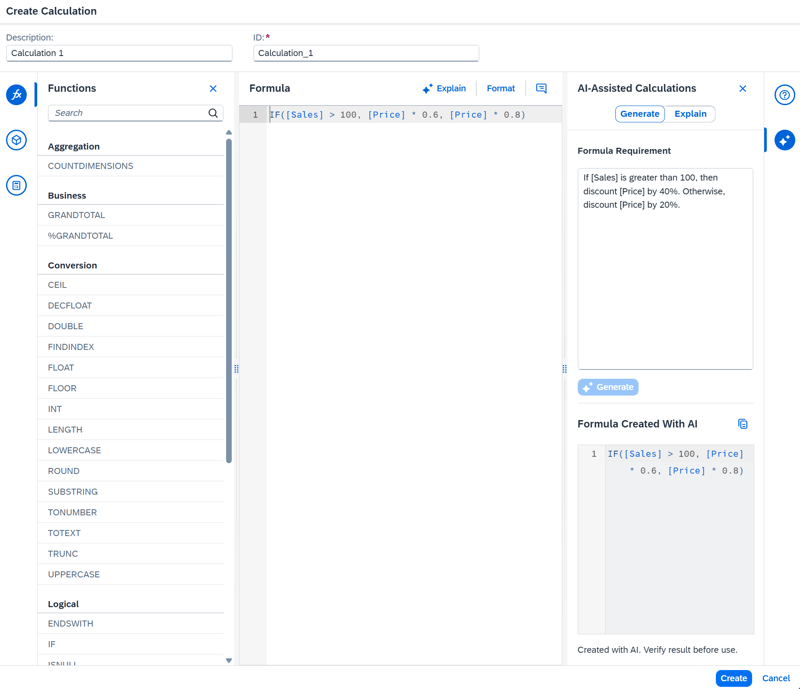
The Explain function also allows existing calculation formulas to be analysed and explained in plain language. This makes complex calculations easier to understand for users who are less familiar with the formula syntax.
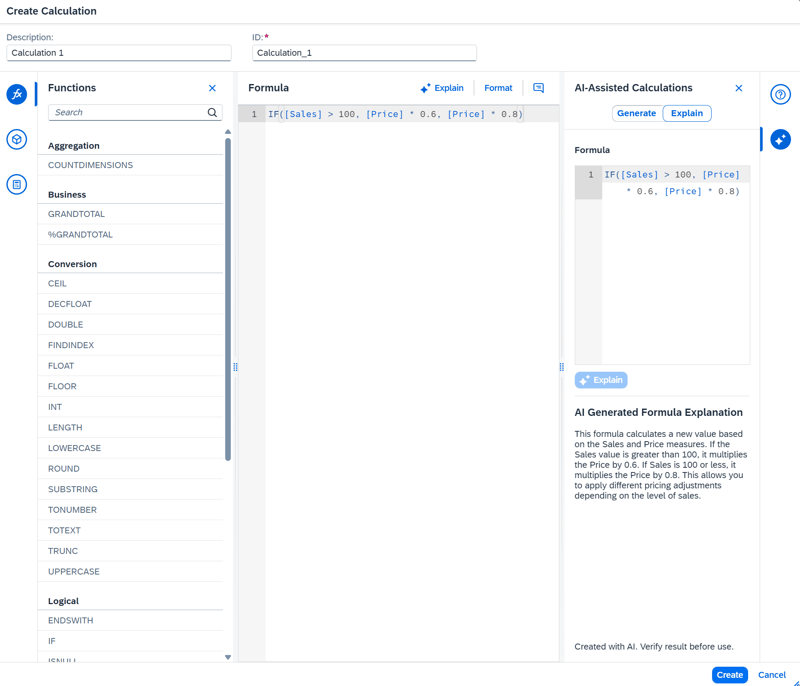
The main advantage lies in the time savings. New calculations can be created faster and existing ones are easier to understand. At the same time, intuitive operation enhances user-friendliness, facilitates getting started with more complex calculations and supports knowledge transfer within the company.
Please note that this functionality is only available for Data Analyser calculations. Calculations within stories or definition of calculated key figures in the model are not yet supported. We would like to see an extension here, as the most complex calculations are created in stories.
How does SAP Analytics Cloud AI summarize and rewrite comments?
This feature helps users to draft and evaluate comments more efficiently. It allows existing cell comments to be summarised clearly. Lengthy comments are presented in a clear format, highlighting broader contexts that can serve as a basis for informed decisions.
The summaries generated are automatically translated into the language specified in the user’s profile. This is particularly helpful in organisations with an international presence. Overall, the time required for analyzing comments is considerably reduced, especially in planning rounds with several participants
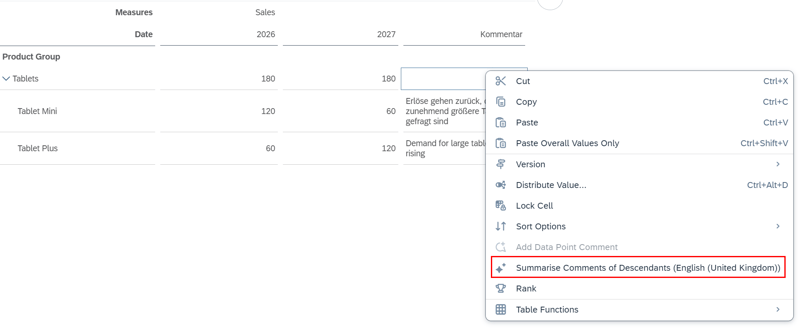
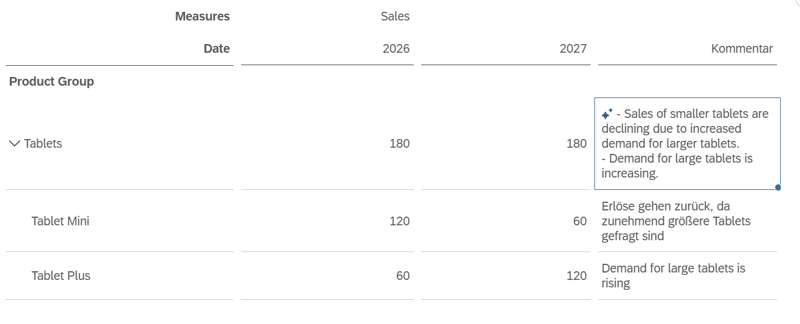
AI also provides support when writing new comments. Comments that have been entered can be rephrased with the help of AI to make them clearer and more precise.
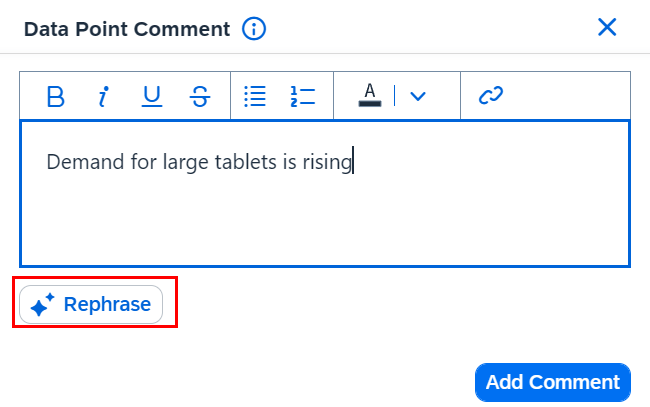
Text processing is one of the core competencies of AI. The results in our tests are correspondingly convincing. The AI reliably delivers usable summaries and rephrasings.
Please note that this function is only available in comment columns. However, these can be added flexibly by right-clicking → Add client calculation → Show comment. Dimension comments, on the other hand, are not supported.
Unfortunately, there is currently no way to influence the format of the summary. As this is a premium feature, we would particularly like to see more customisation options. In our view, it would be desirable to have greater control over the output. Ideally, by allowing users to customise the system prompt. One possibility would be summaries that specifically highlight recurring lines of argument or reveal contradictory assessments, rather than simply condensing the content. The ability to ask specific questions about the comments is also currently lacking.
The SAC Add-in for Microsoft PowerPoint
The next premium feature helps users create presentations using the SAP Analytics Cloud add-in for Microsoft PowerPoint. At the click of a button, a summary of the embedded chart can be generated, consisting of three key points. The analysis is inserted into the presentation as text and can be easily adjusted. Furthermore, the summary can be regenerated if the underlying data changes.
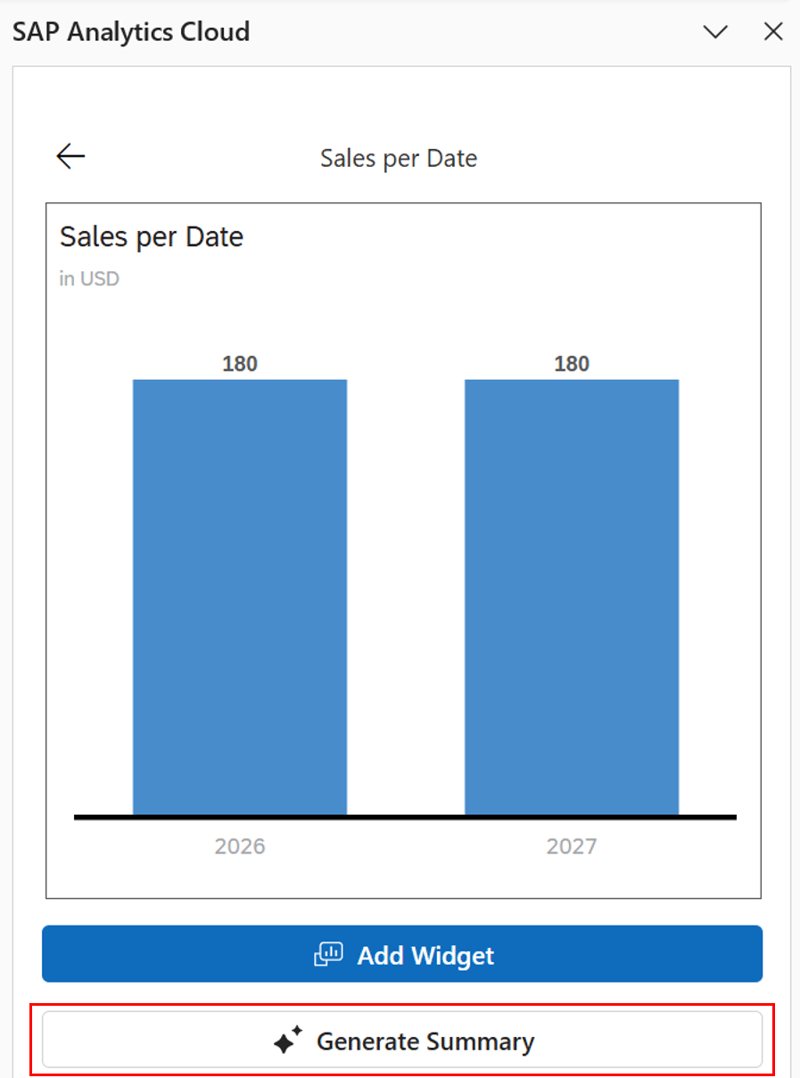
Especially in recurring reporting cycles, commenting on the same standard charts over and over becomes a tedious chore. SAP puts the time savings for writing and updating a chart summary at 96 percent. In addition, the accessibility and comprehensibility of charts is said to be improved.
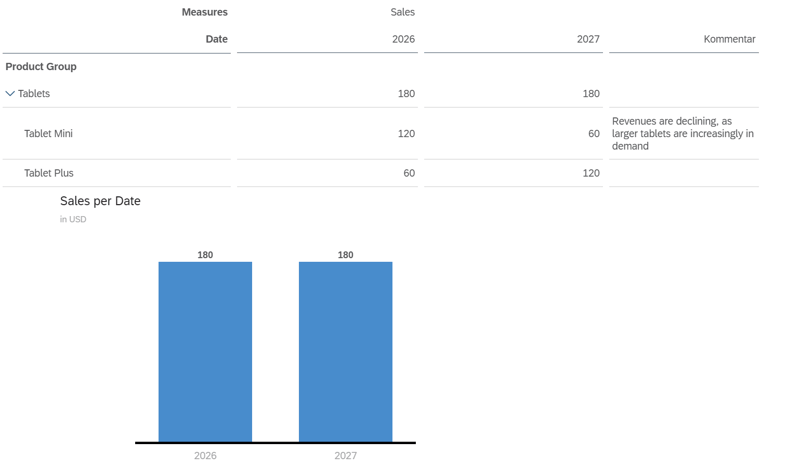
In our testing, we simulated a drastic shift in the market. Sales of small tablets are halved, while sales of larger tablets double. This trend is also highlighted in a comment. Overall, however, these changes cancel each other out.
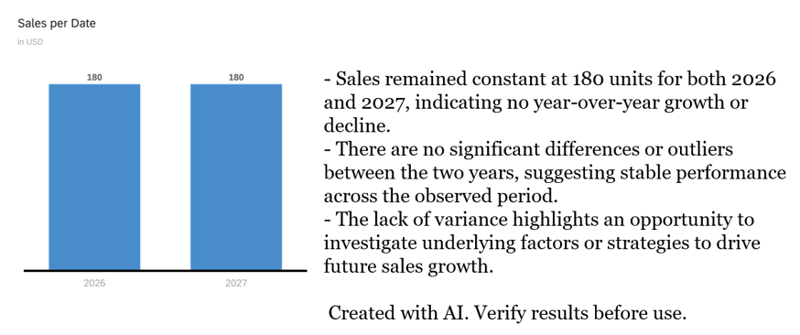
Our aim was to check whether the AI model had access to the underlying data or merely to the chart itself. However, it appears that the model analyses only the chart itself. The AI states that there are “no significant differences between the years”.
However, if you break down the chart by product group, AI can provide reasonable commentary on the trends. As the AI model does not have access to the underlying data, its commentary will always remain rather superficial. Thus, this feature should be viewed more as an accelerator for creating presentations rather than for in-depth analysis.
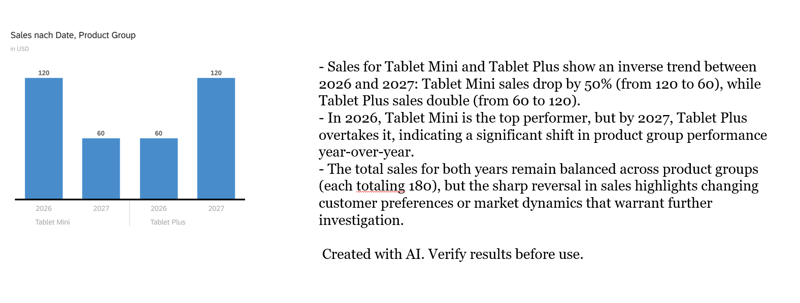
In addition, the format with three bullet points is fixed. Neither the length, nor the level of detail, nor the focus of the content can be controlled. As with AI-generated commentary, we would like to have more control over the output here. For example, to specifically highlight the causes and key drivers, rather than merely describing what the chart already shows.
How much do SAP Analytics Cloud Premium AI features cost?
The AI premium features are not included in the standard scope but are billed per prompt. Billing is based on so-called AI Units, with consumption varying by feature. A request for data actions costs 0.23 AI Units, AI-assisted calculations and commenting 0.08 each, and the chart summary 0.06 AI Units. At a list price of €7 per AI Unit, a script suggestion therefore costs around €1.61, a comment summary around €0.56 and a chart summary around €0.42. Especially with more complex scripts that, as in our test, require several attempts, costs add up quickly.
In addition, consumption is not visible at the moment of use. While the consumption factors are listed in the Estimator, users in SAC itself cannot see what a click has just cost. We therefore recommend establishing clear usage guidelines before rolling out the features to a broad user base.
AI assisted features in SAP Analytics Cloud: Our Conclusion
The new Premium AI features in SAP Analytics Cloud impressively show where the journey is heading. The potential for time savings and relief in daily work is enormous. In particular, text-based tasks such as drafting and summarising comments, as well as documenting data actions, are already being carried out effectively and delivering real added value.
At the same time, our practical test shows that there is still room for improvement. When dealing with more complex logic in data operations, the model reached its limits and produced syntactic errors, whilst the diagram analysis often remained superficial due to a lack of access to deeper data levels. A recurring issue across all functions is the lack of controllability. A customisable system prompt would be the most effective solution here.
The AI is currently a powerful accelerator and assistant, but by no means replaces professional review and technical know-how. However, with targeted improvements from SAP, these functions have the potential to revolutionise the way SAC is used in the long term.
Want to explore how SAP Analytics Cloud AI can support your analytics and planning processes? Our SAP Analytics Cloud experts are happy to help you evaluate the features, identify suitable use cases, and integrate them into your existing landscape. Get in touch with us.