Skip to content
NextLytics
Megamenü_2023_Über-uns

Shaping Business Intelligence

Whether clever add-on products for SAP BI, development of meaningful dashboards or implementation of AI-based applications - we shape the future of Business Intelligence together with you. 

Megamenü_2023_Über-uns_1

About us

As a partner with deep process know-how, knowledge of the latest SAP technologies as well as high social competence and many years of project experience, we shape the future of Business Intelligence in your company too.

Megamenü_2023_Methodik

Our Methodology

The mixture of classic waterfall model and agile methodology guarantees our projects a high level of efficiency and satisfaction on both sides. Learn more about our project approach.

Products
Megamenü_2023_NextTables

NextTables

Edit data in SAP BW out of the box: NextTables makes editing tables easier, faster and more intuitive, whether you use SAP BW on HANA, SAP S/4HANA or SAP BW 4/HANA.

Megamenü_2023_Connector

NextLytics Connectors

The increasing automation of processes requires the connectivity of IT systems. NextLytics Connectors allow you to connect your SAP ecosystem with various open-source technologies.

IT-Services
Megamenü_2023_Data-Science

Data Science & Engineering

Ready for the future? As a strong partner, we will support you in the design, implementation and optimization of your AI application.

Megamenü_2023_Planning

SAP Planning

We design new planning applications using SAP BPC Embedded, IP or SAC Planning which create added value for your company.

Megamenü_2023_Dashboarding

Business Intelligence

We help you with our expertise to create meaningful dashboards based on Tableau, Power BI, SAP Analytics Cloud or SAP Lumira. 

Megamenü_2023_Data-Warehouse-1

SAP Data Warehouse

Are you planning a migration to SAP HANA? We show you the challenges and which advantages a migration provides.

Business Analytics
Megamenü_2023_Procurement

Procurement Analytics

Transparent and valid figures are important, especially in companies with a decentralized structure. SAP Procurement Analytics allows you to evaluate SAP ERP data in SAP BI.

Megamenü_2023_Reporting

SAP HR Reporting & Analytics

With our standard model for reporting from SAP HCM with SAP BW, you accelerate business activities and make data from various systems available centrally and validly.

Megamenü_2023_Dataquality

Data Quality Management

In times of Big Data and IoT, maintaining high data quality is of the utmost importance. With our Data Quality Management (DQM) solution, you always keep the overview.

Career
Megamenü_2023_Karriere-2b

Working at NextLytics

If you would like to work with pleasure and don't want to miss out on your professional and personal development, we are the right choice for you!

Megamenü_2023_Karriere-1

Senior

Time for a change? Take your next professional step and work with us to shape innovation and growth in an exciting business environment!

Megamenü_2023_Karriere-5

Junior

Enough of grey theory - time to get to know the colourful reality! Start your working life with us and enjoy your work with interesting projects.

Megamenü_2023_Karriere-4-1

Students

You don't just want to study theory, but also want to experience it in practice? Check out theory and practice with us and experience where the differences are made.

Megamenü_2023_Karriere-3

Jobs

You can find all open vacancies here. Look around and submit your application - we look forward to it! If there is no matching position, please send us your unsolicited application.

Blog
NextLytics Newsletter
Subscribe for our monthly newsletter:
Sign up for newsletter
 

The hidden JSON-Hack for Database Hints in SAP Datasphere

Anyone who works with SAP Datasphere on a regular basis is familiar with this issue: a view doesn’t return the expected results or runs much slower than expected. In most cases, the cause can be quickly traced back to a user error or a misunderstanding of SQL logic. But what should you do if you’ve ruled out all the obvious causes and the problem persists? In this post, we’ll show you how to fix it.

In 99% of cases, the cause of the problem can be found in front of the monitor. In the vast majority of cases, this is due to user error or a lack of understanding of the underlying SQL logic. However, the remaining 1% involves a serious issue caused by a bug in the HANA DB Query Optimizer.

Fortunately, this error occurs only rarely. After five years of intensive work with SAP Datasphere and HANA, as well as dozens of successfully implemented projects, the error has occurred only three or four times. Nevertheless, we would like to share our experience on how you can respond in such exceptional cases.

First, we will address the underlying cause and show you how to use database hints to resolve the issue. In doing so, we will present a previously undocumented solution in Datasphere that allows you to use database hints in Datasphere objects.

Problem statement

The anomaly is caused by a bug in the HANA Database Optimizer. The database sometimes chooses a mathematical “shortcut” that is, however, logically invalid for the specific data context. For example, amounts are aggregated before currency conversion, which leads to incorrect results. This phenomenon occurs when the optimizer incorrectly forces an “aggregation pushdown.” However, this is a fallacy in the context of currency conversion. Since exchange rates are variable and can vary per data record (e.g., by date), summing the amounts before conversion results in an incorrect total. In this case, the optimizer “sacrifices” semantic correctness in favor of supposedly higher performance by reducing the number of rows to be processed.

To ensure that HANA executes the steps in the correct order - that is, performs the currency conversion first and then aggregates the values - you can use database hints. These allow you to override the SQL optimizer’s automatic selection and force a specific execution plan for the query.

What are Database Hints? 

Introduction

Database hints in SAP HANA are specific instructions used to influence or override the default behavior of the SQL optimizer. Normally, the optimizer independently determines which execution plan (e.g., which engine to use or how to perform joins) is most efficient, based on statistics and heuristics. A hint is used when this automatic decision - as in the case of incorrect pre-aggregation - leads to suboptimal performance or logically incorrect results.

Syntax

In SQL statements, hints are placed at the end, after the WITH HINT clause. For example, if we are dealing with bulk aggregations and want to use the OLAP engine, we can use USE_OLAP_PLAN.
SELECT * FROM TABLE1 WITH HINT( USE_OLAP_PLAN ); 

In CDS Views, the hints are defined in the header. For example:


@Consumption.dbHints: ['USE_OLAP_PLAN'] 

You can also define database hints for Datasphere artifacts such as analytical models in the following format:

"@Analytics.dbHints": [
  {
    "engine": "SQL",
    "hints": [
      {
        "key": "NO_PREAGGR_BEFORE_CONVERT_CURRENCY",
        "value": "true"
      }
    ]
  }
]

 
In the next chapter, we will show you how exactly to integrate it.

Watch the recording of our webinar "Bridging Business and Analytics: The Plug-and-Play future of Data Platforms"


Typical use cases of Databe Hints and reference

In addition to the execution engines (OLAP, HEX, ESX), you can also influence specific behaviors. For example, you can use the CS_AGGR and NO_CS_AGGR hints to control column store aggregation. The CS_AGGR hint instructs the optimizer to perform the aggregation directly in the column engine as much as possible. Instead of reading the data row by row, entire column blocks are aggregated simultaneously.

However, this optimization can lead to incorrect results when dealing with complex user-defined functions or specific join conditions. In this case, you can use NO_CS_AGGR to force the aggregation to occur outside the Column Engine.

You can find a complete list of DB hints in the SAP HANA SQL Reference Guide for the SAP HANA Platform and in SAP Note 2142945 - FAQ: SAP HANA Hints.

Finding the right Database Hint

But how do you find the hint that solves your problem from this endless list? Unfortunately, finding the right database hint often feels like methodical detective work. SAP does point out specific bugs in Note 2142945 - FAQ: SAP HANA Hints - that certain hints can resolve. However, the note by no means covers all the errors that can occur in day-to-day project work.

One systematic approach is to compare the SQL execution plan (PlanViz) of the faulty query with the plan of a manually corrected version. By creating an equivalent query that enforces the logically correct order, by using a hint, you obtain a reference model. A direct comparison of the plan steps in SAP HANA PlanViz then often reveals the problematic section.

Adding Database Hints to Analytical Models

Finally, we would like to show you how we resolved the issue with the incorrect currency conversion.

After a thorough analysis and with SAP’s assistance, we had to add the DB hint NO_PREAGGR_BEFORE_CONVERT_CURRENCY to our analytical model.
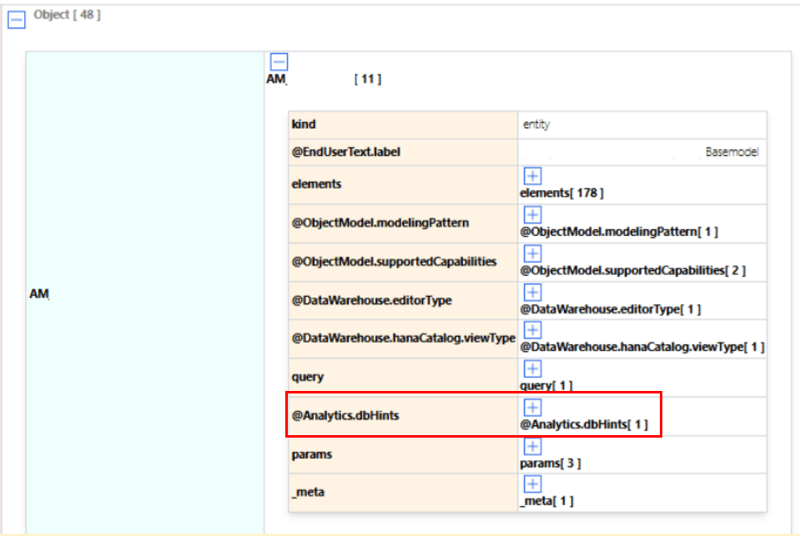
JSON-style metadata structure representation of an analytical data entity.

To do this, export the object's CSN/JSON definition in Datasphere Data Builder.
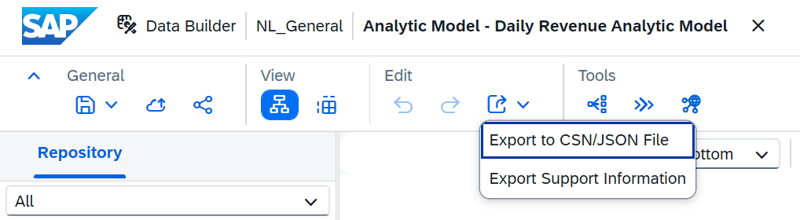
Export_JSON in Datasphere Builder

Open the file in the editor of your choice, e.g., Notepad++. Here you can see the object definition in JSON format.
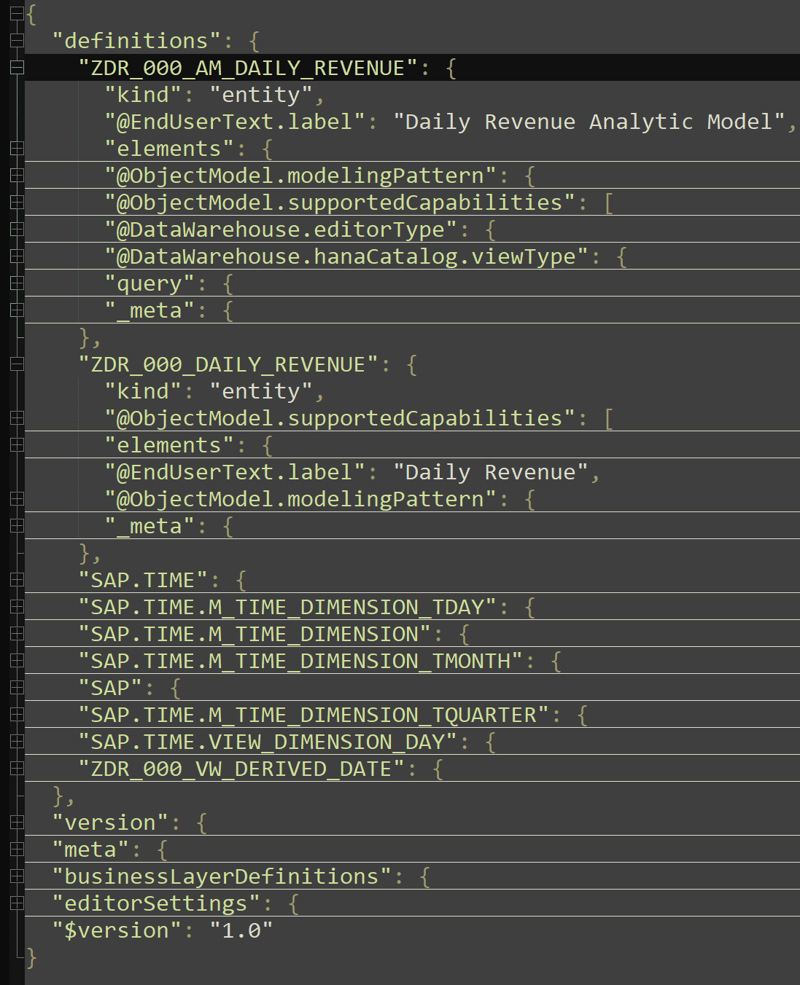
002-DB_Hints_ZDR_000_AM_DAILY_REVENUE_json

Insert the following JSON notation into the definition of your Analytical Model:

            "@Analytics.dbHints": [
                {
                    "engine": "SQL",
                    "hints": [
                        {
                            "key": "NO_PREAGGR_BEFORE_CONVERT_CURRENCY",
                            "value": "true"
                        }
                    ]
                }
            ],
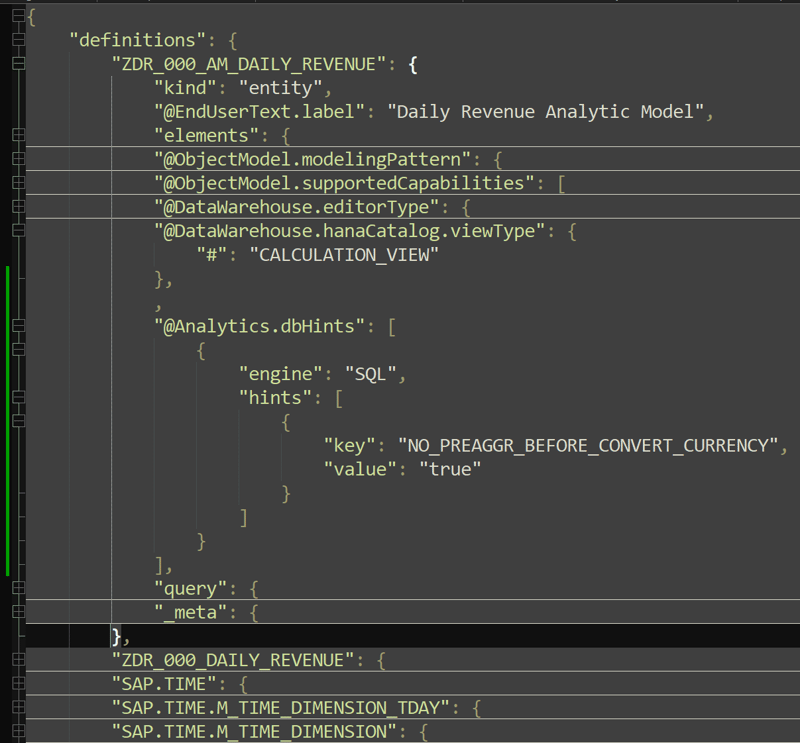
 

003-added_DB_Hints_ZDR_000_AM_DAILY_REVENUE_json


Now close the file and switch to the main screen of Data Builder. Here you can import the adjusted JSON file.
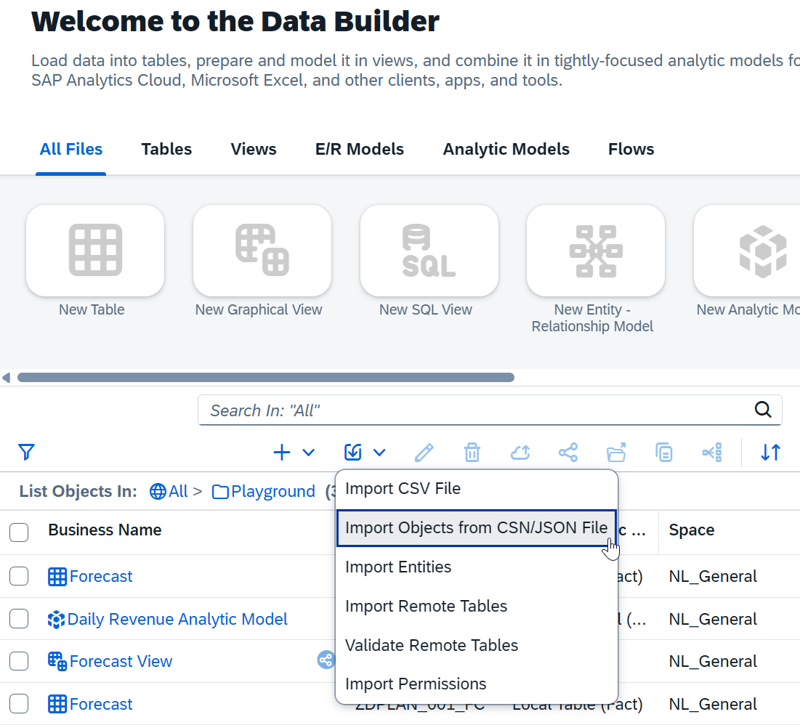
Import JSON in Datasphere Data Builder

For details on the procedure, see our article SAP Datasphere JSON Hack: Transform Graphical to SQL View.

What to do when the HANA Optimizer delivers false results: Our Conclusion

Incorrect query results in SAP Datasphere are usually caused by a faulty application - but when the HANA Optimizer fails, technical expertise is required. In such cases, Database Hints provide the decisive lever to ensure data integrity in the event of bugs like faulty pre-aggregation. With the JSON hack described here, these corrections can now be implemented directly in Datasphere objects. Use this workaround as a last resort for truly stubborn cases.

Are you facing similar challenges in your Datasphere project, or do you need help analyzing complex performance and logic issues? Feel free to reach out - we look forward to finding the right solution together with you.

 

FAQ - Database Hints in SAP Datasphere

Here are some of the most frequently asked questions about Database Hints in SAP Datasphere.

Why does SAP Datasphere deliver unexpected or incorrect results? In 99% of cases, the cause is a user error or a lack of understanding of SQL logic. However, if you have ruled out all the obvious causes, in rare cases it may be a bug in the HANA DB Query Optimizer that takes a logically invalid shortcut in data processing.
What is a typical example of such an error in the HANA Database Query Optimizer? One example is the so-called “aggregation pushdown” during currency conversion. To improve performance, the optimizer aggregates amounts before the currency conversion takes place. However, since exchange rates vary (e.g., by date), this pre-aggregation results in incorrect totals.
What are SAP HANA database hints? Database hints are specific instructions that influence or override the default behavior of the SQL optimizer. When the optimizer automatically selects an inefficient or (as in the case of pre-aggregation) faulty execution plan, hints force the database to execute the steps in the logically correct order and engine.
When should I use a Database Hint? Database hints are used when the HANA Optimizer delivers logically incorrect results or poor performance due to a bug or an unfavorable heuristic, and all other sources of error (user error, SQL logic, modeling) have been ruled out.
How do I apply a Database Hint in SAP Datasphere (e.g., for Analytical Models)?

Since this is not available by default in the graphical interface, we use a "JSON hack":

  1. Export the CSN/JSON definition of the affected object in Datasphere Data Builder.

  2. Open the file in a text editor (e.g., Notepad++). 
  3. Insert the hint notation (under the key "@Analytics.dbHints") into the definition. 
  4. Import the adjusted JSON file back into the Data Builder. 

Which database hint resolves the issue of incorrect aggregation before currency conversion? To ensure that currency conversion occurs first and aggregation only afterward, use the NO_PREAGGR_BEFORE_CONVERT_CURRENCY hint and set its value to “true”.
Where can I find a complete list of all available database hints? A comprehensive overview is provided by the SAP HANA SQL Reference Guide for SAP HANA Platform as well as SAP Note 2142945 – FAQ: SAP HANA Hints.
How do I find out which database hint solves my problem? The search is often methodical detective work. A proven approach is to compare the SQL Execution Plan (PlanViz) of the faulty query with the plan of a manually corrected variant. This allows you to identify the problematic step in the execution plan and address it specifically with an appropriate hint. 
Who can I contact if I cannot solve the problem myself? If you are facing persistent challenges with performance and logic issues in your Datasphere project, feel free to contact us directly. We will support you with detailed error analysis and finding a solution.


,

avatar

Irvin

Irvin has worked with HANA Native and Datasphere since 2019. He can primarily draw on experience as a consultant and in development on the XSA platform using SQLScript. In his spare time, he is passionate about playing basketball and is also a big NBA fan.

Got a question about this blog?
Ask Irvin

The hidden JSON-Hack for Database Hints in SAP Datasphere
6:56

Blog - NextLytics AG 

Welcome to our blog. In this section we regularly report on news and background information on topics such as SAP Business Intelligence (BI), SAP Dashboarding with Lumira Designer or SAP Analytics Cloud, Machine Learning with SAP BW, Data Science and Planning with SAP Business Planning and Consolidation (BPC), SAP Integrated Planning (IP) and SAC Planning and much more.

Subscribe to our newsletter

Related Posts

Recent Posts