




















Agentic planning has long been on SAP's roadmap, and the road there is called Joule. Joule is at the core of SAP's Business AI strategy, and for planning it gets its own planning agents. One builds planning models, one writes the logic for data actions, and one uploads plan data. A further agent that runs simple planning cycles from a prompt is announced for later. SAP also shows how a planner describes in Joule, in their own words, what they want to change, and Joule writes the values into the plan version. As we reported in our post on the DSAG Annual Congress 2026, among others, the first agents are announced for the fourth quarter of 2026, with the caveat that plans may still change. All of them are built for SAP Analytics Cloud.
Yet a great many companies still plan in BW, on BW Integrated Planning or BPC Embedded, and these are often their largest and most business-critical plans. The daily work happens in Analysis for Office, in Excel. This world has no place in SAP's strategy for agentic planning. It is, however, the reality many planning teams work in today and will keep working in for years.
In April I introduced the bw-modeling-mcp here, an open source MCP server that lets an AI agent model directly in BW. It already takes a lot of work off the design time. Since version 1.8 in mid-October it builds a complete planning model, from the plan aDSO through the aggregation level and planning functions to the input-ready query, with the full scope that BW-IP offers.
But agentic planning is more than a model that gets built faster. It changes the way people plan. With agentic analytics I simply ask my data what I want to know. With agentic planning I say just as simply what I want to plan, even when it is a complex requirement with conditions. If energy costs rise by ten percent in the second half of the year, spread that across the plants by their consumption and show me what it means for the margin. Whole scenarios can be played through in a few sentences. That takes more than the model in BW, though. Planning happens in an Analysis for Office workbook, and that workbook has to be built first, with data sources, planning functions on buttons and VBA, so far by hand. And once the workbook exists, an AI assistant in Excel such as Claude in Excel or Microsoft Copilot can see the cells, but a plan value it writes into them does not simply reach BW.
This is the gap the afo-mcp closes. I released it this week as a second open source project on GitHub. It builds planning workbooks for AfO without anyone having to open Excel, and it equips them with an Agent Bridge. Through this bridge the AI assistant in Excel takes a real part in planning. It enters values, runs planning functions, works through scenarios and saves only after the planner's OK. Agentic planning therefore already runs today on BW/4HANA with standard Analysis for Office, in exactly the landscape you already have. No new product and no migration are needed.
Check out our blog series "Agentic AI meets SAP BW" |
| 1. Agentic AI meets SAP BW |
| 2. Agentic AI in Practice |
| 3. Agentic Planning with AfO |
Planning in BW, powerful and a lot of manual work
Anyone who has been part of a planning project in BW rarely measures it in days or weeks. Large planning solutions take months, some even years, before they are in place. BW Integrated Planning and BPC Embedded are a generic framework. Every plan is assembled from building blocks, from plan aDSOs, aggregation levels, filters, variables, characteristic relationships, data slices and planning functions of many types up to FOX and ABAP. Almost any requirement can be modelled this way, at the price of a complexity that, to be honest, can be fiddly at times. Anyone who works with it knows the questions, why a key figure is suddenly not input-ready or why the data looks odd after saving. Behind them is the interplay of input on an aggregated level with the delta records it creates, which have to respect characteristic relationships and data slices. The bottleneck is translating what the business means into these building blocks.
After that, the planner still needs a user interface, and in BW that is mostly Analysis for Office. Planners know Excel, and AfO brings BW queries with input readiness, planning functions and variables right into it. This workbook, too, is diligent work you can see coming, and it comes back with every change to the model.
From one sentence to a planning model with a finished workbook
Since version 1.8 the bw-modeling-mcp builds every object of a BW-IP plan, including planning functions with FOX, planning sequences, formula variables, hierarchies and conversion types. In our demo it starts with one sentence, we need a sales and price plan for 2027 by product, country and month. The agent reads the actuals model, proposes a design and, after my approval, builds the plan aDSO, CompositeProvider, aggregation level, variables, planning functions and queries. In under five minutes everything is active, created through the same interfaces the BW Modeling Tools in Eclipse use, and with a transport request like any other development.
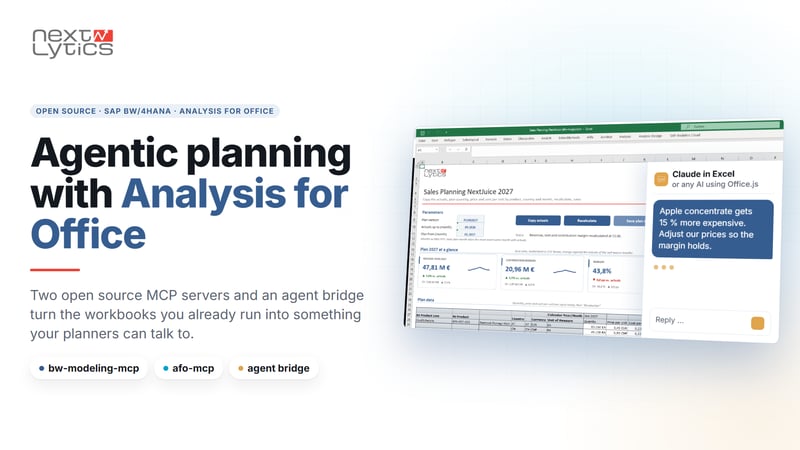
The afo-mcp builds the matching workbook, offline and without Excel or a BW logon. It contains data sources with saved prompts, input-ready crosstabs, buttons for planning functions and sequences, filters and VBA. AfO opens it like a workbook built by hand. In the demo it has a parameter card for version and plan month, buttons to copy actuals, recalculate, save and discard, and KPI tiles above the crosstab. The afo-mcp also reads existing workbooks, shows which workbooks depend on a query, and carries all AfO elements over into a new layout. It is MIT licensed, contains no SAP code and works with what is in the files, because SAP has not documented the AfO format. The business decisions stay with people, the translation into objects and workbooks is done by the agent.
Get our presentation "Agentic Development with SAP BW"

Why AI assistants in Excel fail with AfO
AI assistants in Excel such as Claude in Excel or the integrations of other vendors work through Office.js, Microsoft's programming interface for Office add-ins, and use it to write cells. AfO, however, recognises input by Excel's change event, and Office.js does not fire it. The plan value is in the cell but never reaches BW. Excel filters on a crosstab are gone at the next refresh, and Office.js cannot run a planning function at all. The tricky part is that everything looks right in Excel.
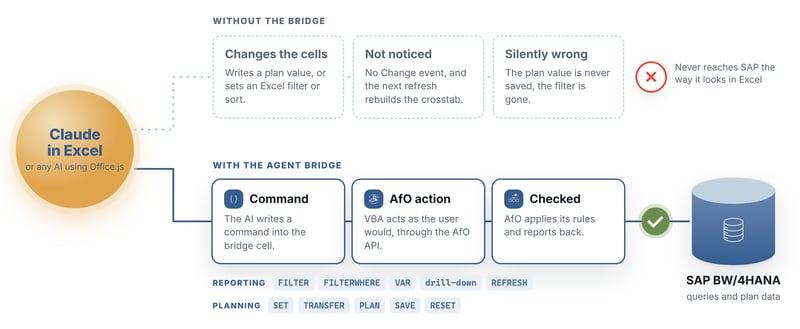
The Agent Bridge, hands in the workbook and knowledge in the AI
The afo-mcp equips every workbook with an Agent Bridge, a hidden sheet with a command cell and a VBA module that runs the commands as genuine AfO input and reports the result back. With it the AI can set values, copy actuals, run planning functions, save and discard, filter and change the drill-down, and use every function of the AfO API except the logon through a generic command. After every step the VBA module checks AfO's messages, so the agent sees whether AfO really accepted an input instead of just assuming it.
How the agent works with it is described in a skill, a set of instructions you give the AI assistant once. It makes sure the assistant asks before saving, does not guess technical names and offers to add a missing bridge. The bridge is not tied to a particular vendor, any AI that works with Excel through Office.js can learn the commands from the help on the bridge sheet. I tested it with Claude in Excel on BW/4HANA with AfO 2.8.
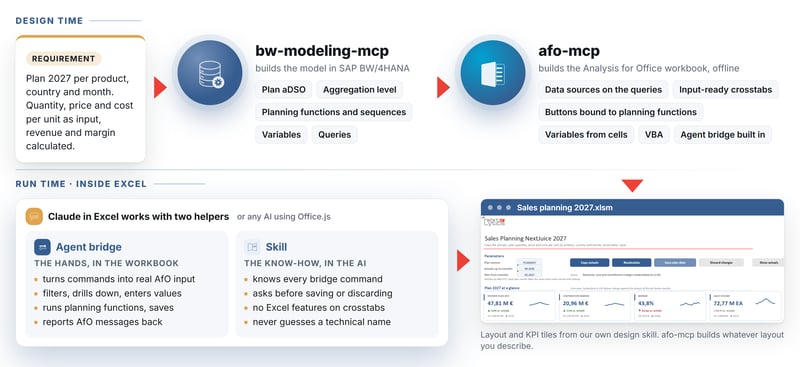
Making existing workbooks agentic, the closed loop
Most companies already have plenty of planning workbooks in BW and do not want to rebuild their existing solutions from scratch. Since version 1.9 the bw-modeling-mcp lists the AfO workbooks stored in BW together with their where-used list. It loads a workbook without disturbing anyone who is working in it, and saves it back to BW, directly into a role menu if you like.
Together with the afo-mcp this makes a closed loop. The agent loads an existing workbook from BW, reads it and improves it, for example by adding the Agent Bridge or putting an additional planning function on a button. The afo-mcp extends existing event handlers instead of replacing them, and it leaves signed VBA projects alone. Then the workbook goes back into the same role. The next morning the planners open their familiar workbook and plan in it with an agent, without a new tool and without a migration.
The agent sees more than the cells
What matters is what the agent sees. With the afo-mcp and the bw-modeling-mcp an AI assistant in Excel sees three levels. The first is the displayed cells, where a collapsed hierarchy node or a filtered characteristic simply does not appear. The second is the data source behind the crosstab, with the unsaved plan values of the session. The third is the whole BW model through the bw-modeling-mcp as a connector, with prior years, master data, hierarchies and the logic of the planning functions, always within the planner's authorisations. If you say prices should hold the contribution margin of the last twelve months, you get an answer, even though that figure is nowhere on the planning sheet.
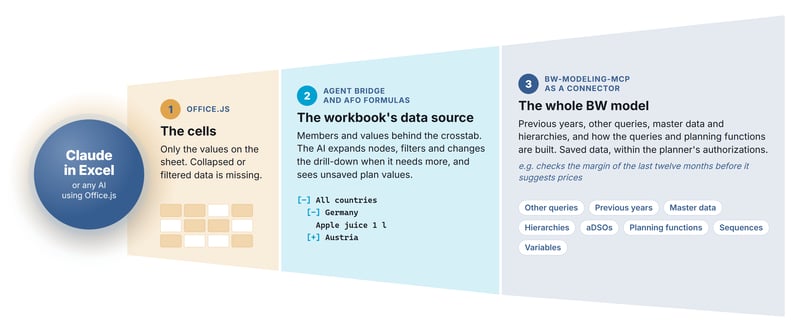
Our Conclusion: Agentic Planning as a benchmark for SAP's planning agents
SAP no longer develops AfO further, but guarantees support until at least 2031. That you can now plan with agents in it, on standard interfaces and as open source, adds enormous value to the existing landscape. And it sets a benchmark for the Joule planning agents. In my view four points decide.
- What the agent sees. In SAP's own planning demo, Joule addresses the cells of the story table by their coordinates, which corresponds to the first of the three levels. What lies below a collapsed hierarchy node, which plan values are still unsaved or what the prior year looked like stays hidden from such an agent. Good planning proposals need exactly this view behind the table.
- Whether it really takes over the design time, also for complex requirements.
- Whether it can reach your own context such as knowledge repositories and conventions.
- What it costs. SAP has not yet named prices for the premium features in Joule.
Anyone who wants to defend their position in planning therefore has to take agentic planning seriously. Planners need new ways to play through scenarios, bring in the context that matters for their plan and plan driver-based. What already works today in the supposed legacy world of BW and AfO shows how far this can go.
If you plan in BW with SAC as the front end, you can take the same route. My colleague Rafael Sachs released the SAC Workbench MCP as open source last week and introduced it in his blog post.The bw-modeling-mcp builds the back end, the SAC Workbench MCP the front end. More posts on this will follow.
You can find the MCP servers on GitHub, the afo-mcp at github.com/dnic-dev/afo-mcp, the bw-modeling-mcp at github.com/dnic-dev/bw-modeling-mcp and the SAC Workbench MCP at github.com/RafaelSachsNL/sac-workbench-mcp. Would you like to find out what agentic planning can do for your planning in BW? Talk to us, we will support you from the first prototype to use in your planning round.