Skip to content
NextLytics
Megamenü_2023_Über-uns

Shaping Business Intelligence

Whether clever add-on products for SAP BI, development of meaningful dashboards or implementation of AI-based applications - we shape the future of Business Intelligence together with you. 

Megamenü_2023_Über-uns_1

About us

As a partner with deep process know-how, knowledge of the latest SAP technologies as well as high social competence and many years of project experience, we shape the future of Business Intelligence in your company too.

Megamenü_2023_Methodik

Our Methodology

The mixture of classic waterfall model and agile methodology guarantees our projects a high level of efficiency and satisfaction on both sides. Learn more about our project approach.

Products
Megamenü_2023_NextTables

NextTables

Edit data in SAP BW out of the box: NextTables makes editing tables easier, faster and more intuitive, whether you use SAP BW on HANA, SAP S/4HANA or SAP BW 4/HANA.

Megamenü_2023_Connector

NextLytics Connectors

The increasing automation of processes requires the connectivity of IT systems. NextLytics Connectors allow you to connect your SAP ecosystem with various open-source technologies.

IT-Services
Megamenü_2023_Data-Science

Data Science & Engineering

Ready for the future? As a strong partner, we will support you in the design, implementation and optimization of your AI application.

Megamenü_2023_Planning

SAP Planning

We design new planning applications using SAP BPC Embedded, IP or SAC Planning which create added value for your company.

Megamenü_2023_Dashboarding

Business Intelligence

We help you with our expertise to create meaningful dashboards based on Tableau, Power BI, SAP Analytics Cloud or SAP Lumira. 

Megamenü_2023_Data-Warehouse-1

SAP Data Warehouse

Are you planning a migration to SAP HANA? We show you the challenges and which advantages a migration provides.

Business Analytics
Megamenü_2023_Procurement

Procurement Analytics

Transparent and valid figures are important, especially in companies with a decentralized structure. SAP Procurement Analytics allows you to evaluate SAP ERP data in SAP BI.

Megamenü_2023_Reporting

SAP HR Reporting & Analytics

With our standard model for reporting from SAP HCM with SAP BW, you accelerate business activities and make data from various systems available centrally and validly.

Megamenü_2023_Dataquality

Data Quality Management

In times of Big Data and IoT, maintaining high data quality is of the utmost importance. With our Data Quality Management (DQM) solution, you always keep the overview.

Career
Megamenü_2023_Karriere-2b

Working at NextLytics

If you would like to work with pleasure and don't want to miss out on your professional and personal development, we are the right choice for you!

Megamenü_2023_Karriere-1

Senior

Time for a change? Take your next professional step and work with us to shape innovation and growth in an exciting business environment!

Megamenü_2023_Karriere-5

Junior

Enough of grey theory - time to get to know the colourful reality! Start your working life with us and enjoy your work with interesting projects.

Megamenü_2023_Karriere-4-1

Students

You don't just want to study theory, but also want to experience it in practice? Check out theory and practice with us and experience where the differences are made.

Megamenü_2023_Karriere-3

Jobs

You can find all open vacancies here. Look around and submit your application - we look forward to it! If there is no matching position, please send us your unsolicited application.

Blog
NextLytics Newsletter
Subscribe for our monthly newsletter:
Sign up for newsletter
 

Automated Metric Reports in SAP Analytics Cloud for easier Daily Work

The latest developments confirm that the business world is changing rapidly. Efficient reporting therefore means more than just providing data. It is important to ensure that decision-makers are regularly informed about the most important developments. With the new function in SAP Analytics Cloud that allows users to subscribe to metrics, SAP extends its information distribution with a push-based approach. This enables users to automatically receive curated updates on the most important KPIs via email, without actively opening SAP Analytics Cloud. In the following, I will present the functionality in detail and explain the added value it offers.

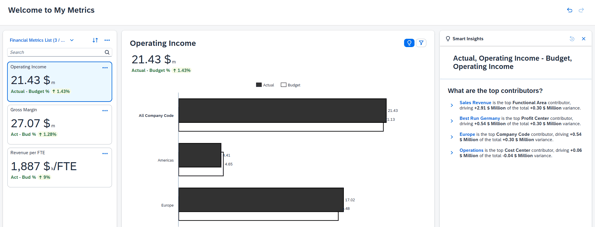
The My Metrics functionality, which we introduced in the article My Metrics in SAP Analytics Cloud: Personalized KPI Monitoring Made Easy, provides a quick overview of the most important key figures. However, this overview must be accessed manually, which is not exactly convenient when you are not working in SAC anyway and just need a quick update. With the new subscription feature, users can have updates automatically sent to them via email. Instead of having to actively open metrics and check KPIs, the information now comes automatically to the user. Thus, the new feature addresses the need of users for regular updates.
My-metrics

The regular updates make it possible to track trends, identify patterns, and make well-founded, data-driven decisions. At the same time, the continuous updates keep users constantly informed about significant changes to their metrics. This allows them to react quickly and in a targeted manner when it matters.

Subscribe to metrics report

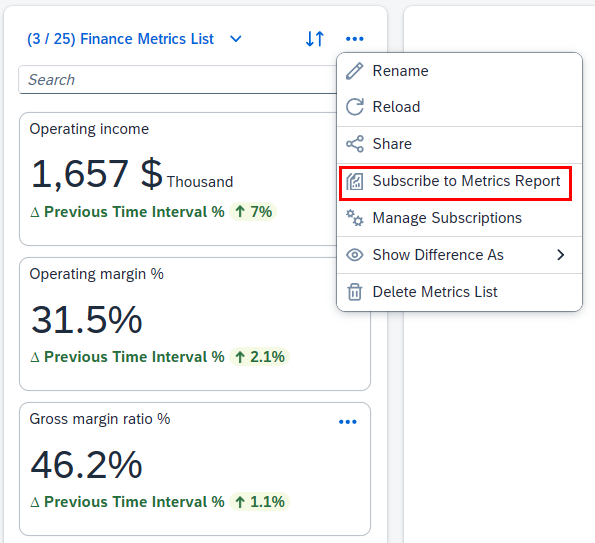
To receive regular updates, open the menu in the metrics list and select the entry Subscribe to Metrics Report.
001-subsribe-to-metrics-report

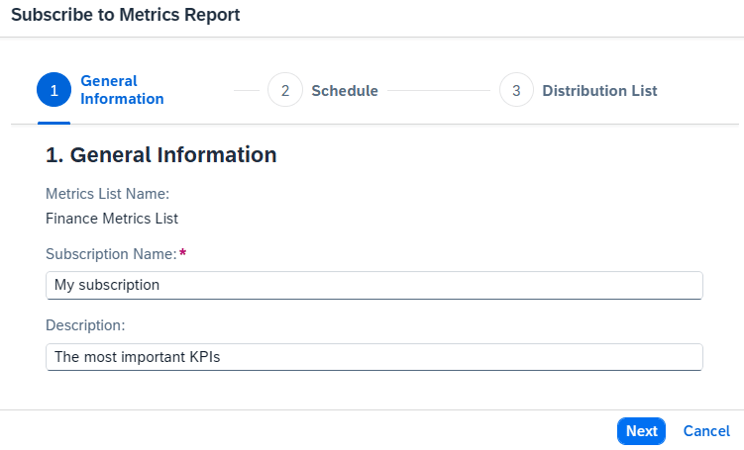
Under General Information, you can assign a name and a description for your subscription. Use a meaningful description to clearly communicate the purpose of the report and the target audience.
002-general-information


Dashboarding with SAP Analytics Cloud - Download the Whitepaper here!
SAP Analytics Cloud Whitepaper


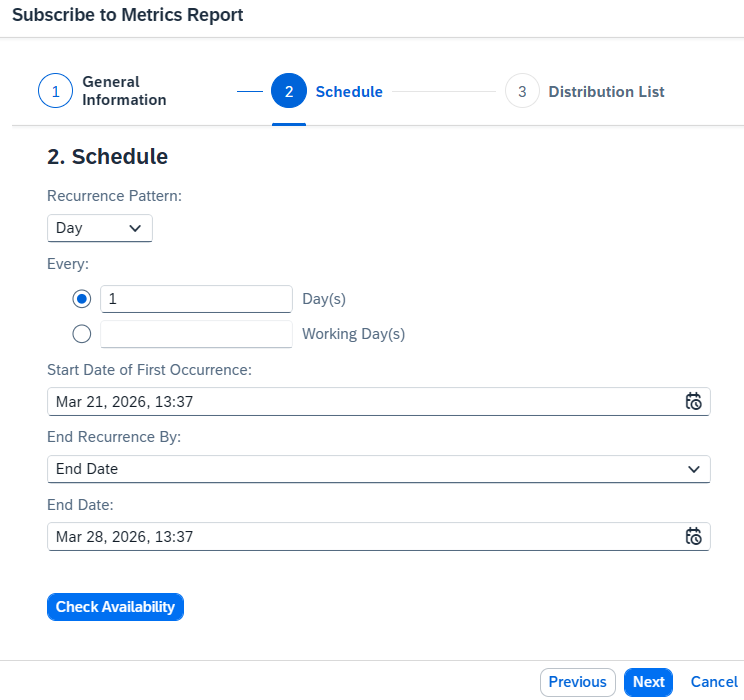
In the Schedule section, use the Recurrence Pattern setting to specify whether the report should be sent daily, weekly or monthly. If required, you can also use a factory calendar to send the report only on working days. For reports dependent on working days, you should check if the model's factory calendar is configured correctly. If the model contains multiple factory calendars, check whether the correct calendar is selected.
003-schedule

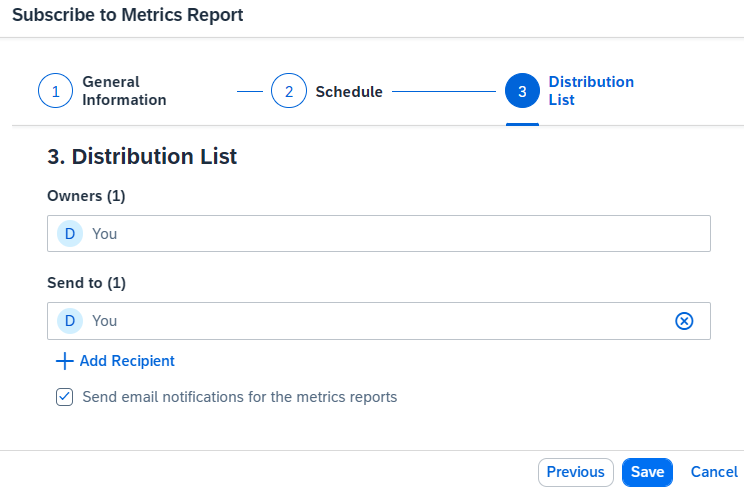
Afterwards, you can define the recipients of the report. You can use both individual users and teams.

Tip: Test the distribution with a small group first to ensure that the schedule and content are appropriate before rolling it out to a larger group of recipients.
004-distribution-list

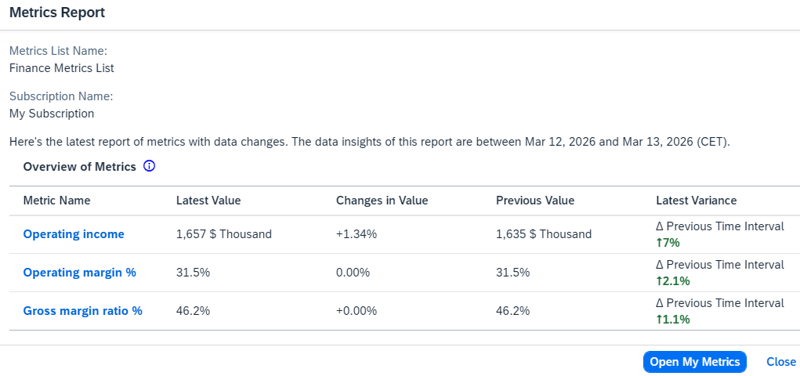
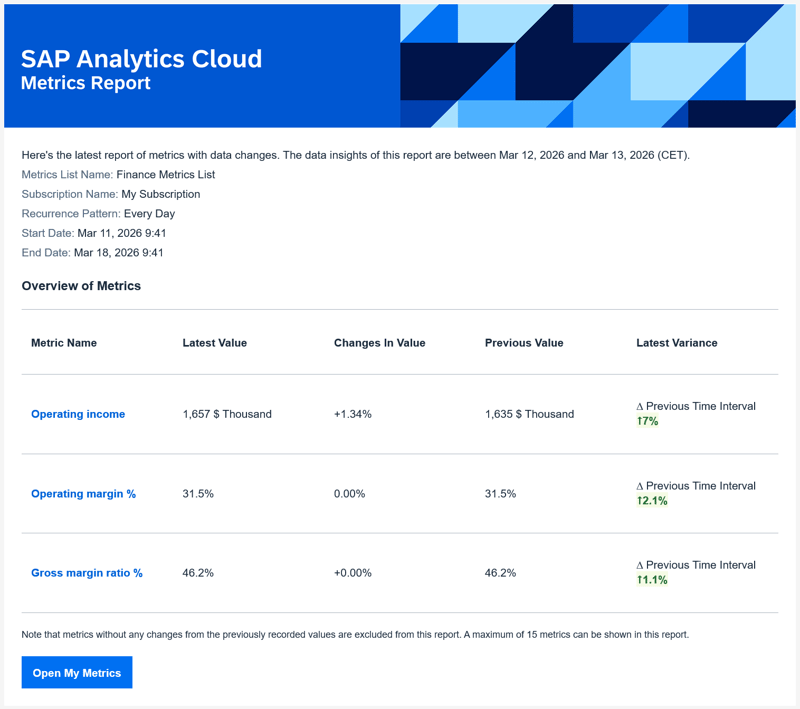
The user receives a notification with the data changes and can immediately jump to the metric if needed. 
SAC-Metrics-Report 

Note: The “Send email notification for metric reports” field must be enabled. Otherwise, notifications will only appear within the SAC environment and will not be sent by email. If a user does not wish to receive notifications, they can also pause the notifications.
Metrics-report

Manage Metrics

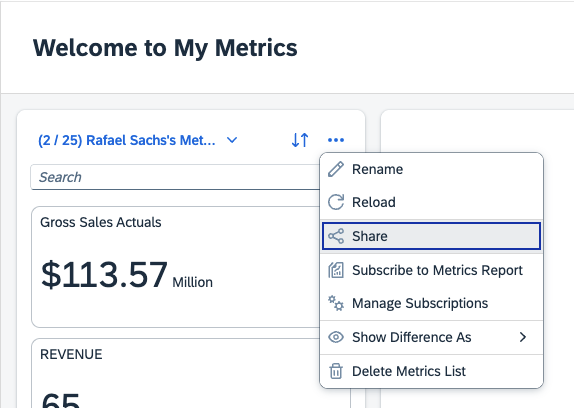
Once the subscriptions are set up, there must of course also be a way to manage them. Directly below the subscribe option in the metrics list, you will find the management for all subscriptions.
 SAC-Manage-Metrics 

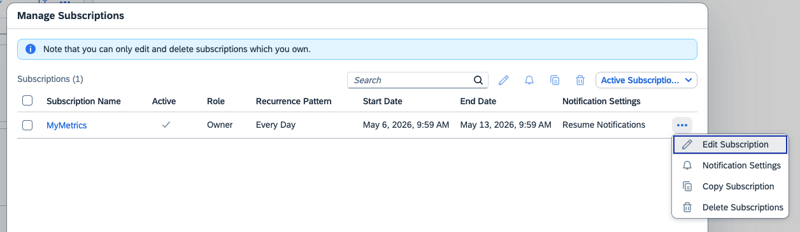
In the following menu, you can manage your own subscriptions. You can adjust the time periods, the frequency, or the recipients. It is also possible to pause a subscription for a certain period or delete it entirely.
 SAC-Metrics-Manage-Subscriptions 

General Notes

There are some limitations to keep in mind when working with subscriptions. Let’s first look at the limitations that directly affect the subscription itself:

  • Subscriptions always cover complete MyMetrics lists – individual KPIs cannot be selected separately.

  • Each subscription is limited to a maximum of 15 KPIs.

  • Notifications are only triggered for KPIs whose value has changed since the last evaluation.

In addition, a few technical requirements must be met:

  • This feature is only available for SAC environments running on Cloud Foundry.

  • Metrics from live sources require the connection type Tunnel.

Metric Reports in SAP Analytics Cloud: Our Conclusion

The subscription feature for metric reports in SAP Analytics Cloud marks an important step towards proactive reporting. By switching from the pull to the push principle, executives receive the relevant information without having to take action themselves. Decision-makers thus stay constantly informed about the development of their most important key figures and can react faster to changes. The simple setup, flexible scheduling options and the ability to receive reports both via SAC notifications and by email make the feature a valuable tool in everyday work.

If you would like to explore how SAP Analytics Cloud metric subscriptions can support your reporting strategy, feel free to reach out for personalized advice or a consultation tailored to your business needs.


 

Learn all about SAC


FAQ - SAC My Metrics Reports

Here you can find some of the most frequently asked questions about My Metrics Reports in SAP Analytics Cloud.

What is the metric report in SAP Analytics Cloud? The metric report is a feature in SAP Analytics Cloud that allows users to subscribe to automatic updates for selected KPIs. The reports are delivered regularly via email or through SAC notifications and display changes in the subscribed metrics.
How can I subscribe to a metrics report? Open the menu in the metrics list and select the entry Subscribe to Metrics Report. Afterwards, you can define a name, a description, the schedule and the recipients for the subscription.
How often can I have the metrics reports sent to me? You can choose whether the report should be sent daily, weekly or monthly. Additionally, there is the option to use a factory calendar to limit the distribution to working days.
Can I send the SAC metrics report to multiple people? Yes, you can define both individual users as well as entire teams as recipients.
Can I pause the notifications of my metrics? Yes, if you temporarily do not wish to receive notifications, you can pause the subscription at any time.

,

avatar

Rafael

Rafael Sachs has been working as an SAP BW and BO consultant in various industries in Germany and abroad since 2013. He covers the range from requirements management to implementation. His core competencies are tailor-made solutions in the front-end area and the professional design of the company's own software NextTables. In his spare time he is a restless hiker, dog tamer and hobby cook.

Got a question about this blog?
Ask Rafael

Automated Metric Reports in SAP Analytics Cloud for easier Daily Work
4:49

Blog - NextLytics AG 

Welcome to our blog. In this section we regularly report on news and background information on topics such as SAP Business Intelligence (BI), SAP Dashboarding with Lumira Designer or SAP Analytics Cloud, Machine Learning with SAP BW, Data Science and Planning with SAP Business Planning and Consolidation (BPC), SAP Integrated Planning (IP) and SAC Planning and much more.

Subscribe to our newsletter

Related Posts

Recent Posts