

















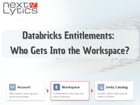



In our article on YAML anchors for Databricks governance we split permissions in Databricks into three levels: account, workspace and Unity Catalog. That article zoomed into Unity Catalog. This one covers the level in between, and the one most teams configure once by clicking and then forget: workspace entitlements.
Forgetting them got harder this year. Since September 14, 2026 the built-in users group no longer carries any entitlements. New users and service principals added to a workspace get nothing unless someone grants it explicitly. If your onboarding relied on "everyone in the workspace can open a notebook", that assumption is gone.
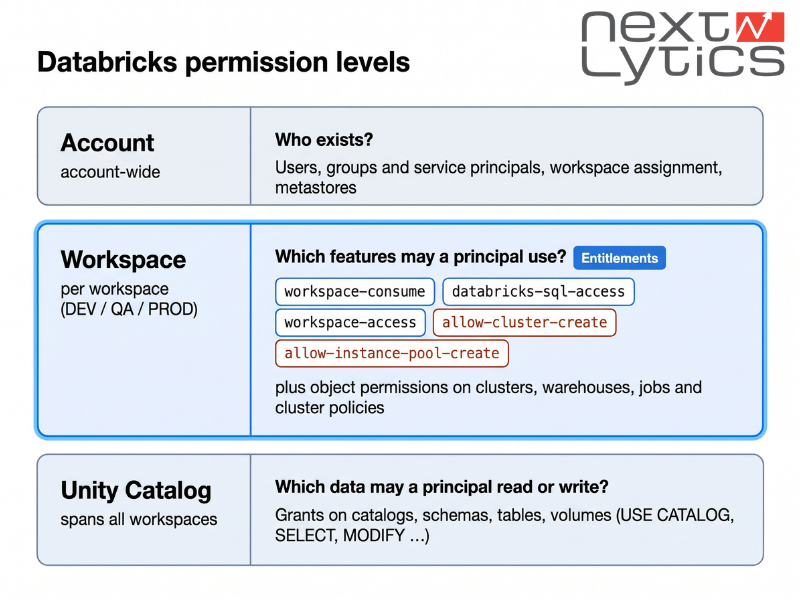 Fig. 1: Databricks permission levels and workspace entitlements
What are Databricks entitlements and how do they differ from Unity Catalog grants?
Unity Catalog grants answer the question what may this principal read or write? Databricks entitlements answer an earlier one: which parts of this workspace may the principal use at all? A user can hold SELECT on every gold-layer table and still be unable to run a query, because they lack the entitlement that opens Databricks SQL.
There are five entitlements, available on the Premium plan and above. To access a workspace, a user needs at least one of the first three:
| Entitlement (API name) | Opens | Typical holder |
workspace-consume (Consumer access) |
"Databricks One": A simplified view for shared dashboards, Genie and Databricks Apps | Business users who only consume |
databricks-sql-access |
Databricks SQL: queries, dashboards, SQL warehouses | Analysts, BI developers, monitoring |
workspace-access |
Notebooks, jobs, models, pipelines | Data and AI engineers |
allow-cluster-create |
Creating unrestricted clusters | Almost nobody; see below |
allow-instance-pool-create |
Creating instance pools | Platform admins |
Entitlements are workspace-scoped: the same account group can hold different entitlements in DEV, QA and PROD. And they are inherited: a user gets every entitlement of every group they belong to, and you can't remove an inherited entitlement on the user. You remove it from the group, or the user from the group.
What changed for the users group in 2026?
Until mid-2026, every workspace user and service principal landed in the users group and inherited workspace-access and databricks-sql-access from it. Databricks rolled out a new behavior from June 2026 and enforced it for all workspaces on September 14, 2026. The users group now has no entitlements, the admins group has all of them, and both sets are locked.
Nobody lost access overnight. Existing entitlements on users were migrated to a workspace-local clone group, so current principals kept what they had. That clone group is worth a look, though: it is a catch-all that gives every legacy member workspace and SQL access, whether they need it or not.
The change also makes consumer access practical. It only works when nobody inherits workspace-access by default, and with the old users group defaults that was impossible without workarounds.
Why don't entitlements fit into Databricks bundles?
In our governance setup, Declarative Automation Bundles manage catalogs, schemas, volumes, compute and their grants. Entitlements aren't on that list: bundles offer no resource type for entitlements, groups or service principals. Entitlements live on the workspace-level SCIM API, which is why they end up in the procedural layer next to the bundle.
You have two options:
- Terraform offers the resource
databricks_entitlementswith one boolean argument per entitlement. It only works with a workspace-level provider, and you shouldn't define the same entitlements ondatabricks_groupordatabricks_useras well; the provider documentation warns about non-deterministic behavior. - A Python SDK script that runs after the bundle deployment. That is the route we recommend, because group membership and workspace bindings already need to be reconciled by SDK scripts when setting up "Governance-as-Code" declarative platform management.
Order matters in both cases. A group only has a workspace-local representation once it has been assigned to the workspace. So the entitlement step runs after the step that creates groups and assigns them to the workspace.
Download our Whitepaper: Governance as Code - Building an Enterprise-Ready Databricks Lakehouse
How do you manage Databricks entitlements declaratively?
We keep one configuration file per environment. A key is either a group's display name or a service principal's application ID:
entitlements:
  grp_workspace_users_prod:
    - workspace-access
    - databricks-sql-access
  grp_data_engineers_prod:
    - workspace-access
    - databricks-sql-access
  grp_ops_monitoring:
    - databricks-sql-access
  # job runner service principal (application ID)
  00000000-0000-0000-0000-000000000000:
    - allow-cluster-create
The script reconciles this file in two layers, and the second one is what makes it governance rather than a convenience:
- Every listed principal gets its entitlement set replaced to match the file exactly. Extra entitlements are removed, not just missing ones added.
- Every principal the project manages (every group from the group membership config) but doesn't list here has its entitlements cleared to none. It stays assigned to the workspace, it just loses its entitlements.
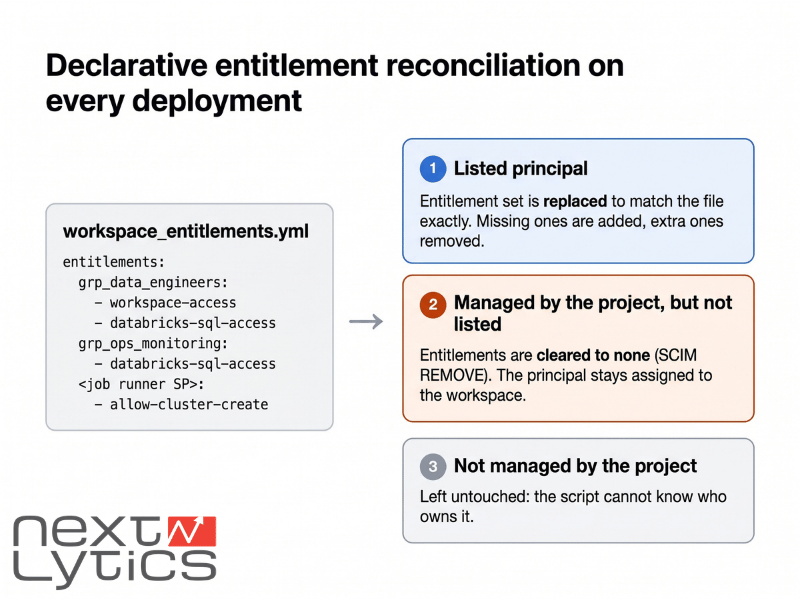 Fig. 2: Declarative entitlement reconciliation
The second rule closes the most common gap we see: "not in the config" quietly meaning "leave whatever is there". With it, removing a line revokes access on the next deploy, and a group someone extended by hand in the UI is reset. Principals which the project doesn't manage stay untouched, because the script can't know who owns them.
One detail in particular cost us an entire debugging session: Clearing a principal with a SCIM REPLACE and an empty list does nothing: the Python SDK silently drops the empty value from the request body, and the call succeeds without changing anything. Clearing needs a REMOVE on the path instead:
if desired:
    op = iam.Patch(op=iam.PatchOp.REPLACE, path="entitlements",
                   value=[{"value": e} for e in sorted(desired)])
else:
    # REPLACE with [] is a silent no-op, so remove the attribute
    op = iam.Patch(op=iam.PatchOp.REMOVE, path="entitlements")
The script also compares the current set with the desired one first and only patches when they differ. That keeps it safe to run on every deployment and the logs readable.
Which principal should get which entitlement?
For your notes, this is the split we recommend for most platforms:
- Engineers who build pipelines and notebooks get
workspace-accessanddatabricks-sql-accessin DEV. In PROD, ask whether they need a workspace at all or whether jobs run under a service principal. - Analysts and BI developers get
databricks-sql-access. Without notebooks they don't needworkspace-access. - Business users who open dashboards, Genie spaces or apps get
workspace-consumeand nothing else. According to the Terraform documentation it can't be combined with the other two access entitlements, so keep these users in their own group. - For monitoring and operations dashboards on system tables,
databricks-sql-accessis enough. - No interactive user gets
allow-cluster-create, because it allows unrestricted clusters. People who need compute getCAN_USEon a cluster policy instead and create clusters within that policy's limits. In our setup the job runner service principal is the one exception.
If you still have the clone group from the migration, treat it as technical debt. Map its members to role groups like the ones above, then empty it.
What does a new data engineer need to work on the platform?
Entitlements are only one of seven steps. If any of them is missing, your new colleague gets an error message that rarely points to the cause. For an engineer, if you follow our recommendations, these are the required steps:
| # | Step | Level | Symptom if it's missing |
| 1 | User is a member of the role group (e.g. grp_data_engineers_dev), provisioned from the identity provider, not granted individually |
Account | They don't show up in any permission |
| 2 | Role group is assigned to the workspace as USER, not ADMIN | Account → workspace | Login to the workspace fails |
| 3 | Group holds workspace-access and databricks-sql-access |
Workspace (entitlements) | No access to notebooks or SQL, even though the grants exist |
| 4 | CAN_USE on a cluster policy and a SQL warehouse, no allow-cluster-create |
Workspace (compute) | Compute can't be created, the warehouse is missing from the list |
| 5 | USE CATALOG, USE SCHEMA and SELECT on sources, write privileges on their own target schemas and volumes | Unity Catalog | PERMISSION_DENIED on read or write |
| 6 | Permissions on the project folder in the workspace, plus Git credentials | Workspace (objects) | Notebooks can't be created or pushed |
| 7 | READ on the secret scope for the source systems | Workspace (secrets) | Secret not found, or no permission |
In QA and PROD the list looks different: jobs run under a service principal there, and the engineer needs read access for troubleshooting at most. Check for each step whether it's needed there at all.
All seven steps hang off the group, none off the individual user. That way onboarding is one line in the member list committed to and tracked in git, and so is offboarding.
Databricks Entitlements: Our Conclusion
The September 2026 change turned Databricks entitlements from an inherited default into something you have to grant on purpose, for every new principal and in every workspace. Doing that by hand in the admin settings works for one workspace and drifts as soon as there are three.
Managed declaratively, entitlements fit the rest of the governance model. The part that matters most is explicit clearing: whatever the project manages but doesn't list ends up with no entitlements, so access can't outlive its configuration. Combined with cluster policies instead of unrestricted cluster creation, that gives you least privilege at the workspace level, reviewable in a pull request. How the other layers fit together, from Unity Catalog grants to Terraform and Declarative Automation Bundles, is covered in our whitepaper Governance as Code: Building an Enterprise-Ready Databricks Lakehouse.
If you would like a second opinion on how access to your Databricks workspaces is set up, we are happy to help.