/Logo%202023%20final%20dunkelgrau.png?width=221&height=97&name=Logo%202023%20final%20dunkelgrau.png)




















These days, every analytics tool seems to be “AI-powered.” The term appears everywhere, whether the feature in question is a true generative assistant, a machine learning model, or simply a well-designed shortcut for finding patterns in data. Over the past few years, SAP Analytics Cloud (SAC) has built up a whole portfolio of intelligent features for planning and analytics, ranging from Just Ask and Smart Insights to Smart Predict. More recently, SAP has also started to position new AI-assisted features that go a step further and rely on generative AI.
In our recent blog post, we already looked at the AI features of Power BI and asked a simple but important question: how much of this is actually artificial intelligence and how much is “just” smart statistics, machine learning, or well-designed user guidance? Now it makes sense to look at the SAP side of the story. Because Power BI has its mix of exploratory helpers, anomaly detection and Copilot-driven assistance, SAC has its own answer: a set of classic smart features that have long supported self-service analytics, plus a newer layer of AI-assisted functionality that is currently attracting a lot of attention. The key question, however, remains the same: what do these features actually contribute in practice?
In this blog post, we therefore take a closer look at SAC’s AI features from a practical perspective. We focus first on the functions that are already established in the product and can be meaningfully assessed in day-to-day analytics work. Afterwards, we briefly address the newer AI-assisted features and their current role in SAC. Finally, we relate the findings back to the Power BI article and summarize the result in a compact comparison matrix.
What counts as AI in SAP Analytics Cloud?
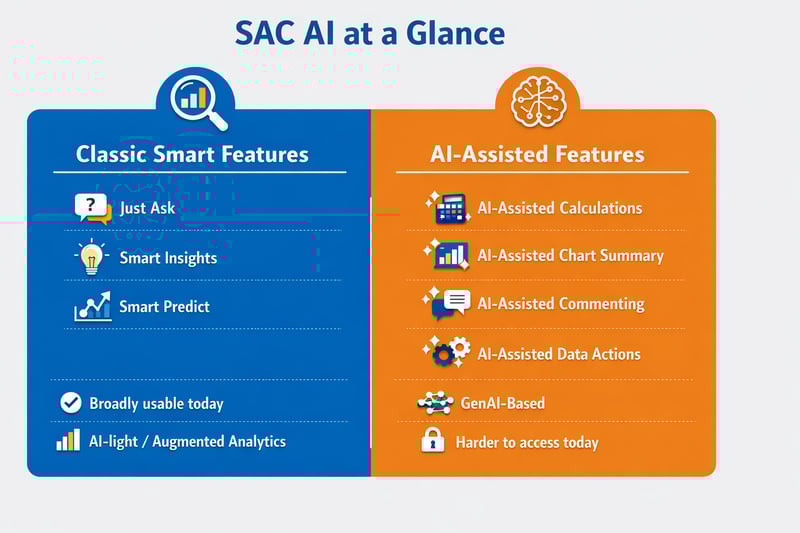
Before taking a closer look at individual features, it is worth clarifying what “AI” actually means in the context of SAP Analytics Cloud. SAC combines several different types of intelligent functionality under one umbrella.
On the one hand, there are the classic smart features such as Just Ask, Smart Insights and Smart Predict. These capabilities have been part of SAC for some time and are primarily based on statistical methods, pattern recognition, and machine learning-supported assistance rather than on large language models. On the other hand, SAP is increasingly expanding SAC with a newer category of AI-assisted features, which are more clearly positioned in the direction of generative AI. This distinction is important for two reasons: first, because the classic features are currently much more relevant in day-to-day analytics work, and second, because the newer AI-assisted functions require separate AI Units and are therefore not always directly available in practice.
In other words, anyone talking about “AI in SAC” should not think of a single, uniform feature set, but of a broader spectrum ranging from established augmented analytics to newer GenAI-oriented assistance.
Dashboarding with SAP Analytics Cloud -
Download the Whitepaper here!
Classic SAC smart features: the practical core of SAC AI
If we look at SAC in practice, the classic smart features are still the most relevant part of its AI story. They are the functions that users can actually work with in day-to-day analytics and planning scenarios and that come closest to the type of intelligent support already discussed in our Power BI article. Rather than focusing on the newer AI-assisted features, it therefore makes sense to start with the established SAC capabilities: Just Ask, Smart Insights and Smart Predict.
Just Ask
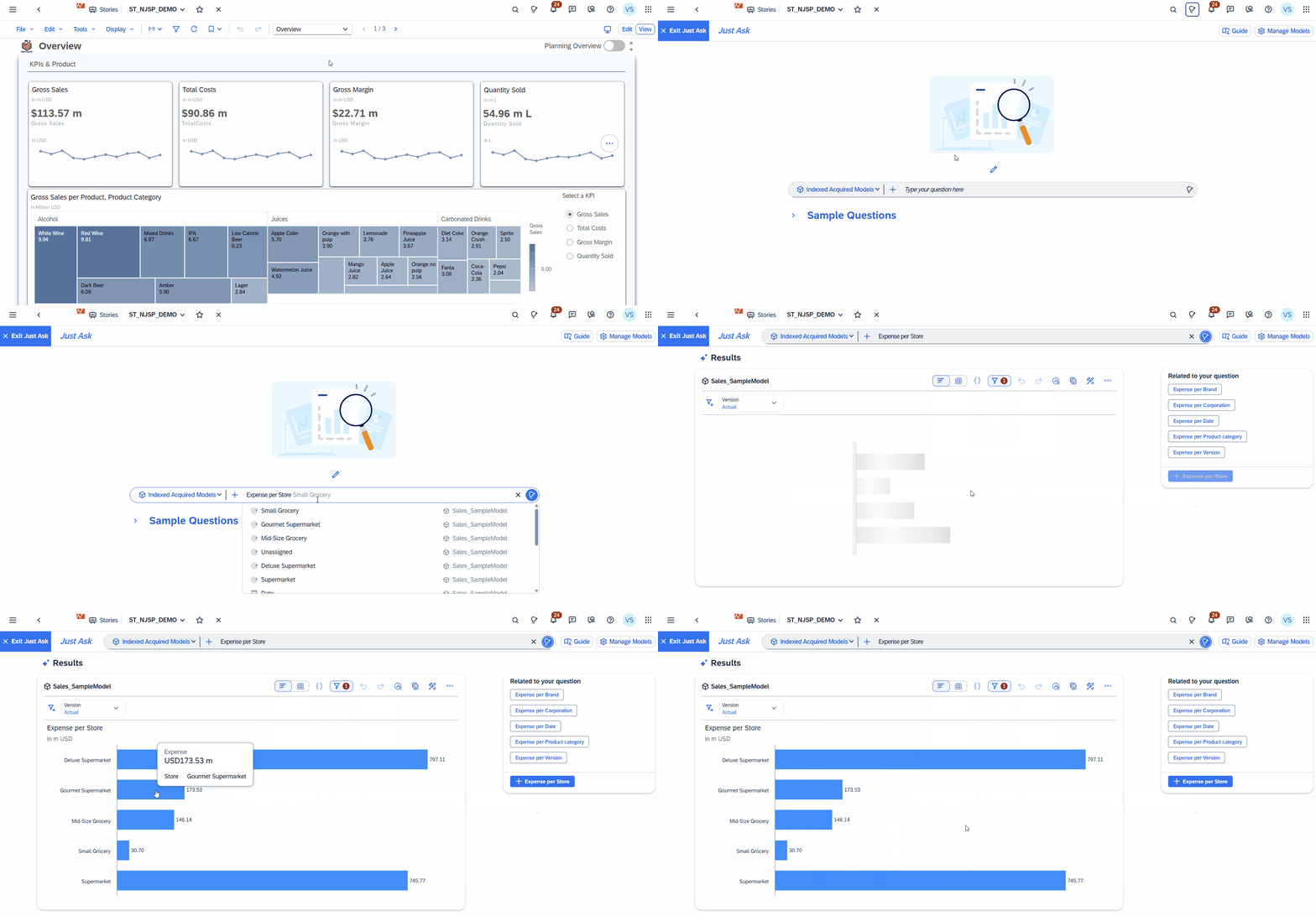
Just Ask is designed to make data access easier for business users. Instead of building a chart manually, users can enter a question in natural language and let SAC generate a suitable result. In practice, the feature is especially useful for quick ad hoc exploration, although its quality depends heavily on the underlying model structure and the business terms used. In that sense, it is closest to Power BI’s Q&A functionality, which also translates natural-language questions into model-based answers rather than acting like a true AI assistant.
Smart Insights
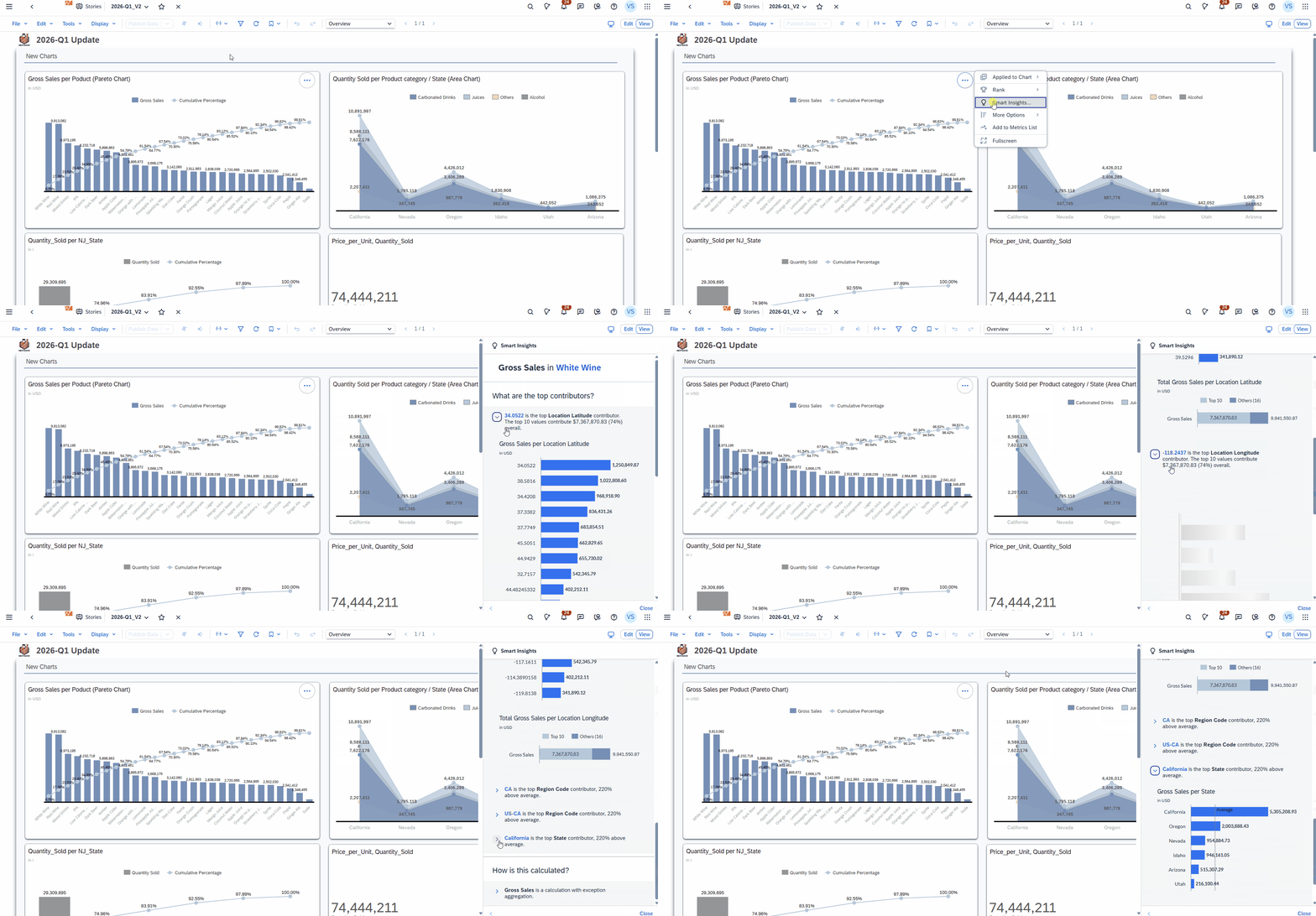
Smart Insights focuses on explanation rather than exploration. When a user selects a value or chart point, SAC generates an automated explanation of the factors behind that result. This is particularly useful in reporting scenarios, where the main question is not only what happened, but also why it happened. The closest equivalent in Power BI would be the combination of Key Influencers and Anomaly Detection, both of which also provide initial clues for interpreting unusual results, although the Power BI article makes clear that these outputs should be treated as hypotheses rather than as proof of cause.
Smart Predict
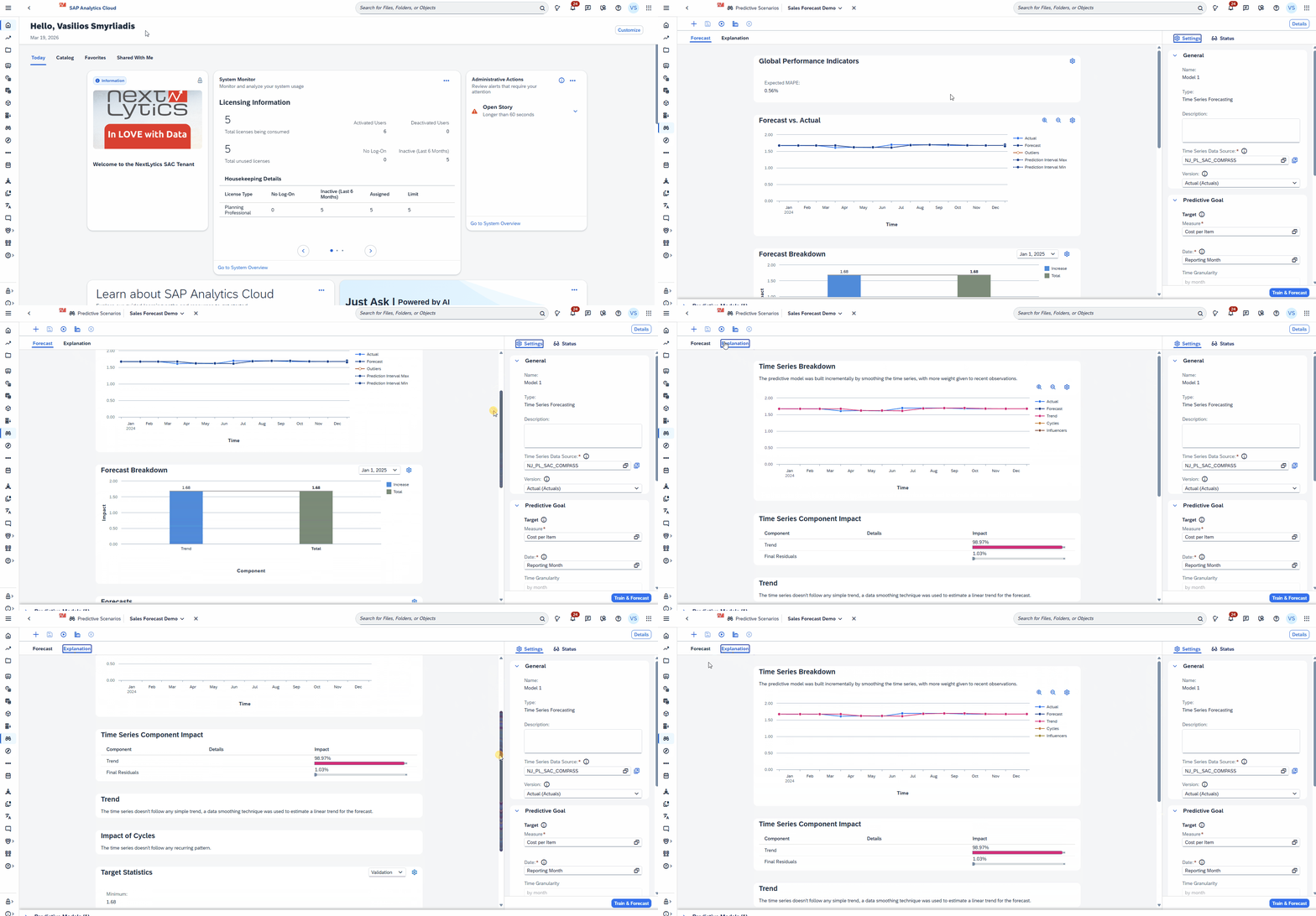
Smart Predict goes one step further by adding predictive capabilities to SAC. Instead of only explaining historical data, it supports use cases such as time series forecasting, regression, and classification. This makes it one of the most advanced classic SAC features, especially for business users who want predictive support without leaving the analytics environment. Compared with Power BI, this is where SAC goes a bit further, because the Power BI mainly presents forecasting as a relatively simple visual projection and explicitly notes that Power BI is not designed for model training or more advanced predictive workflows.
The New AI-Assisted Features in SAC
While features such as Just Ask, Smart Insights, or Smart Predict rely on search, statistics, or guided machine learning, the AI-assisted features are designed to generate or summarize content in context. According to SAP, this includes capabilities such as:
AI-Assisted Calculations
In Data Analyzer, this feature can generate calculation formulas from natural-language input. It can also explain existing formulas in simpler language, which is especially useful when users work with more complex calculation logic.
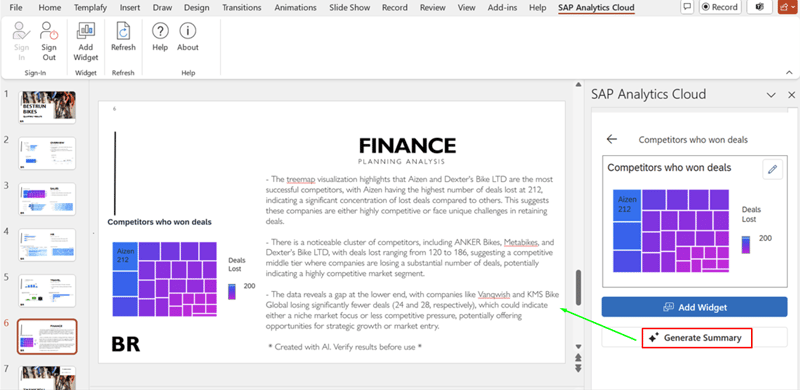
AI-Assisted Chart Summary
In the SAP Analytics Cloud add-in for Microsoft PowerPoint, this feature can create a written summary of a selected SAC chart. The generated summary is inserted into the presentation as editable text and can be regenerated if the chart data changes.
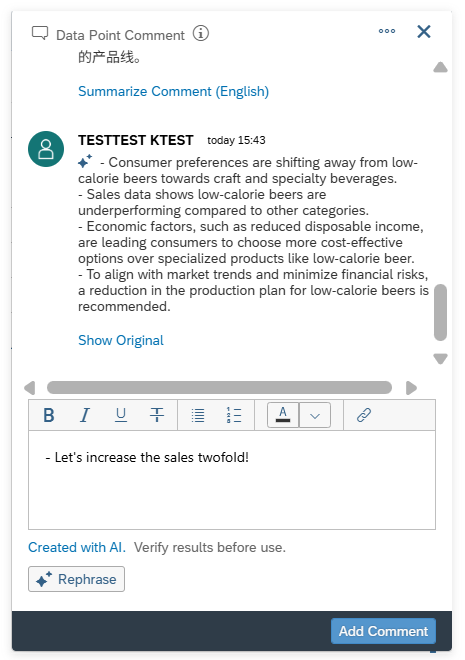
AI-Assisted Commenting
In stories, this feature helps users work more efficiently with comments. It can summarize individual comments or full comment threads and can also rephrase text before a comment is posted, helping users communicate more clearly.
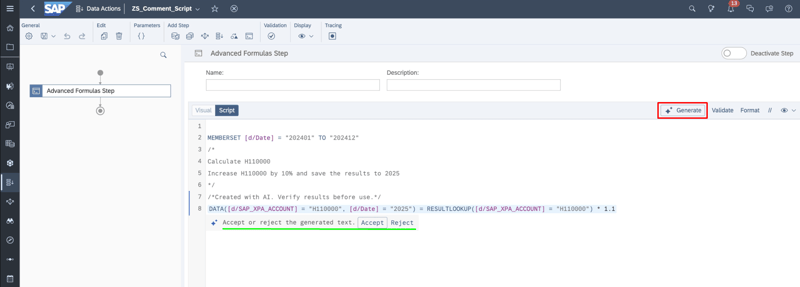
AI-Assisted Data Actions
In advanced formula steps of data actions, this feature can generate scripts from comments or generate textual comments from existing scripts. This is intended to simplify scripting tasks and improve documentation in planning workflows.
SAP positions these features as workflow-specific helpers that reduce manual effort in activities such as writing formulas, summarizing comments, or generating calculations from natural-language input.
At the same time, these features are more difficult to evaluate in practice. SAP notes that AI-assisted capabilities must be enabled separately and require additional AI Units, which means they are not always readily available in project environments. For that reason, they are highly relevant for understanding SAC’s future direction, but less suitable for a hands-on assessment than the classic smart features that can already be tested directly today.
SAC AI vs. Power BI AI: A Practical Comparison Matrix
A simple feature-to-feature mapping is not enough. The most relevant question is how mature and usable these capabilities are in everyday work. That is where the biggest current difference becomes visible: SAC offers a coherent mix of classic smart features and newer AI-assisted functions, but Microsoft’s Copilot is already further along as a day-to-day assistant for report creation, summarization, and model interaction. SAC’s newer AI-assisted features are promising, but in many cases they are still harder to access and evaluate productively.
| Area | SAP Analytics Cloud | Power BI | Practical assessment |
| Natural-language access to data | Just Ask enables users to query data in natural language and generate simple visual answers. | Q&A and increasingly Copilot cover a similar use case for natural-language interaction with reports and models | Close match, but Power BI currently has the more visible conversational AI layer because of Copilot. |
| Explaining KPI changes | Smart Insights focuses on explaining selected values and variances in a direct and structured way. | Key Influencers, Anomaly Detection and related visuals help identify possible drivers and unusual patterns. | Different strengths: SAC is more focused on explanation, while Power BI is stronger in exploratory visual analysis. |
| Predictive support |
Smart Predict supports forecasting, regression, and classification in a dedicated predictive workspace. | Power BI mainly offers lighter forecasting and AI-supported reporting features rather than guided predictive modeling. | SAC ahead: this is the clearest area where SAC goes further than Power BI. |
| Generative AI support | AI-assisted features support calculations, chart summaries, comments, and data actions inside specific workflows. | Copilot already acts as a broader assistant for report creation, summarization, and model interaction. | Power BI ahead today: Copilot is currently more mature and usable in everyday work than SAC’s AI-assisted features. |
| Practical accessibility | Classic smart features are broadly usable, but newer AI-assisted features may require separate activation and AI Units. | Many classic AI features are easy to access, while Copilot depends on setup and licensing. | Power BI ahead today, because SAC’s newer AI-assisted features are still harder to use productively in many environments. |
| Main product strength | Strong fit for analytics, planning and predictive support in one environment. | Strong fit for exploration, reporting, and AI-assisted front-end analysis. | Different focus: SAC is stronger where planning and prediction matter, while Power BI is stronger in highly accessible front-end assistance. |
The comparison therefore does not produce one simple winner. If the goal is highly accessible generative AI assistance for reporting and model interaction, Power BI currently looks more mature in everyday use. If the goal is to combine analytics, planning, and predictive support more closely in one environment, SAC has strengths of its own. In that sense, the difference is less about who uses the term “AI” more aggressively and more about where the feature actually helps the user do their job better.
Outlook: Where SAC AI Could Catch Up
If the current comparison gives Power BI an advantage in everyday generative AI usage, that does not necessarily mean the gap will stay that way. SAP’s current SAC messaging already positions the product around Joule as a copilot for automating reporting, uncovering insights, and supporting planning workflows, while recent SAP roadmap material points more specifically to Joule with SAP Analytics Cloud, a Story Generation Agent, and Conversational & Agentic Planning as part of SAC’s forward direction.
That matters because it suggests a different long-term angle for SAC. Power BI and Copilot currently look more mature in day-to-day front-end assistance, especially for report creation, summarization, and conversational interaction. But SAP may have the chance to catch up through tighter integration with business context across the wider SAP landscape. If SAC’s future AI layer can combine Joule with richer knowledge from systems such as S/4HANA and SuccessFactors, SAP could eventually develop an advantage not just in AI assistance, but in business-context-aware AI assistance. For now, that remains more of a roadmap signal than a practical reality for most users, but it is an important part of the overall picture.
What SAC AI Already Does Well - and Where Its Limits Begin: Our Conclusion
SAP Analytics Cloud already offers a practical and credible set of AI-related features for everyday analytics and planning. With Just Ask, Smart Insights, and Smart Predict, SAC supports three important use cases particularly well: easier access to data, faster explanation of KPI changes, and business-user-oriented predictive support. This makes SAC especially relevant in environments where analytics and planning are closely connected and where users need guided support rather than full technical control.
At the same time, SAC’s AI strengths should be viewed realistically. Much of the current value still comes from the classic smart features rather than from the newer AI-assisted ones. These newer capabilities are an important step toward more workflow-oriented generative AI in SAC, but they are still harder to evaluate in practice and are not always broadly accessible. In that sense, they show more clearly where the product is heading than what most users can already rely on in day-to-day work.
Compared with Power BI, SAC appears particularly strong where analytics, planning, and predictive support begin to overlap. Power BI, by contrast, currently looks more mature in highly accessible front-end assistance and everyday generative AI usage through Copilot. Rather, it shows that both tools approach AI from different angles: Power BI is currently ahead in practical GenAI assistance, while SAC has strengths where business context, planning, and prediction come together.
Ultimately, the real value of these features lies less in the AI label itself and more in whether they make analytics work faster, clearer, and easier for users. In SAC, that is already true for several of the classic smart features. The newer AI-assisted capabilities are promising as well, but for now they are better understood as an indication of SAC’s future direction than as the main basis for a hands-on evaluation today.
Do you have questions about this or other topics? Are you trying to build up the necessary know-how in your department or do you need support with a specific question? We are happy to help you.