/Logo%202023%20final%20dunkelgrau.png?width=221&height=97&name=Logo%202023%20final%20dunkelgrau.png)






















A common problem with projects, especially planning projects, is the lack of test data. The implementation of the reporting stream often runs in parallel and the data flows are not yet ready or provide insufficient data. However, the data is needed now in order to successfully develop and test the planning solution. Data may also be missing in order to simulate planning cycles. Be it data from the past or data to test future scenarios.
This applies to unit and system integration tests, but especially to user acceptance tests from the business department. Many business users find it difficult to test reporting applications if the data does not reflect their real scenarios. In this article, I will show you how you can solve these problems with the help of NextTables.
Data entry made simple
NextTables is an SAP add-on that is 100% integrated into your BW landscape and can edit all tables and ADSO types. The intuitive interface enables business users to edit the tables themselves. Inline editing, i.e. direct editing of cells, is also possible. Users can also copy, change or delete multiple data records at once. Large data sets can be conveniently pasted into the table via the clipboard.
Thanks to the built-in authorization check, the data is always protected against unauthorized access. NextTables also provides several validation logics to ensure data consistency. These can be customized if necessary.
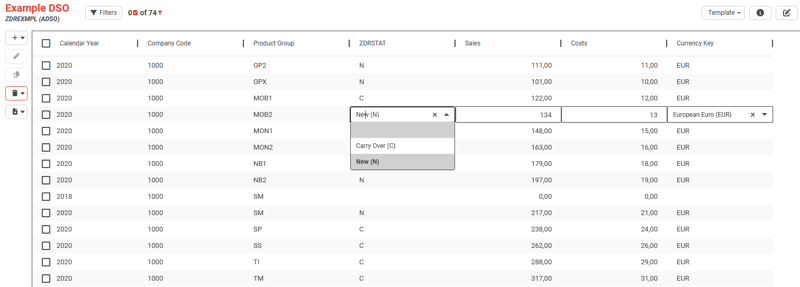
NextTables is therefore ideally suited as a project accelerator. Both the IT department and the business users can benefit from it. Developers from the IT department can use NextTables for rapid prototyping and thus accelerate development cycles. Test data, which is often missing for the execution of unit tests, no longer has to be laboriously created in the source system and loaded into the business warehouse. Developers can create the required data themselves in a few simple steps, test the development and adapt it if necessary. This increases agility and the quality of development many times over.
Users from the business departments can also use NextTables to carry out user acceptance tests. By quickly creating test data, they can test all aspects of the planning solution. In addition to entering test data manually, they can also use the integrated flat file upload function.
Integrated flat file upload
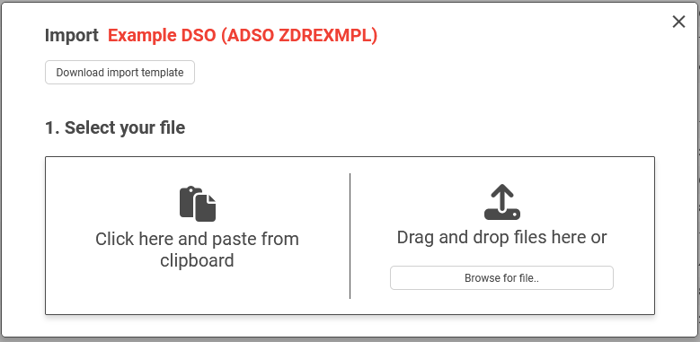
Importing test data can be done easily using drag & drop or copying from the clipboard. The use of import templates makes the process much easier, and the import settings can be easily customized. Importing is format-independent thanks to automatic column recognition via the column header. The import dialog can either be displayed as a stand-alone window or seamlessly integrated into any table view.
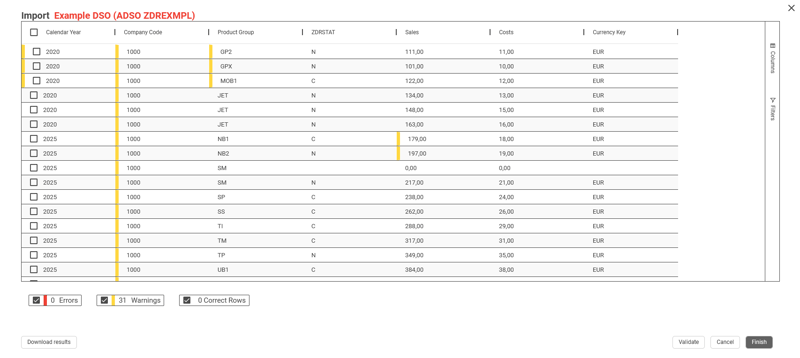
After uploading, users receive a summary of the validation results. This means that any errors can be identified and corrected immediately. It is particularly worth mentioning that NextTables can automatically make corrections during the upload. For example, currency symbols are automatically removed from amount fields. Further validation mechanisms can be implemented for specific tables. In addition, you are warned if a data record with the same key already exists.
Test data generation with NextTables - Our Summary
Using NextTables, business users can easily create test data themselves. They can copy, paste, export and import data without the need for IT assistance. This frees up valuable IT resources, which can now focus more on the development of business-critical applications.
Thanks to the optimized data preparation, test data can now be generated within a few hours instead of days. This in turn leads to shorter test phases, allowing the business department to focus on day-to-day business more quickly. As a result, the project duration is significantly reduced, which leads to considerable cost savings. Overall, the increase in efficiency means that resources can be used more effectively and projects can be completed more quickly and cost-effectively.
NextTables expands your application portfolio with modern tools that enable highly standardized tests with minimal impact on your daily business processes. You don't need a complex system copy, you don't have to involve different departments and you don't have to provide expensive external resources.
So if you want to shorten the project duration and at the same time reduce costs and improve quality, you should consider NextTables. Would you like to find out more about NextTables? Request your personal trial version now, free of charge and without obligation. If you have any questions, please do not hesitate to contact us.