/Logo%202023%20final%20dunkelgrau.png?width=221&height=97&name=Logo%202023%20final%20dunkelgrau.png)























Working with Databricks you probably know this scenario all too well: A new pipeline needs to talk to SAP and SAP needs a password. Someone on the platform team has to decide where that password lives: a Databricks-backed secret scope, an Azure Key Vault-backed one, or the newer Unity Catalog secret from a release note nobody's gotten around to using yet. Whichever one they pick becomes the pattern the next five pipelines copy, because nobody revisits a decision that already "works."
We've written before about keeping Unity Catalog grants consistent with Terraform and Databricks Bundles, and about using YAML anchors to stop copy-pasting grant blocks across bronze, silver and gold. Secrets sit right next to that governance model and get almost none of the attention, even though every pipeline needs a credential to actually run.
Databricks currently gives you three ways to store one. The third fixes most of what's wrong with the first two, but isn't a drop-in replacement yet.
Read our "Hands-on Databricks" Blog-Series: |
| 1. How to leverage SAP Databricks to integrate ServiceNow Data |
| 2. Data Modeling with dbt on Databricks: A Practical Guide |
| 3. Databricks AutoML for Time-Series: Fast, Reliable Sales Forecasting |
| 4. Advanced Data Warehousing in Databricks with DBT Macros and Snapshots |
| 5. Databricks Secrets: Secret Scopes vs Azure Key Vault vs Unity Catalog |
Three Ways to Store a Databricks Secret
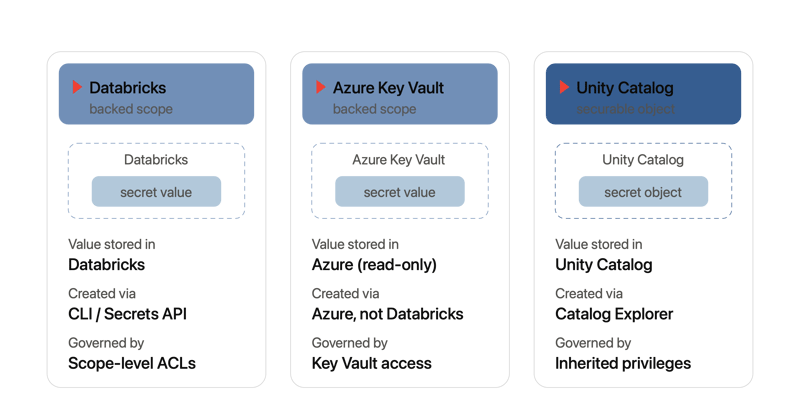
A Databricks-backed secret scope stores key-value pairs in an encrypted store Databricks owns and manages: creation, population and permissioning all happen inside Databricks, through the CLI or the Secrets API.
An Azure Key Vault-backed secret scope is a read-only window into an existing Key Vault. Databricks never stores the value, it reads it live from Azure, so rotation, versioning and the secret material itself stay wherever your Key Vault governance already lives.
A Unity Catalog secret is neither: it's a securable object with a three-level name, catalog.schema.secret, governed by ordinary Unity Catalog privileges inherited from catalog and schema the way a table's SELECT grant is. Catalog Explorer gives you a real UI for creating, granting and listing secrets, no CLI required.
The first two scope types are what most estates still run on, and why teams outgrow them.
Databricks Classic Scopes: One ACL for the Whole Scope
Both the Databricks-backed and Key Vault-backed scope types share the same underlying limitation: ACLs sit on the scope, not the individual secret inside it. Databricks' own guidance is to align a scope to a role or an application rather than to individuals, one scope per source system, say, so access stays coarse enough to manage. The direct consequence: your scope count now tracks your permission granularity, not your credential count, and a workspace tops out at 1,000 scopes, a soft limit raisable through your account team. Every scope past the first needs its own grants, repeated per environment, each one a separate databricks secrets put-acl my-scope data-engineers WRITE run by hand, no bulk grant, nothing resembling a desired-state file to diff against.
The Key Vault-backed variant adds a governance layer: rotation, versioning and access logging inherit whatever process already governs your other vaults, real upside if that process is solid. But three things still catch teams off guard. Key Vault-backed scopes only support the vault's legacy access-policy model, not Azure RBAC, so if your landing zone standardized on RBAC, most do now, you have to flip the vault backwards before Databricks will touch it. The ACL is still scope-level and a scope maps to an entire vault, so granting a team access grants them every secret in it (the documented workaround is a separate vault per boundary). And creating one means visiting https://<workspace-url>#secrets/createScope, a URL nothing in the UI links to, then hand-copying a DNS name and resource ID out of the Azure portal. Get anything wrong and the error you get back, Authorization_RequestDenied, tells you almost nothing about what to fix.
Reasonable for one team and a handful of admins. It stops holding up once secrets management spans several teams and three environments, because each gap depends on someone remembering it exists.
What Unity Catalog Secrets Actually Fix
Unity Catalog secrets are a different model entirely. Permissions are per-secret, inherited the same way any other Unity Catalog privilege is:
GRANT CREATE SECRET, USE SCHEMA ON SCHEMA main.sap TO `data-engineers`;
GRANT READ SECRET ON SECRET main.sap.bw_password TO `job-runner-sp`;
Catalog Explorer gives you a real UI for this too. Anyone with the right privilege can create a secret, grant or revoke access, and see who has it, no terminal required. Every grant, read and write lands in system.access.audit, queryable like any other system table, the audit trail that classic scopes never had.
It isn't a wholesale replacement yet. It requires Databricks Runtime 17.3 LTS or above on standard-access-mode compute, or serverless environment version 4+. SQL warehouses aren't supported at all, and there's no path for pulling a secret in an init script, so those workloads stay on a classic scope. Quotas are tighter too: 100 secrets per schema, 1,000 per metastore, against the workspace-wide 1,000-scope ceiling on the classic side. The permission story is clearly better; the runtime gate decides whether you can use it yet.
Watch the recording of our webinar "Bridging Business and Analytics: The Plug-and-Play future of Data Platforms"
How to choose between Databricks Secret Scopes, Key Vault and Unity Catalog Secrets?
Unity Catalog secrets are the default for any new workload that can use them, per-secret grants, an audit trail, and a real UI, no reason to inherit scope-level ACLs when the platform offers all three. The exceptions are specific: anything touching a SQL warehouse, an init script, or a runtime older than 17.3 LTS stays on a classic scope for now, not as a stopgap but because UC secrets aren't reachable from that compute. Secrets that other Azure services also need to read belong in Key Vault-backed scopes, and the access-policy exception and per-boundary vault sprawl that comes with them are worth budgeting for up front. Most real estates, for a while, will run all three at once. Migration happens per workload, not as a single switch. And if you're already on Databricks Bundles, declare the scope or secret there instead of the CLI.
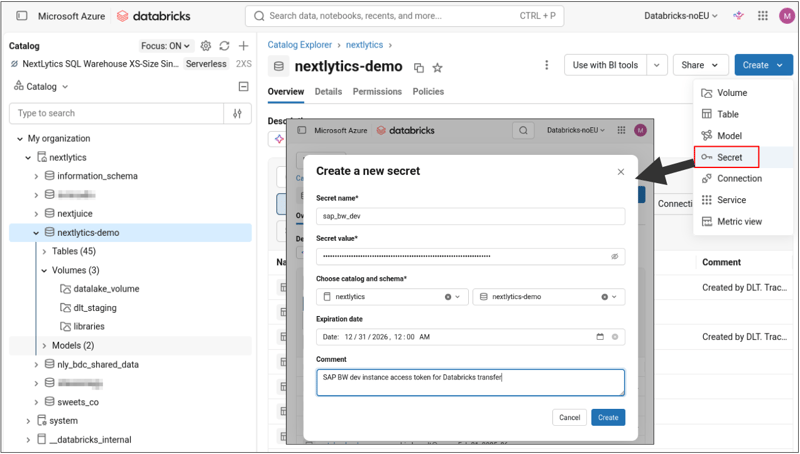 Databricks Secrets introduce API and graphical user interfaces for secret management that are fully integrated into the Unity Catalog governance.
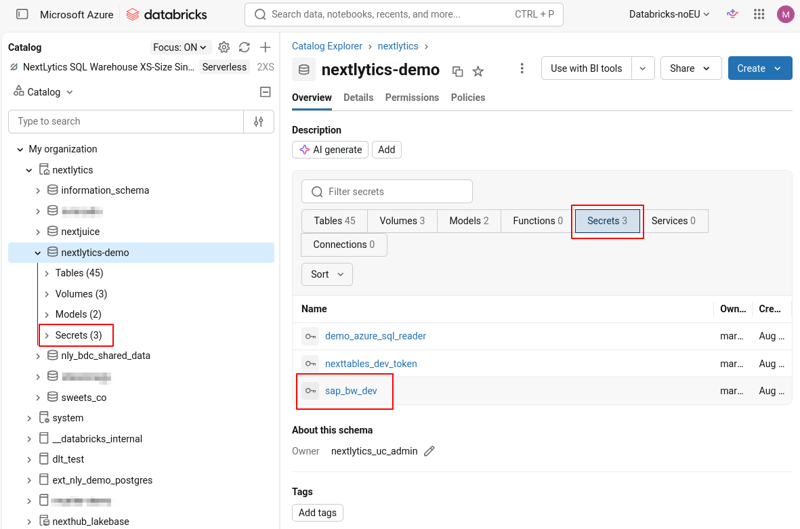 Databricks Secrets are stored within a Unity Catalog schema and follow unified governance mechanisms for fine-grained permission management and access control.
Bundles Closed the Declarative Gap, Mostly
A year ago, this section would have said Databricks Bundles don't model secrets at all. That's no longer true: since CLI v0.252.0 (May 2025), databricks.yml supports a secret_scope resource (backend_type, keyvault_metadata for the Key Vault variant, a permissions block) and a secret resource for Unity Catalog secrets with a grants block, the same shape as catalog and schema grants elsewhere in the bundle. If you already deploy through Bundles, declare secrets there, not the CLI.
It closes the process gap, not the permission-model gap. A permissions: block on a secret_scope still grants MANAGE, WRITE or READ on the whole scope, exactly as put-acl always did. Declaring it in YAML gets you a diff and a PR review before PROD, but the scope is still scope-wide, and a Key Vault-backed one is still vault-wide. Bundling an existing setup buys review and consistency across DEV, QA and PROD; migrating the workload to a Unity Catalog secret buys actual per-secret granularity. Both have their place, but they solve different problems.
Managing Secrets in Databricks: Our Conclusion
Databricks won't keep three storage models for one credential forever. Unity Catalog secrets are clearly where the platform is headed: per-secret grants, a real UI, an audit trail for free, and today's runtime and SQL-warehouse gaps will keep closing. The decision worth making now isn't "which one forever" but which workloads can move today, and which are stuck on a classic scope until the platform catches up.
The harder problem is the gap between a platform that is always deployed through Bundles and one that accumulated years of hand-created scopes and ACLs first. Reconciling that history without losing the record of who granted what, and coordinating the Azure-side half of a Key Vault-backed scope that no Databricks tool reaches, is exactly the kind of problem a purpose-built custom Databricks management toolkit is for, built on top of Bundles rather than instead of them.
If your secrets setup predates your move to Bundles, or spans scopes, Key Vault and Unity Catalog at once with no clear picture of which team has access to what, get in touch, we're happy to walk through it with you.