/Logo%202023%20final%20dunkelgrau.png?width=221&height=97&name=Logo%202023%20final%20dunkelgrau.png)




















Anyone familiar with the BW system will be familiar with customer exit variables. They are an elegant way of automatically filling variables with dynamic default values – for example, the current posting month in financial reports or the last accounting period in a personnel dashboard. In addition to such time-dependent default values, there are also frequent scenarios in which control parameters are read from customer-specific tables (customizing) – such as the currently running campaign for a sales report. Furthermore, exit variables are often used to implement user-dependent default values if these cannot or should not be mapped using analysis authorizations. The range of use cases is correspondingly broad and covers a wide variety of business scenarios.
Dynamic variables in Datasphere
In SAP Datasphere, this principle is now also being introduced in the cloud. Previously, variables could either be entered manually or derived from another variable as a derived variable. New additions are the Dynamic Default variables. These allow a dynamically calculated value to be suggested as the default when the variable dialog is opened – for example, the current date or the last month. This suggested value is visible and can be changed if necessary.
Both variants complement each other: Derived variables set values invisibly in the background and do not require any input, while dynamic defaults make a suggestion to the user that can be adjusted at any time. This covers the different points in time for dynamic logic, similar to the various I_STEP characteristics of the customer exit variables in BW.
In this article, we take a detailed look at the new functionality of dynamic defaults and explore the benefits they offer for your data analysis. We consider both a standard case with time-related logic and an example with customer-specific control tables – and show how you can achieve additional value in combination with our NextTables product for self-service data maintenance in Datasphere.
Example: Dynamic default value with time-related logic
Technically, the new dynamic default variables are mapped by calling a so-called lookup entity, which returns exactly one matching value for the current context. This can be a view or a table that returns only one row. In the following example, we show how a dynamic default variable with time-related logic can be implemented based on an SQL view.
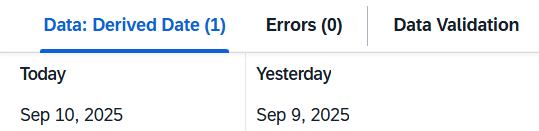
We are looking at a data record with daily sales and want to retrieve yesterday's sales by default. We determine yesterday's date using an SQL view that calculates two columns: Today and Yesterday. To do this, we use the table SAP.TIME.VIEW_DIMENSION_DAY – a standard time dimension provided by SAP in Datasphere. It can be created in Space Management at the touch of a button, covers all days from 1900 to 2050, and is therefore ideal for time-based calculations.

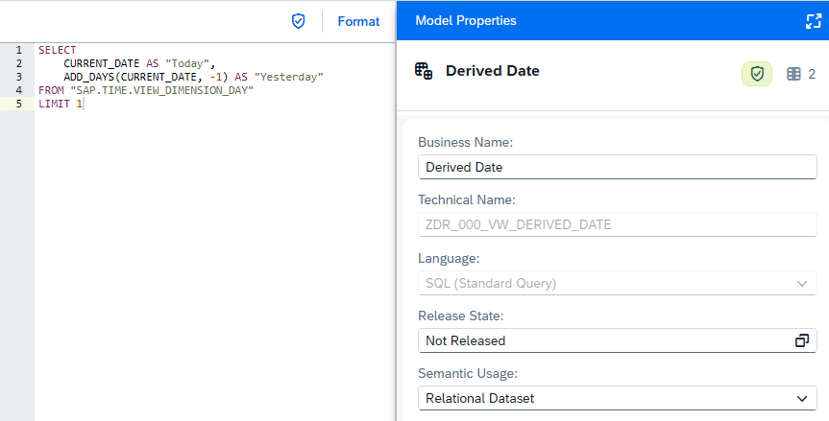
The correctly calculated values can be verified in the Data Viewer.
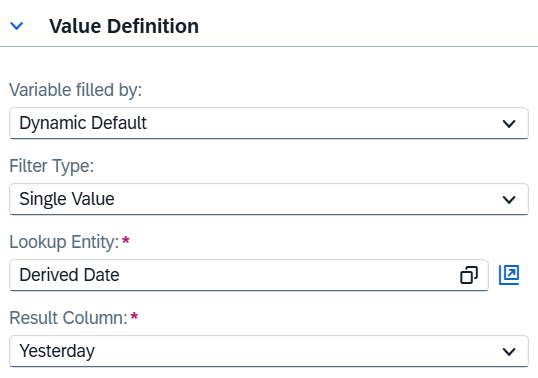
Next, a new filter variable is created in the analysis model. Select the Dynamic Default entry in the value definition. The previously defined SQL view serves as the lookup entity, with the Yesterday column specified as the result. The value contained therein is automatically used as the default value for the variable. In this example, the Filter Type is set to Single Value. However, dynamic default variables can also be used for multiple single values, intervals, or ranges, as is also known from query variables in SAP BW.
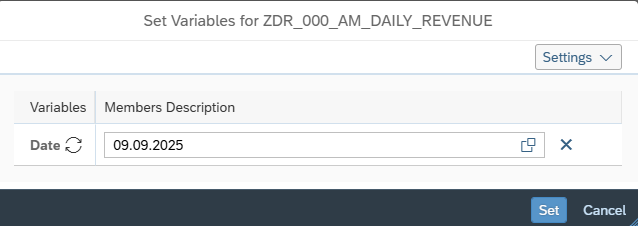
When the analysis model is called in SAC, yesterday's date is already pre-filled, but can be adjusted at any time if necessary.
Example: Dynamic control of released plan versions
Another common example, which is also often implemented in the BW context, is the dynamic reading of variable values from customer-specific control tables. The same principle can now also be implemented in SAP Datasphere with NextTables.
In our Seamless Planning Showcase for our fictional beverage supplier NextJuice, we already use NextTables to integrate a sales manager perspective into reporting. Building on this, we now maintain a control table that specifies which plan version is approved for each sales manager.
When a sales manager accesses their actual/plan dashboard, this approved version is automatically set as the default value – but can be flexibly overwritten if necessary.
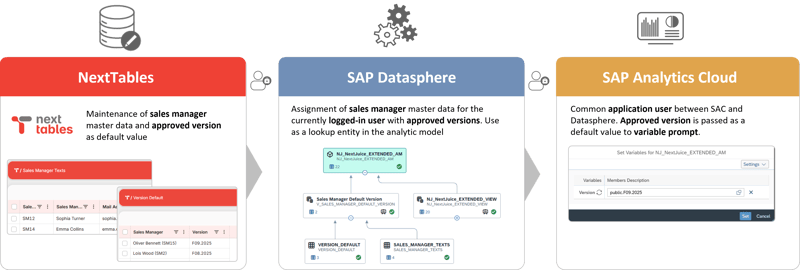
Technically, this is implemented via an SQL view that links the sales manager master data maintained in NextTables (including user IDs such as email addresses) with the plan versions for each sales manager also maintained there. The SQL command SESSION_CONTEXT('APPLICATIONUSER') can be used to read the currently logged-in user and pass it to the view as a filter.

This ensures that the view always returns exactly one result for the logged-in sales manager and, as in the first example, can be used as a lookup entity for a dynamic default variable.
SAP Datasphere Dynamic Defaults: Our Conclusion
The introduction of dynamic default values for variables in SAP Datasphere represents a significant improvement in user-friendliness and efficiency. The new option of automatically pre-assigning context-dependent values not only reduces manual input but also improves the quality and consistency of analyses. Simple implementation via SQL views and lookup entities allows flexible and reusable filter mechanisms to be created.
In direct comparison to customer exit variables in BW, the SQL-based approach in Datasphere naturally does not cover the entire range of possibilities that were feasible with ABAP logic. In addition, BW offers numerous predefined exit variables such as the current year or current quarter, which can also be flexibly adjusted with offsets – custom development is often not necessary at all. In Datasphere, however, there is much less of a need for classic exit mechanisms, as dynamic filtering can already be modeled very well at the view level, for example using join conditions. A direct comparison of the two approaches is therefore only of limited use.
Overall, this innovation strengthens users' self-service capabilities and supports dynamic data analysis.
Do you have questions about another topic? Just get in touch with us – we look forward to hearing from you!