/Logo%202023%20final%20dunkelgrau.png?width=221&height=97&name=Logo%202023%20final%20dunkelgrau.png)





















In our previous blog post, we explored the premium AI capabilities of SAP Analytics Cloud. Now we are taking a closer look at two additional innovations: Prompt Insights and AI-assisted Story Script Generation. Unlike the premium features, both are included in Base AI. This means they do not incur additional SAP AI Unit costs and can be used more broadly without putting extra pressure on the budget.
Setting up SAC Base AI features: SAP for Me request and role permissions
Getting started was not entirely seamless, though. Activating the Base AI features took a little more effort than expected. First, activation must be requested through the SAP for Me portal. In our case, the request was only approved after we submitted an additional support ticket to SAP.
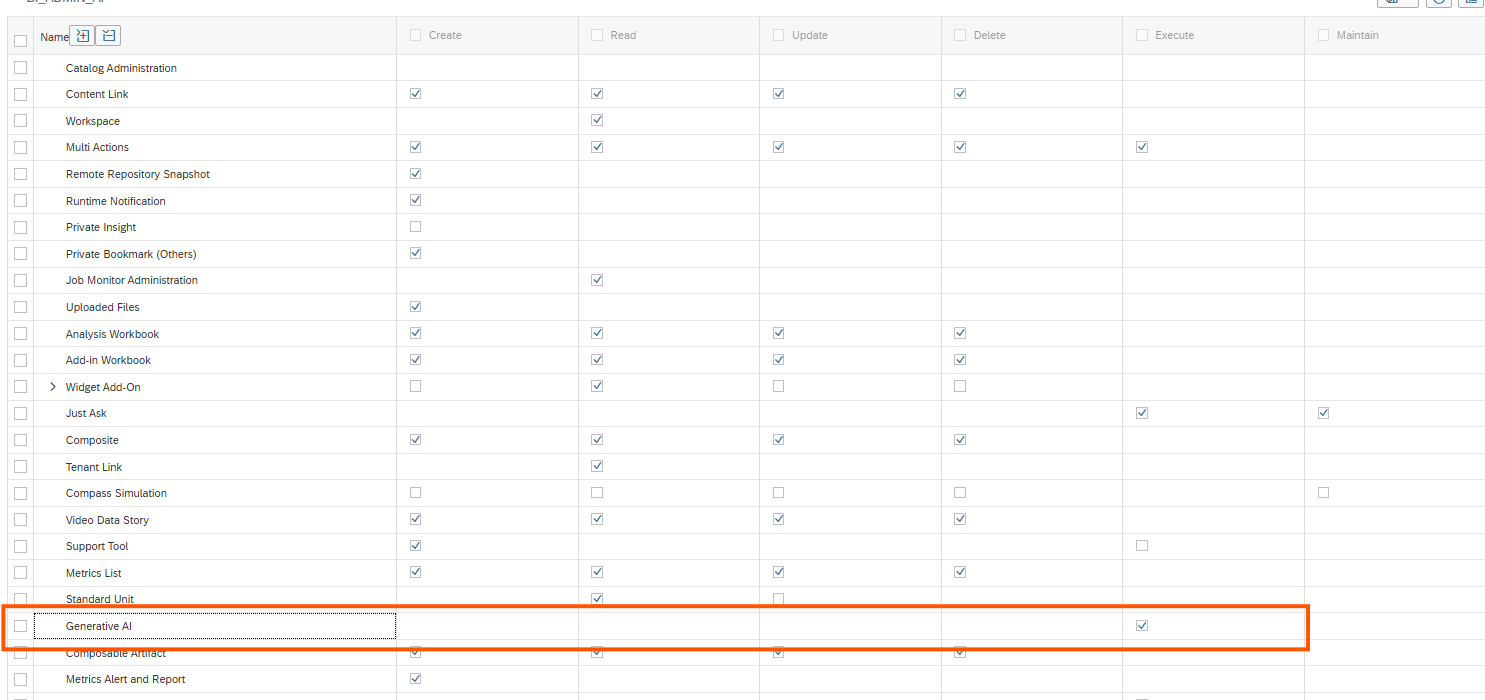
Furthermore, it is important to explicitly enable the “Generative AI” permission in a role, as it is currently not enabled by default in any of the standard roles. Once this setting was configured and everything was set up, we were finally ready to put the AI features to the test.
Detailed instructions on how to activate the AI features can be found in the SAP Help documentation.
Just like last time, we went beyond the feature descriptions to see how these capabilities perform in practice. In this article, we share our findings, highlight their strengths and limitations, and explore where they can add real value.
Prompt Insights: AI-generated analysis directly in SAC stories
Prompt Insights brings AI-powered analysis directly into SAP Analytics Cloud stories. Story designers can embed an LLM prompt as a widget, allowing users to generate AI-driven insights without leaving their dashboards. Whether analyzing a table or a chart, the feature can help explain deviations, identify anomalies, and highlight noteworthy patterns in the data.
Until now, users often had to export data from SAP Analytics Cloud and paste it into external AI tools to get similar insights. Prompt Insights offers a more seamless and integrated alternative, with data masking applied before AI processing to help protect sensitive information.
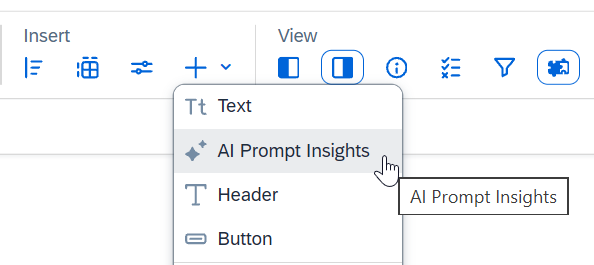
In addition to selecting the data source for the analysis, users can provide the AI model with detailed instructions on how the analysis should be performed and how the response should be structured.
Interestingly, SAP is addressing a key criticism we raised in our previous review of the premium AI features, where we highlighted the limited control over AI-generated results. With Prompt Insights, story designers can define the questions the AI should answer and specify the focus of the analysis. SAP Analytics Cloud also provides predefined templates that can serve as a starting point.
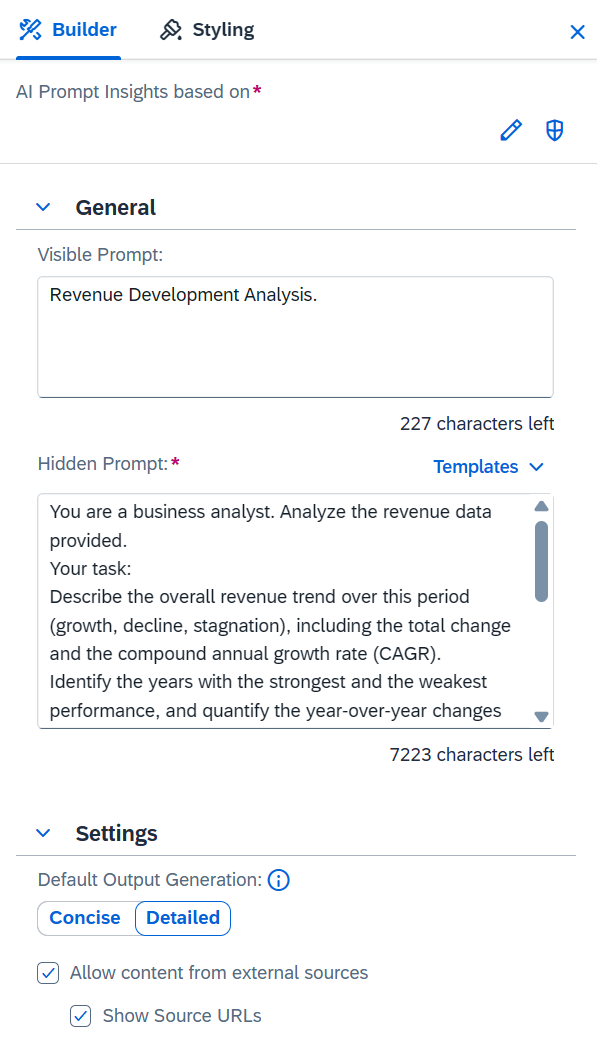
Moreover, the settings allow users to control whether the analysis should be concise or detailed. They can also decide whether information from external sources should be retrieved and incorporated into the analysis. If enabled, the AI model performs an online search. In this case, displaying the source URLs is particularly useful for transparency and traceability.
Limitations of Prompt Insights in practice
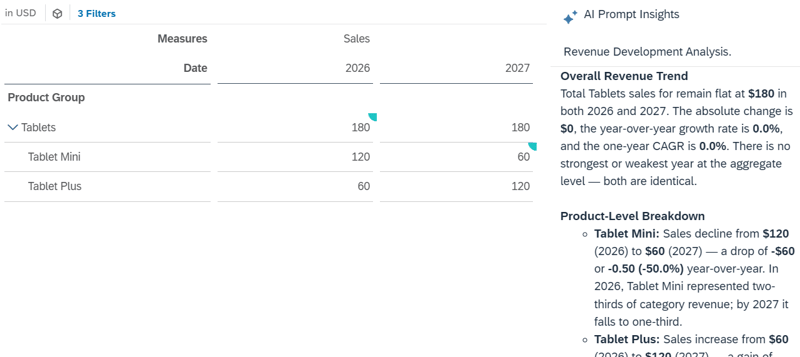
SAP promises rich, structured narratives based on business data and claims that the feature can reduce analysis time by up to 60%. However, our tests revealed an important limitation: the analysis only considers the data currently visible in the table or chart. Even expanding or collapsing a hierarchy node can lead to different results, as the underlying data available to the AI changes.
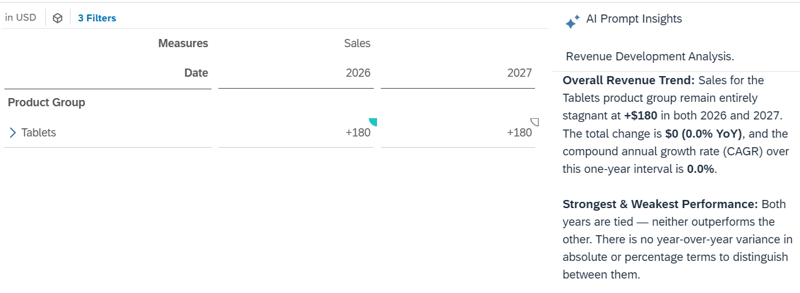
As a result, the significant change in demand is only identified when the hierarchy node for the product group is expanded and the underlying products are visible. The quality of the analysis therefore depends heavily on the currently displayed level of detail.
Furthermore, users cannot ask follow-up questions to explore the analysis in greater depth or modify the questions predefined by the story designer. Another limitation we observed is that the AI always generates responses in English, even when the prompts are written in German. These are areas where we would like to see improvements in future releases.
Dashboarding with SAP Analytics Cloud - Download the whitepaper here!
How well does the SAC Story Code Generator write scripts?
The Story Code Generator is designed for users who want to enhance their SAC stories with custom functionality and interactions through scripting. Instead of writing JavaScript code entirely from scratch, users can describe the desired functionality in natural language and let AI generate the corresponding code. This low-code approach aims to make the development of interactive dashboards faster and more flexible.
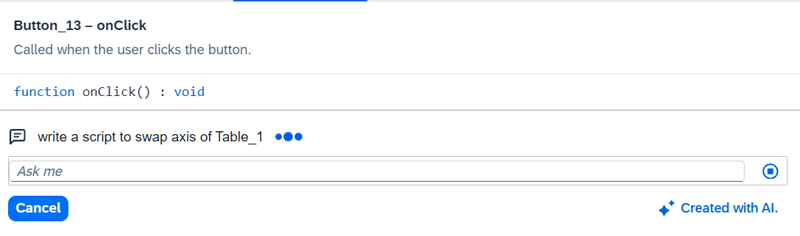
We spent quite a bit of time putting the Story Code Generator through its paces. After all, the real test of an AI assistant begins when you move beyond simple demo scenarios and start working with more demanding requirements. And the results genuinely surprised us. Basic tasks like "Hide the chart when the button is clicked" worked as expected, but the generator also handled much more sophisticated scripts involving nested conditions, variables and mappings between numerical values and text labels.
We had anticipated fragmented code that would need considerable manual adjustments. Instead, the AI consistently produced well-structured scripts that were ready to run in most cases. This was a noticeable improvement over our experience with AI-generated data actions, where we encountered basic syntax errors. Another welcome detail was the automatically generated code comments, which make the scripts easier to understand and maintain over time. There is one downside, however: Even moderately complex tasks took a surprisingly long time to generate.
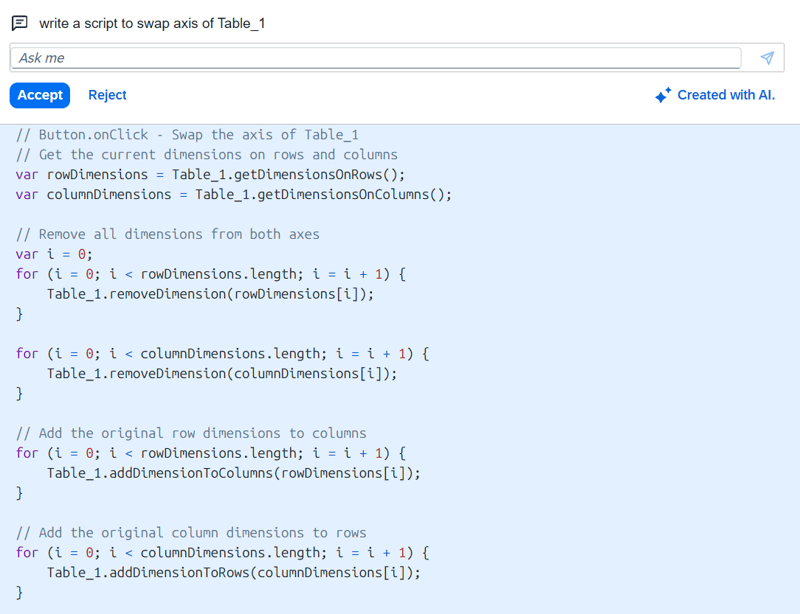
On the positive side, the Story Code Generator can even make use of globally defined variables, as long as they are explicitly referenced in the prompt. However, things become more challenging when it comes to understanding the underlying data model. AI cannot reliably identify custom dimension structures, technical member IDs, or the logic behind them on its own. To get the desired results, you need to provide these details as clearly and precisely as possible. The same goes for widgets. If your story contains multiple dropdowns or charts, you need to tell the AI exactly which one the script should target.
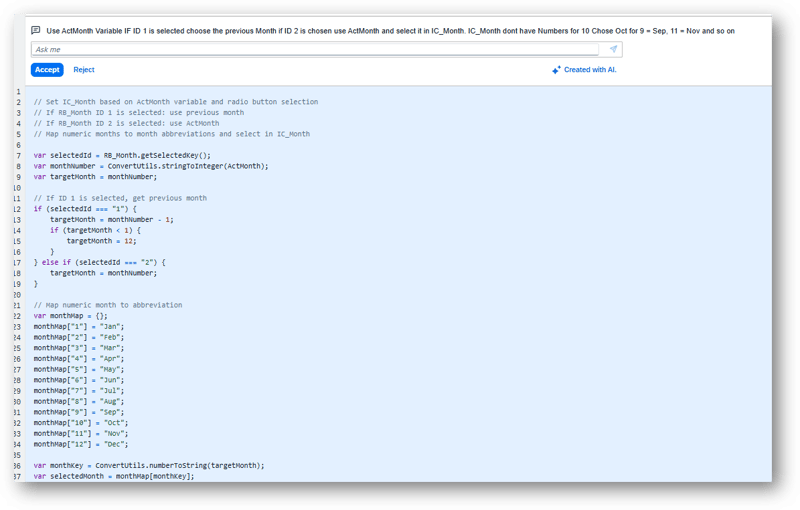
Another limitation concerns the modification of generated code. Unlike traditional AI chat assistants, the Story Code Generator does not offer an ongoing dialogue in which a script can be refined step by step. Instead, each request generates a new script that can only be accepted or rejected in its entirety. If the result does not meet expectations, a new prompt must be formulated.
We also identified room for improvement when modifying existing scripts. During our tests, the AI did not always remove the previous code completely, making manual adjustments necessary.
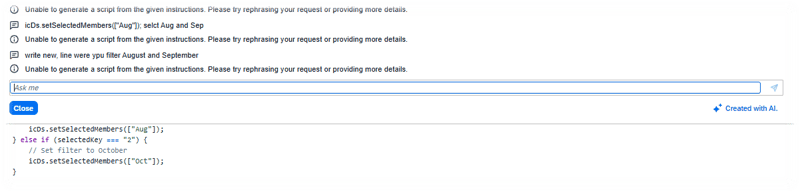
The key takeaway: The Story Code Generator can make scripting in SAP Analytics Cloud considerably easier, delivering impressive results even for more demanding tasks. But getting the most out of it comes down to writing effective prompts. The clearer and more detailed your instructions are, especially when it comes to variables, widgets, and data structures, the more reliable the results will be.
SAP Analytics Cloud Base AI Features: Our Conclusion
With Prompt Insights and the Story Code Generator, SAP is taking another step toward bringing AI into everyday workflows in SAP Analytics Cloud. What we particularly appreciate is the greater flexibility these features offer. Prompt Insights gives story designers control over the questions being asked and how the AI presents its findings. Together with data masking, it offers a more secure and convenient alternative to exporting business data into external AI tools.
The Story Code Generator was the standout feature in our hands-on tests. We were particularly impressed by how reliably it handled more complex scripts. While we encountered basic syntax errors when testing AI-generated data actions, the Story Code Generator consistently produced working code.
Of course, there is still room for improvement. Code generation can take quite some time, the AI does not always recognize custom data structures, and refining existing scripts is not as straightforward as we would like. One major limitation is the lack of contextual understanding. The AI often lacks information about the underlying data models and custom data structures, and unlike other AI agents, there is currently no way to provide this context explicitly.
Even so, our verdict is overwhelmingly positive. For a feature included in SAP Analytics Cloud without additional licensing costs, the Story Code Generator offers remarkable value. It already has the potential to save time, simplify development, and make custom scripting more accessible to business users. With a few improvements, it could become an even more powerful tool for building interactive, customized SAC stories.
Ready to explore what these new AI features could bring to your organization? Our SAP Analytics Cloud experts can help you identify the right use cases, evaluate the capabilities, and integrate them into your existing analytics and planning environment. Get in touch with us to discuss your next steps.